







Question: write a bash script using grep regular expression like grep -c filename. Just do the five questions blew number 3. . Write your own scripts
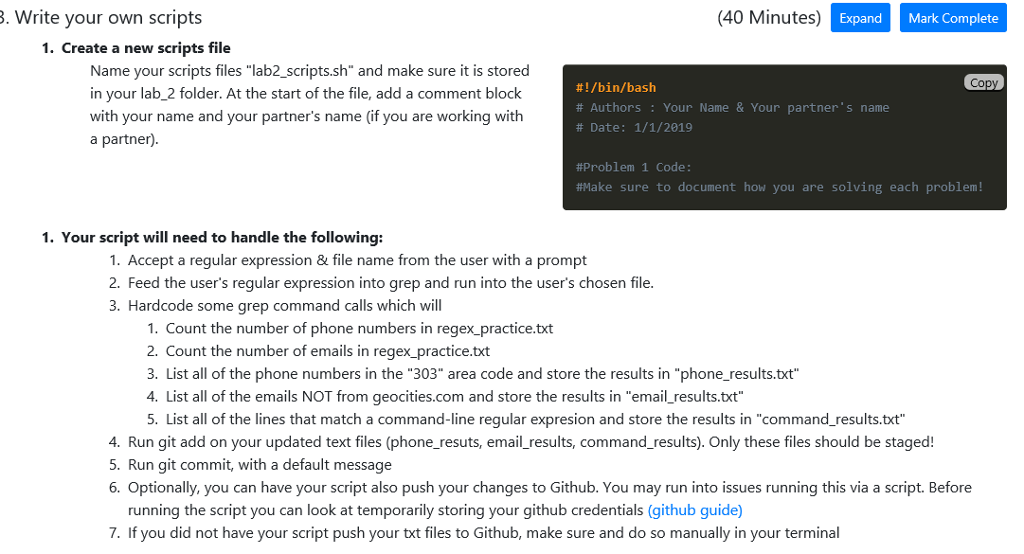
write a bash script using grep regular expression like "grep -c filename". Just do the five questions blew number 3.
. Write your own scripts (40 Minutes) ExpandMark Complete 1. Create a new scripts file Name your scripts files "lab2_scripts.sh" and make sure it is stored in your lab_2 folder. At the start of the file, add a comment block with your name and your partner's name (if you are working with a partner) Copy #1 /bin/bash # Authors : Your Name & Your partner's name # Date: 1/1/2019 #Problem 1 Code: fMake sure to document how you are solving each problem! 1. Your script will need to handle the following: 1. Accept a regular expression & file name from the user with a prompt 2. Feed the user's regular expression into grep and run into the user's chosen file 3. Hardcode some grep command calls which will 1. Count the number of phone numbers in regex practice.txt 2. Count the number of emails in regex_practice.txt 3. List all of the phone numbers in the "303" area code and store the results in "phone_results.txt" 4. List all of the emails NOT from geocities.com and store the results in "email_results.txt" 5. List all of the lines that match a command-line regular expresion and store the results in "command_results.txt" 4. Run git add on your updated text files (phone_resuts, email_results, command_results). Only these files should be staged! 5. Run git commit, with a default message 6. Optionally, you can have your script also push your changes to Github. You may run into issues running this via a script. Before running the script you can look at temporarily storing your github credentials (github guide) 7. If you did not have your script push your txt files to Github, make sure and do so manually in your terminal
Step by Step Solution
There are 3 Steps involved in it

Get step-by-step solutions from verified subject matter experts
 Study Help