







Question: Write a C++ program to create your own Microsoft Word (.doc) file using the given guidelines IMPORTANT: Download your resource folder (Compressed folder that contain
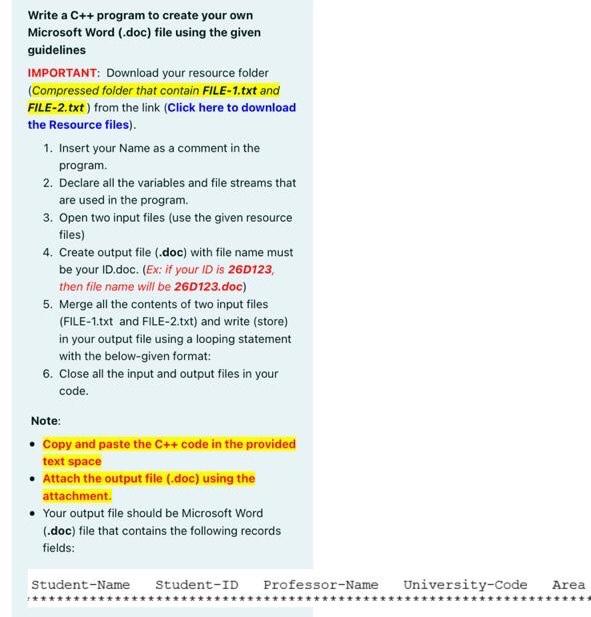

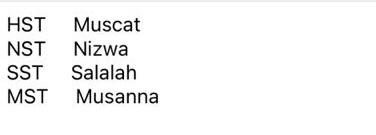
Write a C++ program to create your own Microsoft Word (.doc) file using the given guidelines IMPORTANT: Download your resource folder (Compressed folder that contain FILE-1.txt and FILE-2.txt) from the link (Click here to download the Resource files). 1. Insert your Name as a comment in the program 2. Declare all the variables and file streams that are used in the program 3. Open two input files (use the given resource files) 4. Create output file (.doc) with file name must be your ID.doc. (Ex: if your ID is 26D123, then file name will be 26D123.doc) 5. Merge all the contents of two input files (FILE-1.txt and FILE-2.txt) and write (store) in your output file using a looping statement with the below-given format: 6. Close all the input and output files in your code. Note: Copy and paste the C++ code in the provided text space Attach the output file (.doc) using the attachment. Your output file should be Microsoft Word (.doc) file that contains the following records fields: Student-Name Student-ID Professor-Name University-Code Area Ahmed 16J11 Dr.Hammed Mohammed 16512 Dr. Nishad Salwa 16J23 Dr.David Ameera 45J11 Dr.Noora HST Muscat NST Nizwa SST Salalah MST Musanna
Step by Step Solution
There are 3 Steps involved in it

Get step-by-step solutions from verified subject matter experts
 Study Help