







Question: Write a C# solution using VISUAL STUDIO 2015 that contains a form with the following: 2 text boxes in which the user can input a
Write a C# solution using VISUAL STUDIO 2015 that contains a form with the following:
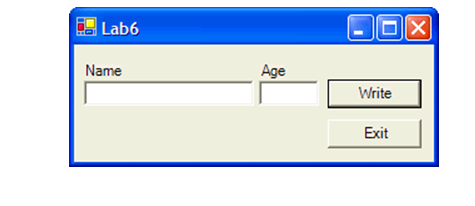
2 text boxes in which the user can input a name and an age.
A Write button, which writes the data, inputted into the text boxes, to a sequential file. Once that data is written to the file, the textboxes should be appropriately readied for the next input..
A third command button that exits the application.
The file should be saved in the default location used by C#.NET (bin folder of the solution.)
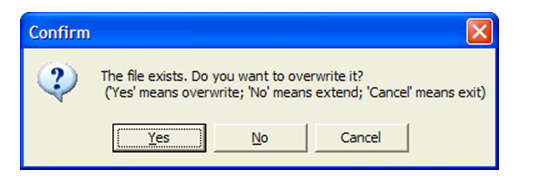
After starting the program for the first time and trying to open the file, if the file already exists, the program should show a message similar to the following one, and then take the appropriate action. If the file does not exist, then no message has to be shown. This message should be shown only once per program run (that is, not after each record is processed), and before showing the main form of the program.
The form could look somewhat like the following one (use your design creativity as much as desired):
Here is an example of the output that the program could produce:
Joe 11
Rose 5
Old Bart 102
Ray 44
Ruben 21
Rachel 40
John The Third 55
Martha 50
Julie 6
Grandpa Hector 78
Baby Hector 2
Be sure to provide correct alignment of the Age on its rightmost digit (as shown above), no matter how long the name is.
In addition, please provide proper documentation:
(1)Comments within the code
(2)Use of proper naming conventions for the declared variables.
Confirm The file exists. Do you want to overwrite it? (Yes means overwrite; No means extend; 'Cancel' means exit) Yes No Cancel
Step by Step Solution
There are 3 Steps involved in it

Get step-by-step solutions from verified subject matter experts
 Study Help