







Question: Write a C# Windows Forms application to calculate a user's body mass index (BMI) based on the design below. A user has the option to
Write a C# Windows Forms application to calculate a user's body mass index (BMI) based on the design below. A user has the option to use either the Imperial or Metric measurement system. Upon selecting a measurement system, the height and weight units are modified (i.e., with Imperial, height's unit becomes "in" and weight's unit becomes "lbs"; with Metric, height's unit becomes "cm" and weight's unit becomes "kg"). Based on values entered for height and weight and the chosen measurement system, clicking the Calculate button uses one of the formulae below to calculate and output a user's BMI. BMI formula using Imperial measurements: BMI = weight * 703 / (height2) BMI formula using Metric measurements: BMI = (weight / height / height) * 10,000 Round user's BMI to one decimal place. Display the results in a label control along with whether the user is underweight, overweight, or optional weight. If a user's BMI is less than 18.5, inform the user they are underweight. If a user's BMI is between 18.5 and 25, inform the user their weight is optimal. If a user's BMI is more than 25, inform the user they are overweight. Alternative Flows Based on the scenario below, place an error message in the "Result" label. No calculations will be performed. No value, non-numeric values, or negative values entered for either height or weight: o Error message: Invalid height or weight. Please enter positive numeric values for both height and weight." o Select all text in the first offending textbox. o Set the focus to the first offending textbox.
Additional Requirements Ensure the "Imperial" radio button is selected by default. Clicking the "Reset" button does the following: o Selects the "Imperial" radio button. o Removes all text from textboxes and "Result" label. o Sets the focus to the first textbox. Clicking the "Exit" button terminates the application. Set the form's "accept" button to the Calculate button. Set the form's "cancel" button to the Exit button. Place appropriate keyboard accelerators on relevant controls. On execution, the application is centered on the desktop. Do not allow the user to resize the form. Disable the Maximize button. Ensure the application has a logical tab order
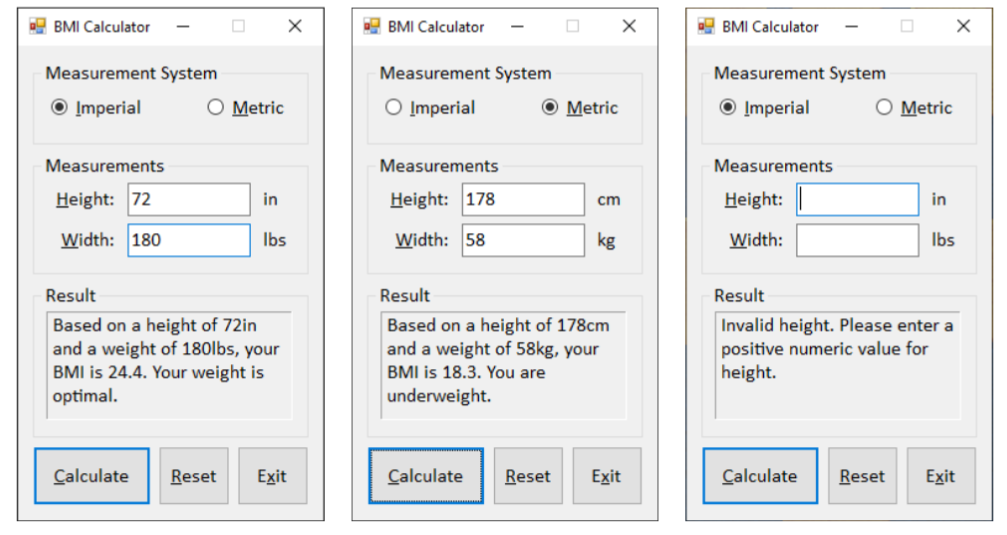
BMI Calculator BMI Calculator BMI Calculator Measurement System Measurement System Imperial O Metric Measurement System Imperial O Metric O Imperial O Metric Measurements Measurements Measurements Height: 72 in Height: 178 cm Height: in Width: 180 lbs Width: 58 kg Width: lbs Result Based on a height of 72in and a weight of 180lbs, your BMI is 24.4. Your weight is optimal. Result Based on a height of 178cm and a weight of 58kg, your BMI is 18.3. You are underweight. Result Invalid height. Please enter a positive numeric value for height Calculate Reset Exit Calculate Reset Exit Calculate Reset Exit
Step by Step Solution
There are 3 Steps involved in it

Get step-by-step solutions from verified subject matter experts
 Study Help