







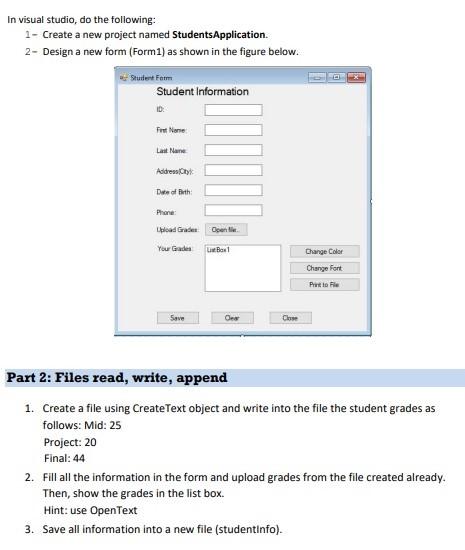
Question: write a code in visual basic In visual studio, do the following: 1 - Create a new project named Students Application. 2- Design a new
write a code in visual basic
In visual studio, do the following: 1 - Create a new project named Students Application. 2- Design a new form (Form1) as shown in the figure below. Student Form Student Information Fet None Last Name Addressly Date of birth Phone blood Grade Open Your Gades Box1 Change Color Change Fort Print to le Save Oes Close Part 2: Files read, write, append 1. Create a file using Create Text object and write into the file the student grades as follows: Mid: 25 Project: 20 Final: 44 2. Fill all the information in the form and upload grades from the file created already. Then, show the grades in the list box. Hint: use Open Text 3. Save all information into a new file (studentinfo)
Step by Step Solution
There are 3 Steps involved in it

Get step-by-step solutions from verified subject matter experts
 Study Help