







Question: Write a function called BiSectionSearch that will use the BiSection function to search for roots of a function. We will want the search to be
Write a function called BiSectionSearch that will use the BiSection function to search for roots of a function. We will want the search to be done systematically, by applying the BiSection function to a set of overlapping intervals that work through a defined region, searching for the roots. A "reasonable" amount of error checking should be done at the start of all functions. Also, only call BiSection, if the interval (x0, x1) is a bracket of the root (f(x0)*f(x1)
As an example of how the intervals should be set up this is how I started the first interval.
x0 = xStart; x1 = x0 + xStep;
The next interval would be
x0 = x1 - xOverlap; x1 = x0 + xStep;
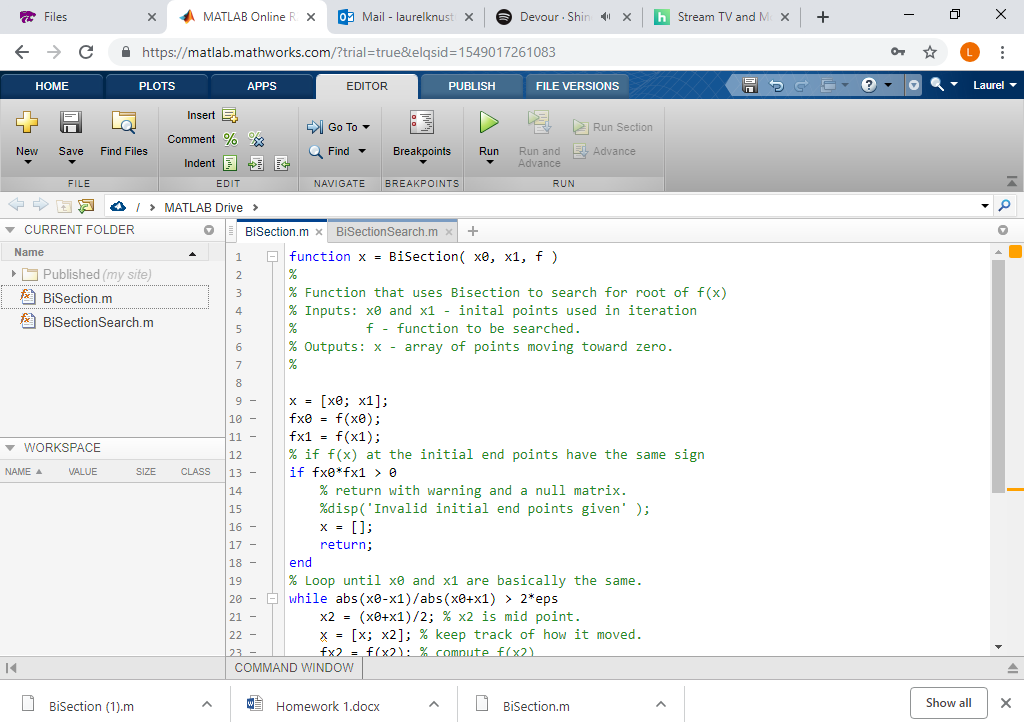
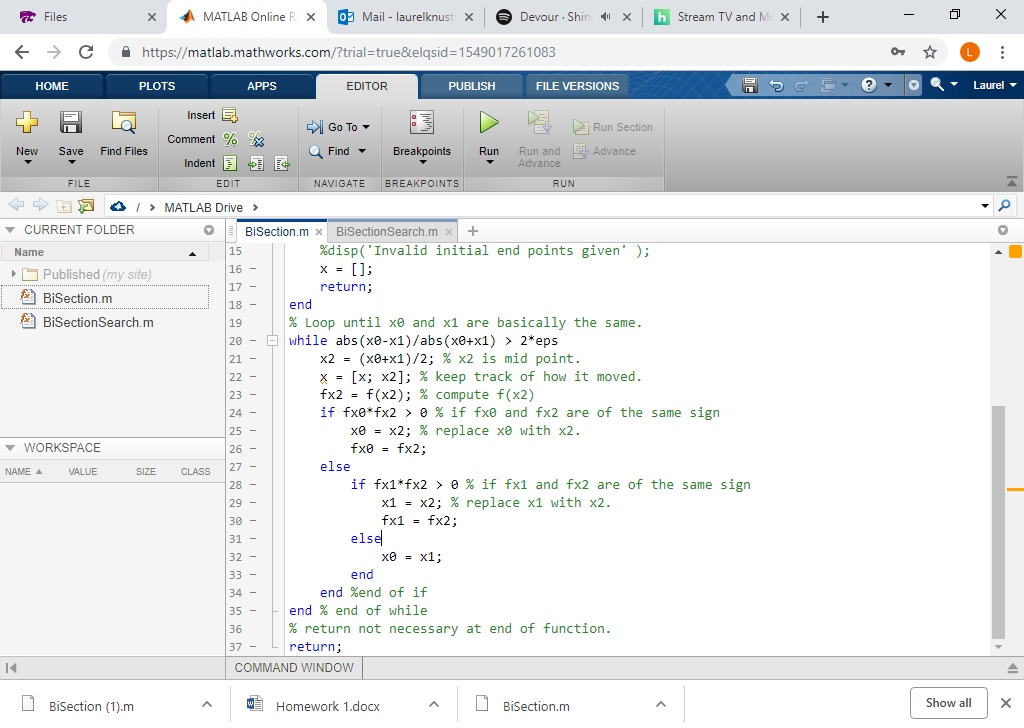
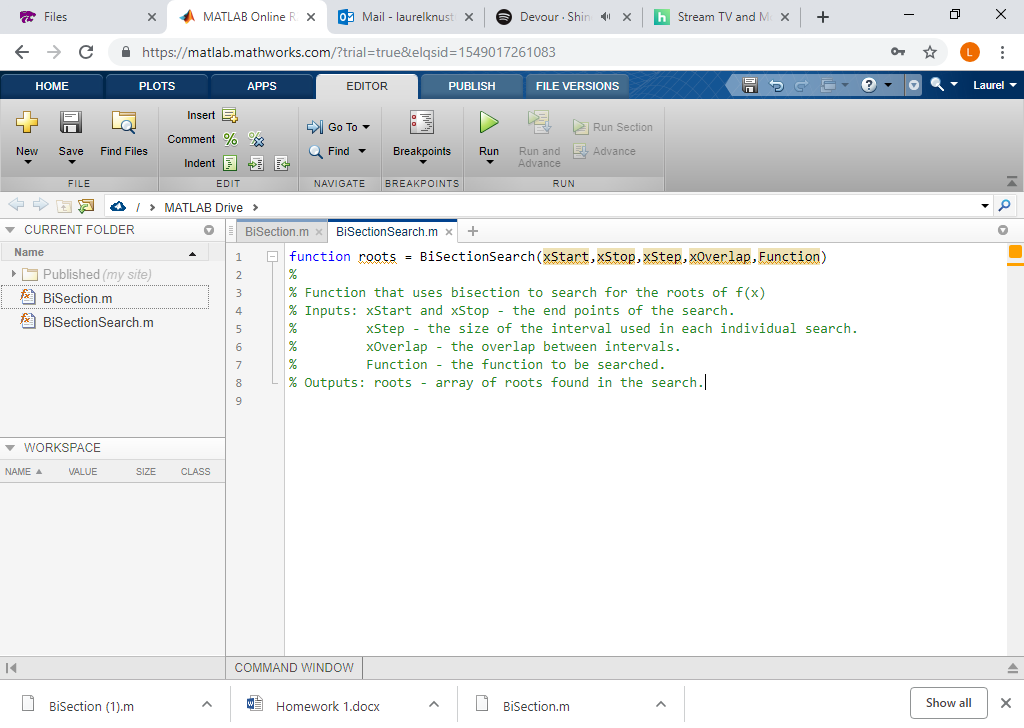
Files MATLAB Online F p Mail-laureknus X | Devour . Shi Stream TV and N Chttps://matlab.mathworks.com/?trial true&lelqsid-1549017261083 HOME PLOTS EDITOR PUBLISH FILE VERSIONS Laurel Comment % New Save Find Files Find Breakpoints Run Run and Advance Advance Indent FILE EDIT NAVIGATE BREAKPOINTS RUN EJa/ > MATLAB Drive > CURRENT FOLDER Name function x Bisection( x0, x1, f ) Published (my site) % Function that uses Bisection to search for root of f(x) % Inputs: x0 and x1 - inital points used n iteration Bisectionm 4 BiSectionSearch.m - function to be searched 6 % Outputs: x - array of points moving toward zero x = [x0; x1]; #x0 = f(x0); #x1 f(x1); % if f(x) at the initial end points have the same sign 10 - WORKSPACE 12 NAME VALUE SIZE CLASS 13 14 15 16 - % return with warning and a null matrix. %disp("Invalid initial end points given . ); return; 18- 19 20 - 21 end % Loop until x0 and x1 are basically the same . while abs (xe-x1)/abs (xe+x1) > 2*eps is = [x; x2]; % keep track of how it moved x2 (x0+x1)/2; % x2 mid point . COMMAND WINDOW Bisection (1).rm Homework 1.docx BiSection.m Show all | Files MATLAB Online F p Mail-laureknus X | Devour . Shi Stream TV and N Chttps://matlab.mathworks.com/?trial true&lelqsid-1549017261083 HOME PLOTS APPS EDITOR PUBLISH FILE VERSIONS Laurel Comment % New Save Find Files Find Breakpoints Run Run and Advance Advance Indent FILE EDIT NAVIGATE BREAKPOINTS RUN EJa/ > MATLAB Drive > CURRENT FOLDER Name 15 %disp("Invalid initial end points given' ); 16 - Published (my site) Bisectionm return; 18- 19 20 - 21 end % Loop until x0 and x1 are basically the same . while abs (xe-x1)/abs (xe+x1) > 2*eps BiSectionSearch.m is = [x; x2]; % keep track of how it moved X2 (x0+x1)/2; % x2 mid point. = #x2 f(x2); % compute f(x2) if fx0*fx2 > % if fx8 and fx2 are of the same sign 24- 25- 26 - SIZE CLASS 27- x0 = x2; % replace x0 with x2 WORKSPACE else NAME VALUE if fx1 *fx2 > % if fx1 and fx2 are of the same sign 28 - 29- 30 - x1 = x2; % replace x1 with x2 fx1 = fx2 ; els x0 = x1; end end %end of if end % end of while 34- 35 36 37- % return not necessary at end of function return COMMAND WINDOW Bisection (1).rm Homework 1.docx BiSection.m Show all | Files MATLAB Online F p Mail-laureknus X | Devour . Shi Stream TV and N Chttps://matlab.mathworks.com/?trial true&lelqsid-1549017261083 e Eq- HOME PLOTS EDITOR PUBLISH FILE VERSIONS Laurel Comment % New Save Find Files Find Breakpoints Run Run and Advance Advance Indent FILE EDIT NAVIGATE BREAKPOINTS RUN EJa/ > MATLAB Drive > CURRENT FOLDER BiSection.mBiSectionSearch.m Name function roots - Bisectionsearch(xStart,xStop,xStep, xoverlap, Function) Published (my site) % Function that uses bisection to search for the roots of f(x) % Inputs: xstart and xstop - the end points of the search. Bisectionm BiSectionSearch.m xStep - the size of the interval used in each individual search. xOverlap - the overlap between intervals. Function - the function to be searched 6 % Outputs: roots - array of roots found in the search WORKSPACE NAME SIZE CLASS COMMAND WINDOW Bisection (1).rm Homework 1.docx BiSection.m Show all |
Step by Step Solution
There are 3 Steps involved in it

Get step-by-step solutions from verified subject matter experts
 Study Help