







Question: Write a java program to display three image in the same window. I have written the codes for the image but do not know how
Write a java program to display three image in the same window. I have written the codes for the image but do not know how to write the main method to display all three images at the same time at runtime. I am also unsure what to import at the beginning of the codes that would work. This is the images that need to be display:
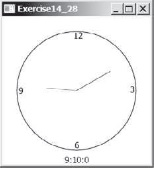
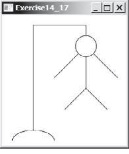
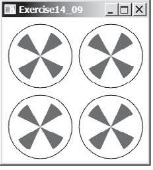
public class ClockPane extends Pane { private int hour; private int minute; private int second; private boolean hourHandVisible; private boolean minuteHandVisible; private boolean secondHandVisible;
// Clock pane's width and height private double w = 250, h = 250;
/** Construct a default clock with the current time */ public ClockPane() { setCurrentTime(); }
/** Construct a click with specified hour, minute, and second */ public ClockPane(int hour, int minute, int second) { this.hour = hour; this.minute = minute; this.second = second; hourHandVisible = minuteHandVisible = secondHandVisible = true; paintClock(); }
/** Return hour */ public int getHour() { return hour; }
/** Set a new hour */ public void setHour(int hour) { this.hour = hour; paintClock(); }
/** Return minute */ public int getMinute() { return minute; }
/** Set a new minute */ public void setMinute(int minute) { this.minute = minute; paintClock(); }
/** Return second */ public int getSecond() { return second; }
/** Set a new second */ public void setSecond(int second) { this.second = second; paintClock(); }
/** Return clock pane's width */ public double getW() { return w; }
/** Set clock pane's width */ public void getW(double w) { this.w = w; paintClock(); }
/** Return clock pane's height */ public double getH() { return h; }
/** Set clock pane's heigt */ public void setH(double h) { this.h = h; paintClock(); }
/** Return hourHandVisible */ public boolean isHourHandVisible() { return hourHandVisible; }
/** set hourHandVisible */ public void setHourHandVisible(boolean hourHandVisible) { this.hourHandVisible = hourHandVisible; paintClock(); // Repaint the clock }
/** Return minuteHandVisible */ public boolean isMinuteHandVisible() { return minuteHandVisible; }
/** set minuteHandVisible */ public void setMinuteHandVisible(boolean minuteHandVisible) { this.minuteHandVisible = minuteHandVisible; paintClock(); // Repaint the clock }
/** Return secondHandVisible */ public boolean isSecondHandVisible() { return secondHandVisible; }
/** set secondHandVisible */ public void setSecondHandVisible(boolean secondHandVisible) { this.secondHandVisible = secondHandVisible; paintClock(); // Repaint the clock }
/* Set the current time for the clock */ public void setCurrentTime() { // Construct a Calendar for the current date and time Calendar calendar = new GregorianCalendar();
// Set current hour, minute and second this.hour = calendar.get(Calendar.HOUR_OF_DAY); this.minute = calendar.get(Calendar.MINUTE); this.second = calendar.get(Calendar.SECOND);
paintClock(); // Repaint the clock } /** Paint the clock */ protected void paintClock() { // Initialize clock parameters double clockRadius = Math.min(w, h) * 0.8 * 0.5; double centerX = w / 2; double centerY = h / 2;
// Draw circle Circle circle = new Circle(centerX, centerY, clockRadius); circle.setFill(Color.WHITE); circle.setStroke(Color.BLACK); Text t1 = new Text(centerX - 5, centerY - clockRadius + 12, "12"); Text t2 = new Text(centerX - clockRadius + 3, centerY + 5, "9"); Text t3 = new Text(centerX + clockRadius - 10, centerY + 3, "3"); Text t4 = new Text(centerX - 3, centerY + clockRadius - 3, "6");
// Draw second hand double sLength = clockRadius * 0.8; double secondX = centerX + sLength * Math.sin(second * (2 * Math.PI / 60)); double secondY = centerY - sLength * Math.cos(second * (2 * Math.PI / 60)); Line sLine = new Line(centerX, centerY, secondX, secondY); sLine.setStroke(Color.RED);
// Draw minute hand double mLength = clockRadius * 0.65; double xMinute = centerX + mLength * Math.sin(minute * (2 * Math.PI / 60)); double minuteY = centerY - mLength * Math.cos(minute * (2 * Math.PI / 60)); Line mLine = new Line(centerX, centerY, xMinute, minuteY); mLine.setStroke(Color.BLUE);
// Draw hour hand double hLength = clockRadius * 0.5; double hourX = centerX + hLength * Math.sin((hour % 12 + minute / 60.0) * (2 * Math.PI / 12)); double hourY = centerY - hLength * Math.cos((hour % 12 + minute / 60.0) * (2 * Math.PI / 12)); Line hLine = new Line(centerX, centerY, hourX, hourY); hLine.setStroke(Color.GREEN);
getChildren().clear(); getChildren().addAll(circle, t1, t2, t3, t4); if (secondHandVisible) getChildren().add(sLine); if (minuteHandVisible) getChildren().add(mLine); if (hourHandVisible) getChildren().add(hLine); } }
public class Exercise_14_17 extends Application { @Override // Override the start method in the Application class public void start(Stage primaryStage) { // Create a pane Pane pane = new Pane();
// Create three polylines and set their properties Polyline polyline1 = new Polyline(); pane.getChildren().add(polyline1); polyline1.setStroke(Color.BLACK); ObservableList
Polyline polyline2 = new Polyline(); pane.getChildren().add(polyline2); polyline2.setStroke(Color.BLACK); ObservableList
Polyline polyline3 = new Polyline(); pane.getChildren().add(polyline3); polyline3.setStroke(Color.BLACK); ObservableList
// Create a circle and set its properties Circle circle = new Circle(x3, y1 * .25, 15); circle.setFill(Color.WHITE); circle.setStroke(Color.BLACK); pane.getChildren().add(circle);
// Create an arc and set its properties Arc arc = new Arc(x1, y1 + 1, 25, 15, 0, 180); arc.setFill(Color.WHITE); arc.setStroke(Color.BLACK); pane.getChildren().add(arc);
// Create a scene and place it in the stage Scene scene = new Scene(pane, 200, 200); primaryStage.setTitle("Exercise_14_17"); // Set the stage title primaryStage.setScene(scene); // Place the scene in the stage primaryStage.show(); // Display the stage } }
public class Exercise_14_09 extends Application { @Override // Override the start method in the Application class public void start(Stage primaryStage) { // Create a GridPane and set its properties GridPane gridPane = new GridPane(); gridPane.setPadding(new Insets(10, 10, 10, 10)); gridPane.setHgap(10); gridPane.setVgap(10);
// Place nodes in the pane for (int i = 0; i
// Add circle to stack pane Circle circle = getCircle(); stackPane.getChildren().add(circle);
// Add Arcs to stack pane getArcs(stackPane);
gridPane.add(stackPane, i, j); } }
// Create a scene and place in in the stage Scene scene = new Scene(gridPane); primaryStage.setTitle("Exercise_14_09"); // Set the stage title primaryStage.setScene(scene); // Place the scene in the stage primaryStage.show(); // Display the stage }
/** Add four arcs to a pane and place them in a stack pane */ private void getArcs(StackPane stackPane) { double angle = 30; // Start angle for (int i = 0; i
/** Return a Circle */ private Circle getCircle() { Circle c = new Circle(); c.setRadius(100); c.setStroke(Color.BLACK); c.setFill(Color.WHITE); return c; } }
Exercisel4 28 9:10:0 Exercisel4 28 9:10:0
Step by Step Solution
There are 3 Steps involved in it

Get step-by-step solutions from verified subject matter experts
 Study Help