







Question: Write a MATLAB function and a MATLAB testbench code to gmerate the signal shown below, which is a sinusoid with frequency 20Hz for 0.5 sec
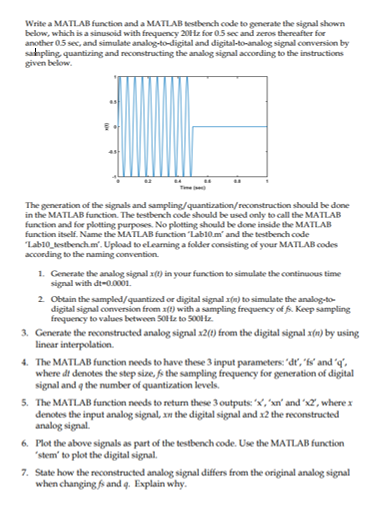
Write a MATLAB function and a MATLAB testbench code to gmerate the signal shown below, which is a sinusoid with frequency 20Hz for 0.5 sec and zeros thereafter for another 05 sec, and simulate analog-to-digital and digital-to-analog signal conversion by sahpling quantizing and reconstructing the analog signal according to the instructions given below should be done The generation of the signals and sampling in the MATLAB function. The testbench code should be used only to call the MATLAB function and for plotting purposes No plotting should be done inside the MATLAB function itself. Name the MATLAB function Lab10m and the testbench code Lab10 testbench m. Upload to eleaming a folder consisting of your MATL AB codes according to the naming convention 1. Generate the analog signal x() in your function to simulate the continuous time signal with dt-00001 2 Ottain the sampled/quantized or digital signal n) to simulate the analog digital signal conversion from xft) with a sampling freqaency of A. Keep sampling frequency to values between S0Hz to 500Hz 3. Generate the reconstructed analog signal x2(0) from the digital signal n) by using linear interpolation. 4 The MATLAB function needs to have these 3 input parameters:'dt, 'fs and q where dt denotes the step size,fs the sampling frequency for generation of digital signal and q the number of quantization levels 5. The MATLAB function needs to return these 3 outputs:x, 'xn and "x2, where x denotes the input analog signal, xn the digital signal and x2 the reconstructed analog signal. Plot the above sig als as part of the testbenchcode. Use the MATIAB function stem to plot the digital signal 6 7. State how the reconstructed analog signal differs from the original analog signal when changing,fs and q. Explain why
Step by Step Solution
There are 3 Steps involved in it

Get step-by-step solutions from verified subject matter experts
 Study Help