







Question: write a MATLAB script using the provided template for A & B: %Problem 2 %message in ASCII code - each row is one character message
write a MATLAB script using the provided template for A & B:
%Problem 2
%message in ASCII code - each row is one character
message = [0 1 0 0 1 1 1 1 0 1 0 0 1 0 0 0 0 1 0 0 1 0 0 1 0 1 0 0 1 1 1 1];
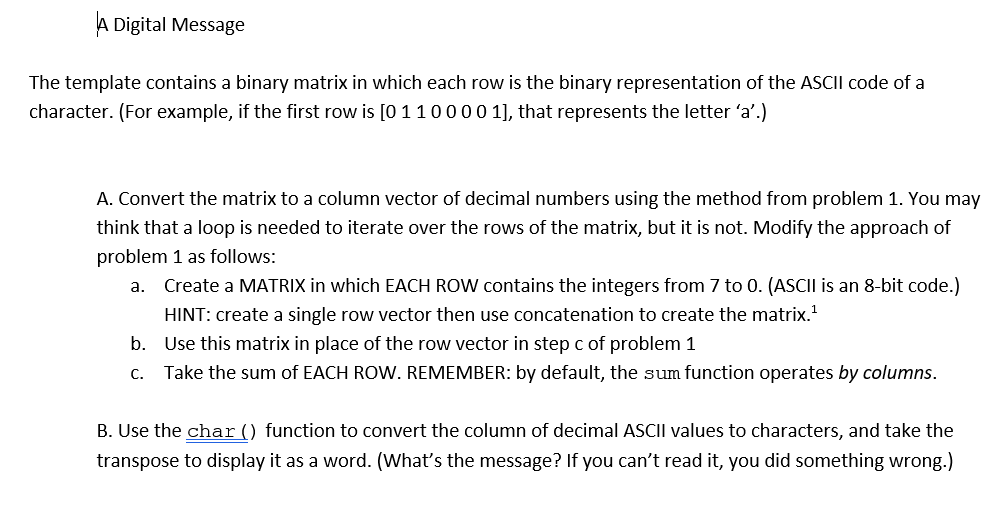
A Digital Message The template contains a binary matrix in which each row is the binary representation of the ASCII code of a character. (For example, if the first row is [0 110000 1], that represents the letter 'a'.) A. Convert the matrix to a column vector of decimal numbers using the method from problem 1. You may think that a loop is needed to iterate over the rows of the matrix, but it is not. Modify the approach of problem 1 as follows: a. Create a MATRIX in which EACH ROW contains the integers from 7 to 0. (ASCII is an 8-bit code.) HINT: create a single row vector then use concatenation to create the matrix." b. Use this matrix in place of the row vector in step c of problem 1 C. Take the sum of EACH ROW. REMEMBER: by default, the sum function operates by columns. B. Use the char() function to convert the column of decimal ASCII values to characters, and take the transpose to display it as a word. (What's the message? If you can't read it, you did something wrong.)
Step by Step Solution
There are 3 Steps involved in it

Get step-by-step solutions from verified subject matter experts
 Study Help