







Question: write a php program code solve the second pic Step 1: Create a new database named PlantStore in MySQL server. Step 2: Import the provided
write a php program code
solve the second pic
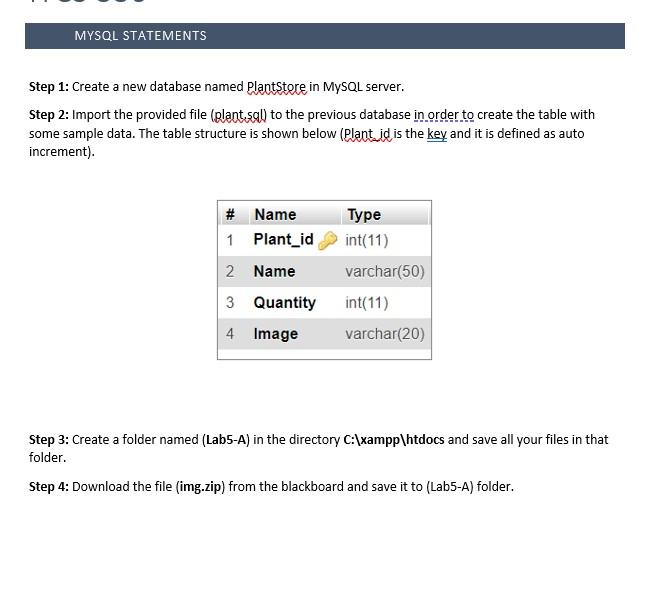
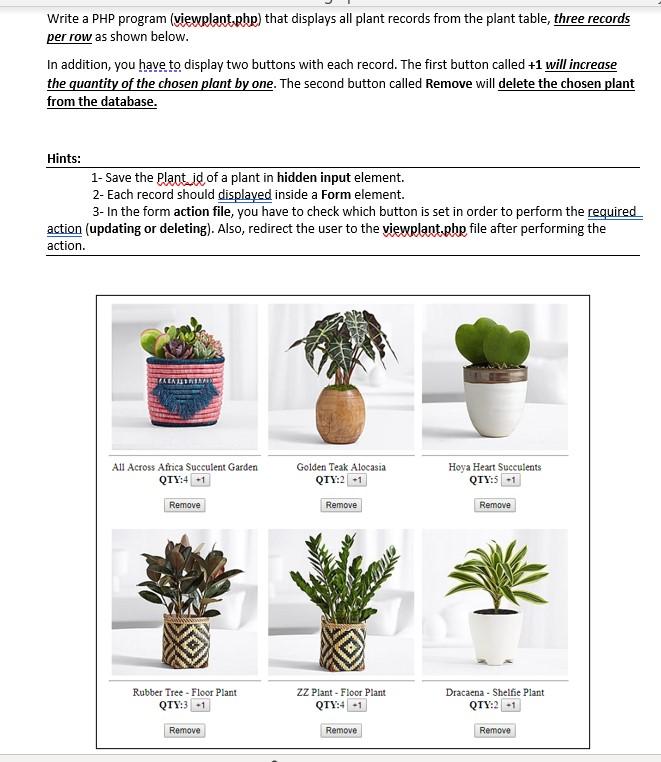
Step 1: Create a new database named PlantStore in MySQL server. Step 2: Import the provided file (plant squl) to the previous database in order to create the table with some sample data. The table structure is shown below (Plant id is the key and it is defined as auto increment). Step 3: Create a folder named (Lab5-A) in the directory C: :xampp\htdocs and save all your files in that folder. Step 4: Download the file (img.zip) from the blackboard and save it to (Lab5-A) folder. Write a PHP program (viewplant, php) that displays all plant records from the plant table, three records per row as shown below. In addition, you have to display two buttons with each record. The first button called +1 will increase the quantity of the chosen plant by one. The second button called Remove will delete the chosen plant from the database. Hints: 1- Save the Plant id of a plant in hidden input element. 2- Each record should displayed inside a Form element. 3- In the form action file, you have to check which button is set in order to perform the required action (updating or deleting). Also, redirect the user to the viewplant.php file after performing the action
Step by Step Solution
There are 3 Steps involved in it

Get step-by-step solutions from verified subject matter experts
 Study Help