







Question: Write a program in C (GNU GCC (MinGW)) that uses a structure to store grocery product information. For each product we store the following information
Write a program in C (GNU GCC (MinGW)) that uses a structure to store grocery product information. For each product we store the following information in a structure:
-PLU code: Product Look Up Code. Unique for each product, stored as a string.
-Product Name,
-Product Sales Type: 0 = per unit, 1 = per pound
-Price per Pound or price per unit,
-Current Inventory Level.
The structures are accessed through an array of pointers, where each pointer points to a structure.
Your program should read grocery product information from the productData.txt file, and populate the structures. Below is an example of file content. Each line in the file corresponds to one product. A001 Apples 1 0.90 21
A002 Peaches 1 0.82 11
A006 Avocados 0 1.54 27
A008 Mangos 0 1.69 19
A009 Strawberries case 0 12.5 8
4261 Rice_1_Lb_bag 0 0.49 107
Then the program should display a menu for the user to choose from:
1 Checkout
2 Close and exit
Checkout
If the user chooses checkout, the user can purchase multiple products in each checkout. The user is asked to enter the PLU code, then the quantity (weight or # of units, depending on the sales type) for each product. The program keeps up with the total cost ($). The user can enter 0 for a PLU to indicate the end of checkout. The program then displays the total price, and displays the menu again. The program should do input validation on the quantity, which must be positive. If the quantity is not positive, the user is asked to reenter. Your program is not required to do input validation on the PLU and ask the user to reenter, but your program must display an error if the PLU entered cannot be found. Your program should make sure the quantity bought is not more than the inventory level. For example, if the user wants to buy 10 apples, but only 5 apples are in the inventory, the program will sell only 5 apples. The inventory level should be automatically updated with each purchase.
Close and exit
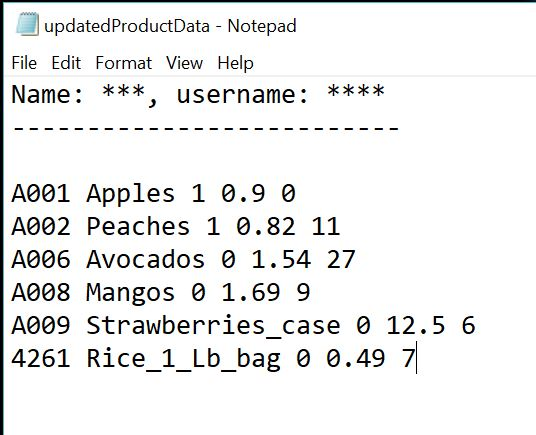
If the user chooses this option, all the updated product information (updated inventory level) should be displayed on the screen and written into the updatedProductData.txt file, then the program exits.
Additional requirements Make sure you meet all the requirements
To ensure consistency in the submissions, your program must do the following:
a) Use this structure
struct product
{
char PLU[PLU_LENGTH]; // set PLU_LENGTH to 10
char name[PRODUCT_NAME_LENGTH]; // set PRODUCT_NAME_LENGTH to 20
int salesType;
double unitPrice;
double inventoryLevel;
};
typedef struct product Product;
b) Array definition
const int SIZE = 100; // Assume there are at most 100 products
Define an array of pointers to Product, of size SIZE, locally in main.
Your program must work for any product data file that has the same format as productData.txt, where the number of products is variable, but less than or equal to 100.
c) Functions
You are required to implement your program with at least the 3 below functions. You are encouraged to implement more functions to make your program more modular.
To read a file and populate the structures, call a function with the following prototype and description:
/********************************************************************* ***********************
This function takes as arguments a file name and an array of pointers to Product, along with
the max size of the array. It opens the file and reads the inventory from the file.
It reads line by line, where each line corresponds to a product. For each product, it dynamically allocates a Product structure and assigns the pointer to an element of the array.
It populates the structure with the data read.
The structure content is displayed. The function terminates when there is no more data in the file or when the array is full. It also terminates upon error condition. It returns the number of products if all the data was valid, -1 if file could not be opened.
**********************************************************************
***********************/
int readInventory(char * fName, Product * arrayProd[], size_t max_size);
For the checkout, implement a function with the following prototype and description:
/********************************************************************* ***********************
This function does the checkout. It takes as argument the array of pointers to Product, and
the actual number of products in the inventory (which may be less than SIZE). It reads the PLU and quantity from the user.
The function does input validation on the quantity, which must be > 0. If the quantity is not positive, the user is asked to reenter. The function does not do input validation on the PLU and ask the user to reenter, but it displays an error if the PLU entered cannot be found.
The function updates the product data to reflect the user's purchase, then prompts the user for more product purchases.
The user types a PLU of zero when done. The function returns the total purchase price.
**********************************************************************
***********************/
double checkout(Product * arrayProd[], int nProd);
For the close and exit, implement a function with the following prototype and description:
/*********************************************************************
***********************
This function displays the updated product data on the screen and writes the data into a file.
The function takes as arguments the file name, the array of pointers to Product and the actual number of
products in the inventory. The function starts by writing a header with your name and username,
before writing the data into the file. Returns true if file open was successful, false otherwise.
**********************************************************************
***********************/
_Bool updateInventory(char * fName, Product * arrayProd[], int nProd);
d) Outline of main
To demonstrate your program, write a main function with the following outline. The file
productData.txt is on eLearning.
Call readInventory to read product data from file productData.txt
Display menu and get users choice
While (users choice is not Close and exit)
Call checkout
End while
Call updateInventory to write updated product data into file updatedProductData.txt
Write first your name and username in the file before you write the updated product data
You are allowed to hard code all the file names.
Suggestions for Implementation
The product data file is formatted such that there are 5 items (PLU, name, type, unit price and inventory level) for each product. fscanf() returns the number of items actually read. To determine if there is no more data in the file, read the value returned by fscanf and check if it is equal to 5.
itemsRead = fscanf(fPtr, "%s%s%d%lf%lf", plu, pName, &type, &price, &level);
Expected Output
Content of the file:
1
A001
22
4261
0
-2
100
0
1
A009
2
A004
1
A008
10
0
2
Below is an example of output if your implementation is correct.
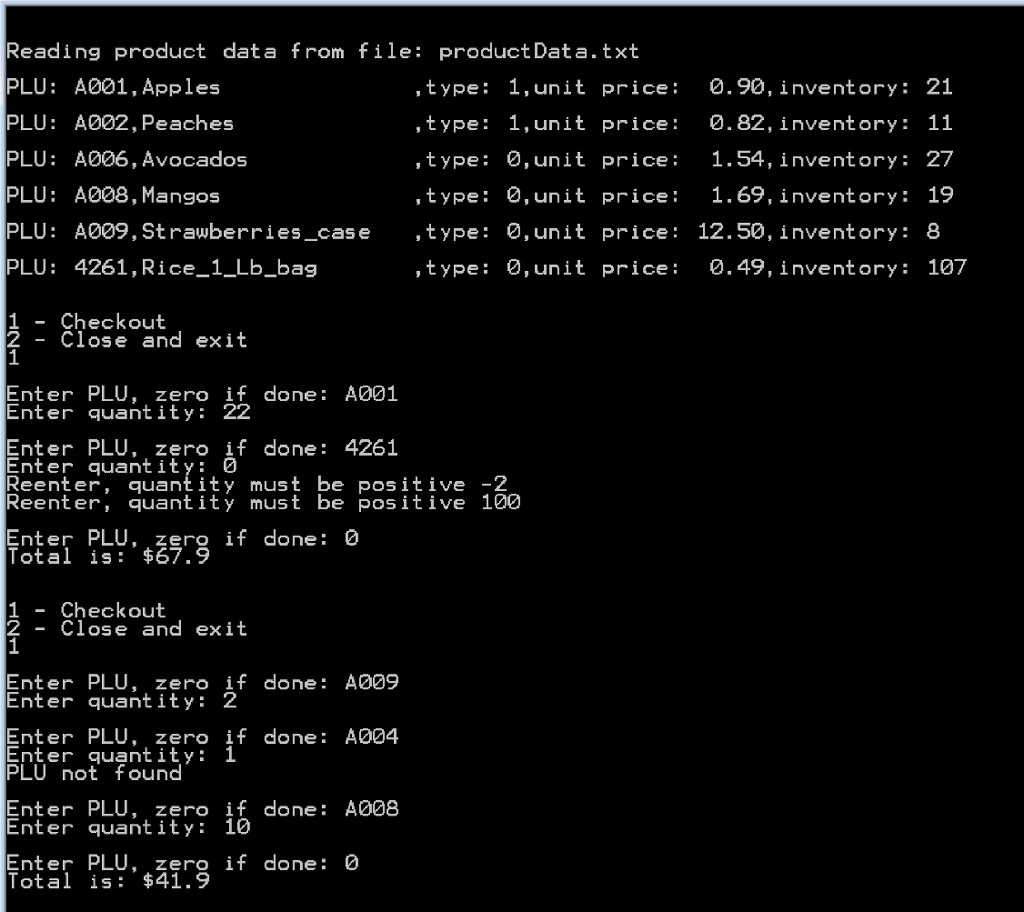
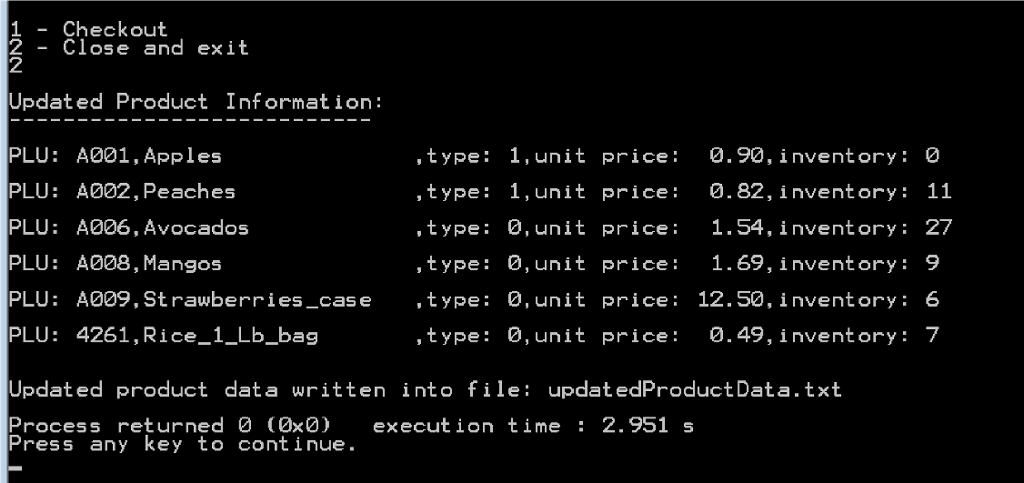
Reading product data from file: product Data.txt PLU: A001, Apples PLU: A002, Peaches PLU: A006, Avocados PLU: A008, Mangos PLU: A009, St rawberriescase PLU: 4261, Rice_1_Lb bag ,type: 1,unit price 0.90, inventory: 21 , type: 1,unit price: 0.82, inventory: 11 ,type: ,unit price: 1.54, inventory: 27 ,type: 0, unit price 1.69, inventory: 19 ,type: 0,unit price: 12.50, inventory: 8 ,type: 0, unit price: 0.49, inventory: 107 1 - Checkout 2 - Close and exit Enter PLU, zero if done: A001 Enter quant ity: 22 Enter PLU, zero if done: 4261 Enter quantity: 0 Reenter, quantity must be positive -2 Reenter, quantity must be pos itive 100 Enter PLU, zero if done: 0 Total is: $67.9 1 - Checkout 2- Close and exit EnterPLU, zero if done: A009 Enter quant ity: 2 Enter PLU, zero if done: A004 Enter quantity: 1 PLU not found Enter PLU, zero if done: A008 Enter quantity: 10 Enter PLU, zero if done: 0 Total is: $41.9 Reading product data from file: product Data.txt PLU: A001, Apples PLU: A002, Peaches PLU: A006, Avocados PLU: A008, Mangos PLU: A009, St rawberriescase PLU: 4261, Rice_1_Lb bag ,type: 1,unit price 0.90, inventory: 21 , type: 1,unit price: 0.82, inventory: 11 ,type: ,unit price: 1.54, inventory: 27 ,type: 0, unit price 1.69, inventory: 19 ,type: 0,unit price: 12.50, inventory: 8 ,type: 0, unit price: 0.49, inventory: 107 1 - Checkout 2 - Close and exit Enter PLU, zero if done: A001 Enter quant ity: 22 Enter PLU, zero if done: 4261 Enter quantity: 0 Reenter, quantity must be positive -2 Reenter, quantity must be pos itive 100 Enter PLU, zero if done: 0 Total is: $67.9 1 - Checkout 2- Close and exit EnterPLU, zero if done: A009 Enter quant ity: 2 Enter PLU, zero if done: A004 Enter quantity: 1 PLU not found Enter PLU, zero if done: A008 Enter quantity: 10 Enter PLU, zero if done: 0 Total is: $41.9
Step by Step Solution
There are 3 Steps involved in it

Get step-by-step solutions from verified subject matter experts
 Study Help