







Question: Write a program that asks the user for a name of an image .png file and the name of an output file. Your program should
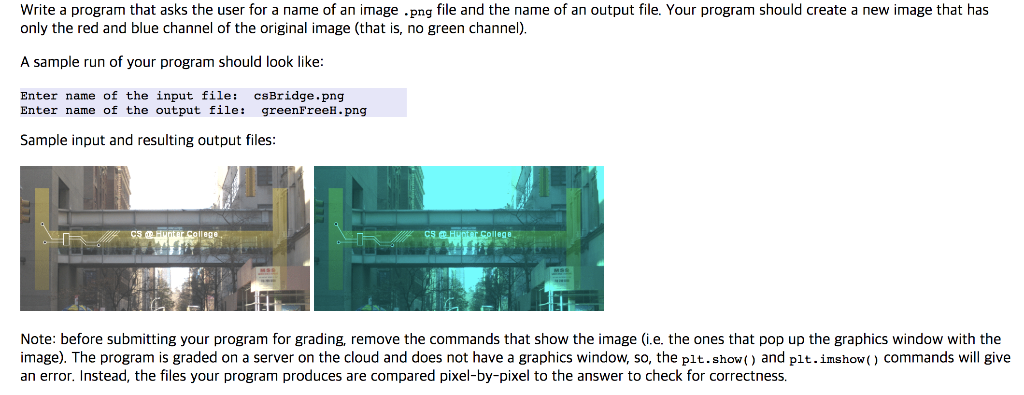
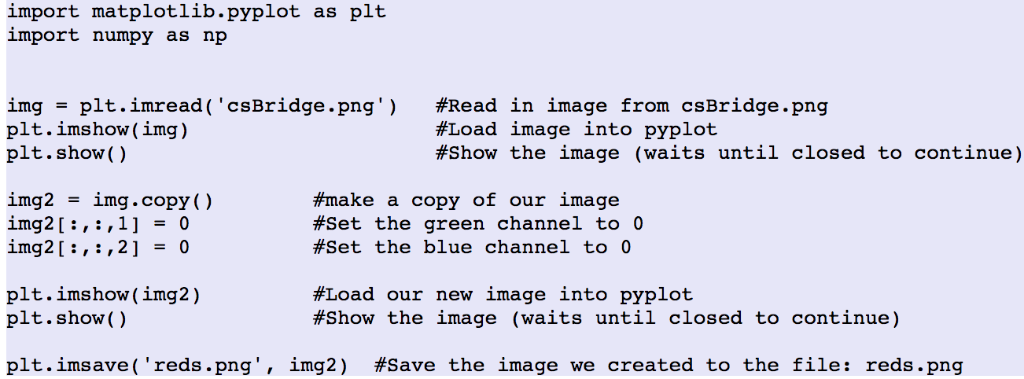
Write a program that asks the user for a name of an image .png file and the name of an output file. Your program should create a new image that has only the red and blue channel of the original image (that is, no green channel) A sample run of your program should look like: Enter name of the input file: csBridge.png Enter name of the output file: greenFreeH.png Sample input and resulting output files Note: before submitting your program for grading, remove the commands that show the image (i.e. the ones that pop up the graphics window with the image). The program is graded on a server on the cloud and does not have a graphics window, so, the plt.show) and plt.imshow( commands will give an error. Instead, the files your program produces are compared pixel-by-pixel to the answer to check for correctness. import matplotlib.pyplot as plt import numpy as np img plt.imread ('csBridge.png' ) plt.imshow(img) plt.show() #Read In image from csBridge.png #Load image into pyplot #show the image (waits until closed to continue) img2 -img.copy() img2[:, ,1-0 #make a copy of our image #set the green channel to 0 #set the blue channel to 0 plt.imshow (img2) plt. show () #Load our new image into pyplot #show the image (waits until closed to continue) plt.ims ave ('reds.png', 1mg2) #save the image we created to the file: reds.png
Step by Step Solution
There are 3 Steps involved in it

Get step-by-step solutions from verified subject matter experts
 Study Help