







Question: Write a program that changes how a model is rendered and computes an axis aligned bounding box, which in the future can be use for
Write a program that changes how a model is rendered and computes an axis aligned bounding box, which in the future can be use for operations like collision detection. This assignment is also intended to teach you about OpenGL program flow.
(15pts) To calculate an AABB: simply loop through all the models vertices, and store the x,y,z values if they are the min and max x,y,z values. That is, you must find the min and max x, the min and max y, and the min and max z. To do this, inside the Model class you will need to interact with the shapes object to get at the position data. For example, in the Model class, youd say shapes[0].mesh.positions to get at the vertex position data. Here is how the vertex position data is stored in the positions vector
[x1,y1,z1,x2,y2,z2,x3, y3,z3, xn,yn,zn ]
Where (x1,y1,z1) is the first vertexs position in 3D.
Here is an example of an axis aligned bounding box around a torus. NOTE: I pulled this off of Google images to show you what an AABB looks like. You program will not look exactly like this.
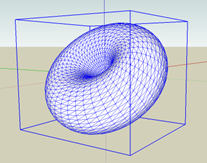
(15pts) To render the AABB: Take the mins and maxes from part a, and turn them into 8 vertices, and a list of indices stored in a tinyobj::shape object. Also, make sure to set a default values for the normals as (1.0, 0.0, 0.0). Otherwise you might get some weird errors when you render!
To do this part efficiently, Id suggest either making a subclass of Model or modify the Model class to support this functionality. Then, you can just change the render function to call glDrawElements with GL_LINES as the first parameter.
GL_LINES works differently than the current GL_TRIANGLES. See https://www.opengl.org/wiki/Primitive for an explanation. Thus, you will need to organize your vertices and indices for GL_LINES to produce the desired result.
To make the AABB green (10pts): you will need to create another shader object that uses a different fragment shader - green.frag included in the shaders folder. You can use the same vertex shader as in the current shader program phong.vert
Keyboard controls (10 pts)
b: toggle the bounding box on and off
w: toggle wireframe mode. If on, this should render the model as a wireframe. To do this, you must call
glPolygonMode(GL_FRONT, GL_LINE);
glPolygonMode(GL_BACK, GL_LINE);
To make it solid again you call:
glPolygonMode(GL_FRONT, GL_FILL);
glPolygonMode(GL_BACK, GL_FILL);
Step by Step Solution
There are 3 Steps involved in it

Get step-by-step solutions from verified subject matter experts
 Study Help