







Question: Write a project to display a weather report in Microsoft Visual Studio 2017 . The user can choose one of the radio buttons and display
Write a project to display a weather report in Microsoft Visual Studio 2017. The user can choose one of the radio buttons and display an icon and a message. The message should give the weather report in words and include the persons name (taken from the textbox at the top of the form). For example, if the user chooses the Sunny button, you might display It looks like sunny weather today, John (assuming that the user entered John in the textbox). The figure below shows how the interface looks like.
Include keyboard access keys for the button and radio buttons. Make the Exit button the cancel button and include ToolTips.
There are different ways to change images. You might consider the method of selecting images from Properties.Resources, or hiding and displaying different pictureboxes. The four icons are cloud.ico, snow.ico, rain.ico, and sun.ico in this zip file I uploaded. You can also use your own pictures.
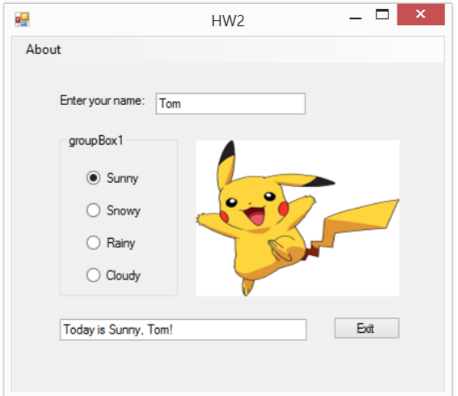
HW2 About Enter your name: Tom Sunny Snowy O Rainy O Cloudy Edt Today is Sunny. Tom
Step by Step Solution
There are 3 Steps involved in it

Get step-by-step solutions from verified subject matter experts
 Study Help