







Question: write a python program with output!! Write a Weather Display class that is responsible for printing weather information for a given place at a given
write a python program with output!!
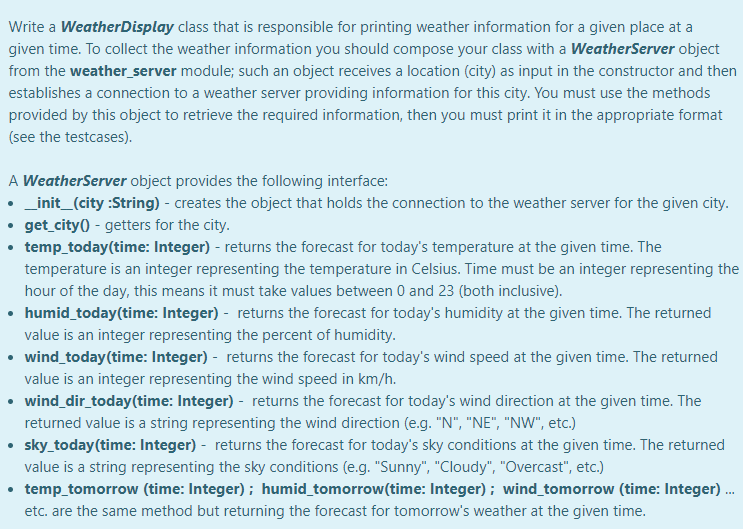
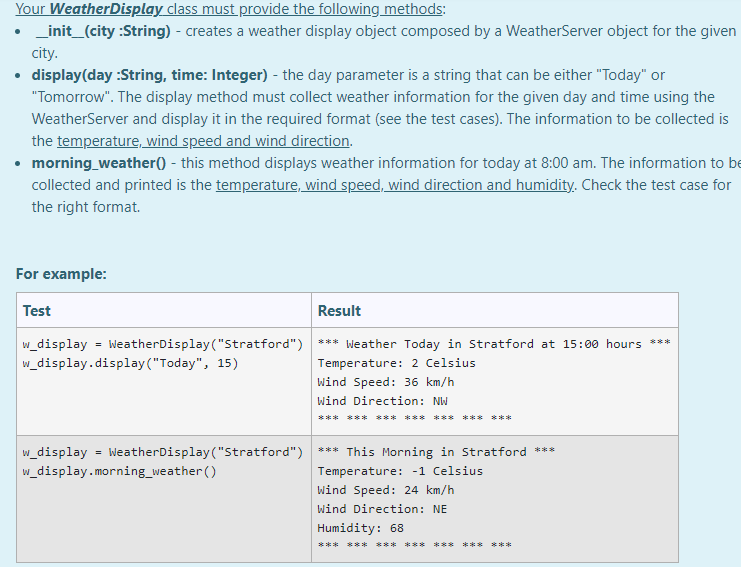
Write a Weather Display class that is responsible for printing weather information for a given place at a given time. To collect the weather information you should compose your class with a Weather Server object from the weather_server module; such an object receives a location (city) as input in the constructor and then establishes a connection to a weather server providing information for this city. You must use the methods provided by this object to retrieve the required information, then you must print it in the appropriate format (see the testcases). A Weather Server object provides the following interface: _init_(city:String) - creates the object that holds the connection to the weather server for the given city. get_city -getters for the city. temp_today(time: Integer) - returns the forecast for today's temperature at the given time. The temperature is an integer representing the temperature in Celsius. Time must be an integer representing the hour of the day, this means it must take values between 0 and 23 (both inclusive). humid_today(time: Integer) - returns the forecast for today's humidity at the given time. The returned value is an integer representing the percent of humidity. wind_today(time: Integer) - returns the forecast for today's wind speed at the given time. The returned value is an integer representing the wind speed in km/h. wind_dir_today(time: Integer) - returns the forecast for today's wind direction at the given time. The returned value is a string representing the wind direction (e.g. "N", "NE", "NW", etc.) sky_todaytime: Integer) - returns the forecast for today's sky conditions at the given time. The returned value is a string representing the sky conditions (e.g. "Sunny", "Cloudy", "Overcast", etc.) temp_tomorrow (time: Integer); humid_tomorrow(time: Integer); wind_tomorrow (time: Integer) ... etc. are the same method but returning the forecast for tomorrow's weather at the given time. Your Weather Display class must provide the following methods: _init_(city :String) - creates a weather display object composed by a WeatherServer object for the given city. display(day :String, time: Integer) - the day parameter is a string that can be either "Today" or "Tomorrow". The display method must collect weather information for the given day and time using the WeatherServer and display it in the required format (see the test cases). The information to be collected is the temperature, wind speed and wind direction. morning_weather() - this method displays weather information for today at 8:00 am. The information to be collected and printed is the temperature, wind speed, wind direction and humidity. Check the test case for the right format For example: Test Result w_display = WeatherDisplay("Stratford") *** Weather Today in Stratford at 15:00 hours *** w_display.display("Today", 15) Temperature: 2 Celsius Wind Speed: 36 km/h Wind Direction: NW ***** w_display = WeatherDisplay("Stratford") *** This Morning in Stratford *** w_display.morning_weather() Temperature: -1 Celsius Wind Speed: 24 km/h Wind Direction: NE Humidity: 68 *** *** ***** Write a Weather Display class that is responsible for printing weather information for a given place at a given time. To collect the weather information you should compose your class with a Weather Server object from the weather_server module; such an object receives a location (city) as input in the constructor and then establishes a connection to a weather server providing information for this city. You must use the methods provided by this object to retrieve the required information, then you must print it in the appropriate format (see the testcases). A Weather Server object provides the following interface: _init_(city:String) - creates the object that holds the connection to the weather server for the given city. get_city -getters for the city. temp_today(time: Integer) - returns the forecast for today's temperature at the given time. The temperature is an integer representing the temperature in Celsius. Time must be an integer representing the hour of the day, this means it must take values between 0 and 23 (both inclusive). humid_today(time: Integer) - returns the forecast for today's humidity at the given time. The returned value is an integer representing the percent of humidity. wind_today(time: Integer) - returns the forecast for today's wind speed at the given time. The returned value is an integer representing the wind speed in km/h. wind_dir_today(time: Integer) - returns the forecast for today's wind direction at the given time. The returned value is a string representing the wind direction (e.g. "N", "NE", "NW", etc.) sky_todaytime: Integer) - returns the forecast for today's sky conditions at the given time. The returned value is a string representing the sky conditions (e.g. "Sunny", "Cloudy", "Overcast", etc.) temp_tomorrow (time: Integer); humid_tomorrow(time: Integer); wind_tomorrow (time: Integer) ... etc. are the same method but returning the forecast for tomorrow's weather at the given time. Your Weather Display class must provide the following methods: _init_(city :String) - creates a weather display object composed by a WeatherServer object for the given city. display(day :String, time: Integer) - the day parameter is a string that can be either "Today" or "Tomorrow". The display method must collect weather information for the given day and time using the WeatherServer and display it in the required format (see the test cases). The information to be collected is the temperature, wind speed and wind direction. morning_weather() - this method displays weather information for today at 8:00 am. The information to be collected and printed is the temperature, wind speed, wind direction and humidity. Check the test case for the right format For example: Test Result w_display = WeatherDisplay("Stratford") *** Weather Today in Stratford at 15:00 hours *** w_display.display("Today", 15) Temperature: 2 Celsius Wind Speed: 36 km/h Wind Direction: NW ***** w_display = WeatherDisplay("Stratford") *** This Morning in Stratford *** w_display.morning_weather() Temperature: -1 Celsius Wind Speed: 24 km/h Wind Direction: NE Humidity: 68 *** *** *****
Step by Step Solution
There are 3 Steps involved in it

Get step-by-step solutions from verified subject matter experts
 Study Help