







Question: Write a script called 09-firstLastLogout that will do the following: i. Reads data from a wtmp log file that will be specified on a
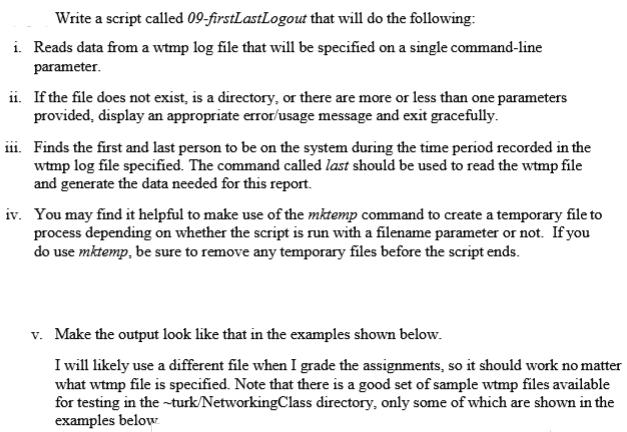
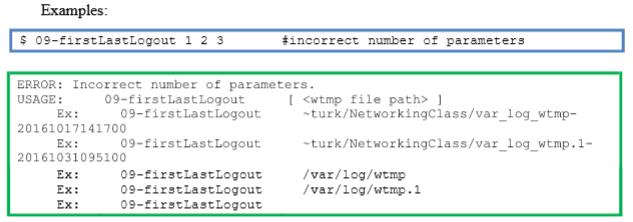
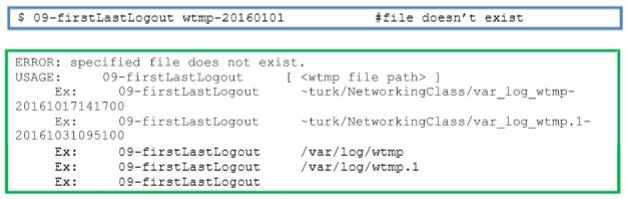
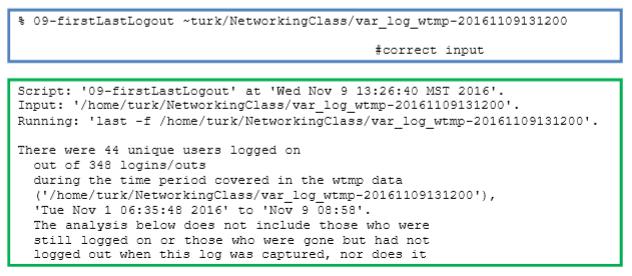
Write a script called 09-firstLastLogout that will do the following: i. Reads data from a wtmp log file that will be specified on a single command-line parameter. ii. If the file does not exist, is a directory, or there are more or less than one parameters provided, display an appropriate error/usage message and exit gracefully. iii. Finds the first and last person to be on the system during the time period recorded in the wtmp log file specified. The command called last should be used to read the wtmp file and generate the data needed for this report. iv. You may find it helpful to make use of the mktemp command to create a temporary file to process depending on whether the script is run with a filename parameter or not. If you do use mktemp, be sure to remove any temporary files before the script ends. v. Make the output look like that in the examples shown below. I will likely use a different file when I grade the assignments, so it should work no matter what wtmp file is specified. Note that there is a good set of sample wtmp files available for testing in the -turk/NetworkingClass directory, only some of which are shown in the examples below Examples: $ 09-firstLastLogout 1 2 3 #incorrect number of parameters ERROR: Incorrect number of parameters. 09-firstLastLogout 09-firstLastLogout ( ) -turk/Networkingciass/var_log_wtmp- USAGE: Ex: 20161017141700 Ex: 09-firstLastLogout -turk/NetworkingClass/var_log_wtmp.1- 20161031095100 09-firstLastLogout 09-firstlastLogout 09-firstLastLogout /var/log/wtmp /var/log/wtmp.1 Ex: Ex: Ex: $ 09-firstLastLogout wtmp-20160101 #file doesn't exist ERROR: specified file does not exist. 09-firstLastLogout 09-firstLastLogout [ ] -turk/Networkingclass/var_log_wtmp- USAGE: Ex: 20161017141700 Ex: 09-firstLastLogout -turk/NetworkingClass/var_log_wtmp.1- 20161031095100 09-firstlastLogout 09-firstLastLogout 09-firstLastLogout /var/log/wtmp /var/log/wtmp.1 Ex: Ex: Ex: $ 09-firstLastLogout turk/NetworkingClass/var_log_wtmp-20161109131200 #correct input Script: '09-EirstLastLogout' at 'Wed Nov 9 13:26:40 MST 2016'. Input: '/home/turk/NetworkingClass/var_log_wtmp-20161109131200'. Running: 'last -f /home/turk/NetworkingClass/var_log_wtmp-20161109131200'. There were 44 unique users logged on out of 348 logins/outs during the time period covered in the wtmp data ('/home/turk/NetworkingClass/var_log_wtmp-20161109131200'), "Tue Nov 1 06:35:48 2016' to 'Nov 9 08:58'. The analysis below does not include those who were still logged on or those who were gone but had not logged out when this log was captured, nor does it
Step by Step Solution
3.46 Rating (153 Votes )
There are 3 Steps involved in it
To create the script 09firstLastLogout follow these steps Step 1 Initialize the Script Start by creating the script file and adding a shebang for Bash ... View full answer

Get step-by-step solutions from verified subject matter experts
 Study Help