







Question: Write a script file for the creation of an executable jar file GUI.jar. Use for this purpose the java project GUI.java used in Lab 01
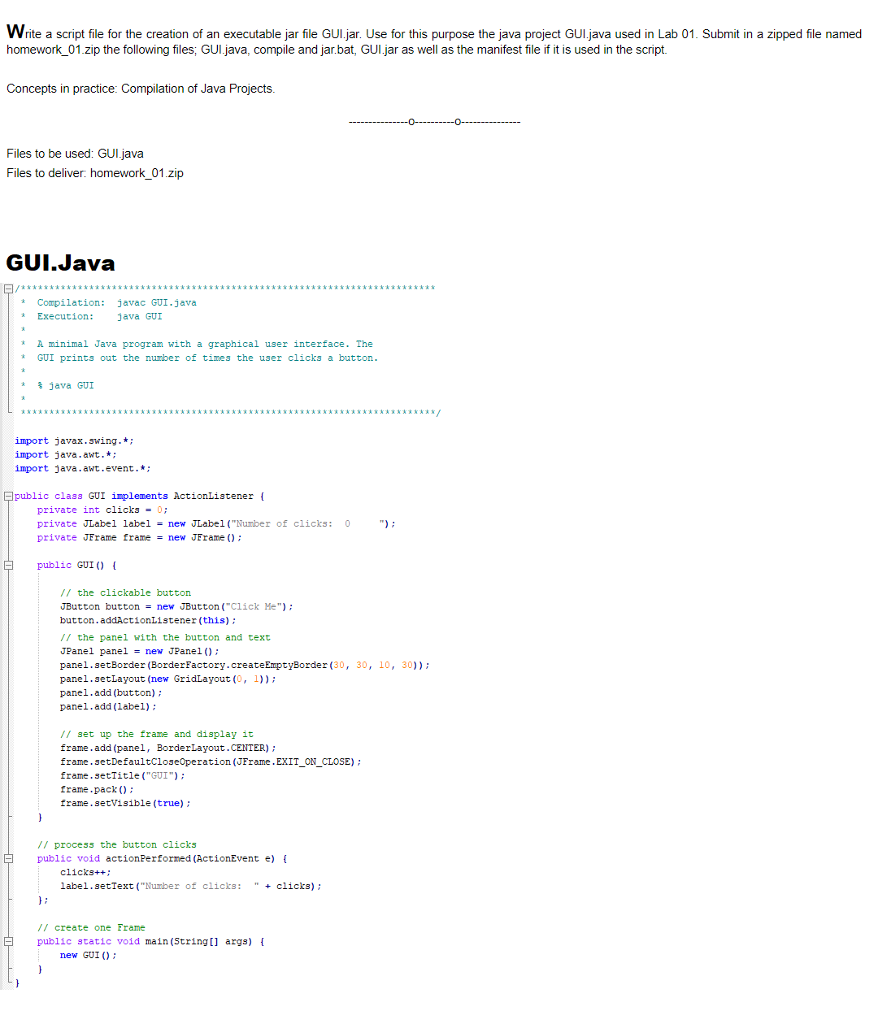
Write a script file for the creation of an executable jar file GUI.jar. Use for this purpose the java project GUI.java used in Lab 01 Submit in a zipped file named homework_01.zip import javax swing. *: import java.awt.*: import java.awt.event.*: public class GUI implements ActionListener { private int clicks = 0: private JLabel label = new JLabel("Number of clicks: 0 "): private JFrame frame = new JFrame(): public GUI { // the clickable button JButton button = new Button("Click Me"): button.addActionListener(this): // the panel with the button and text JPanel panel = new JPanel(): panel.setBorder(BorderFactory.createEmptyBorder (30, 30, 10, 30)): panel.setLayout (new GridLayout (0, 1)): panel.add (button): panel.add (label): // set up the frane and display it frame.add (panel, BorderLayout.CENTER): frame.setDefaultCloseOperation (JFrame.EXIT_ON_CLOSE): frame.setTitle("GUI"): frame.pack (): frame.setvisible (true): } // process the button clicks public void actionPerformed (ActionEvent e) { clicks++: label.setText ("Number of clicks: " + clicks): {: // create one Frame public static void main (String[] args) { new GUI (): } }
Step by Step Solution
There are 3 Steps involved in it

Get step-by-step solutions from verified subject matter experts
 Study Help