







Question: Write a script that contains a button (in the external file called Counter.js) and a counter in a (in the html document called Counter.html). The
Write a script that contains a button (in the external file called "Counter.js) and a counter in a
(in the html document called "Counter.html"). The buttons event handler should increment the counter each time its clicked. A) You have to use the external CSS file called "Counter.CSS" to set the margin of the paragraph to the desired value, for example 4 or 5, etc. B) The JavaScript file (Counter.js) contains two (02) variables and two (02) functions: 1. Global variables: counter = 0 and dom. 2. The function getElementBtnIncrement() that reads the counter element using the existing function getElementById() to access to the element and adds the increment button using its id by using the function addEventListener() to register the event handler, which takes three (03) arguments : a) the name of event as a string literal (here is "click"), (b) the handler function increment, and (c) the Boolean value false. 3. The function increment() that increments the counter by 1 before and assign this new counter value to the dom variable which references the innerHtml. C) At the end of the JavaScript file, finish with this line to fire the load event when a resource and its dependent resources have finished loading: window.addEventListener( "load", getElementBtnIncrement, false );
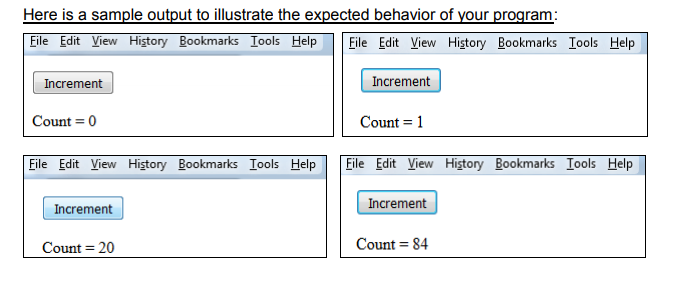
Eile EditView Hitory Bookmarks Iools HelpEile Edit View History Bookmarks Iools Help Increment Increment Count = 0 Count 1 File Edit View History Bookmarks Tools Help Eile Edit View Hitory Bookmarks Iools Help Increment Increment Count 20 Count = 84
Step by Step Solution
There are 3 Steps involved in it

Get step-by-step solutions from verified subject matter experts
 Study Help