







Question: Write a set of Excel functions in cell Orders!H2, which can be copied down the column to cell H14, to determine thewarranty cost of the
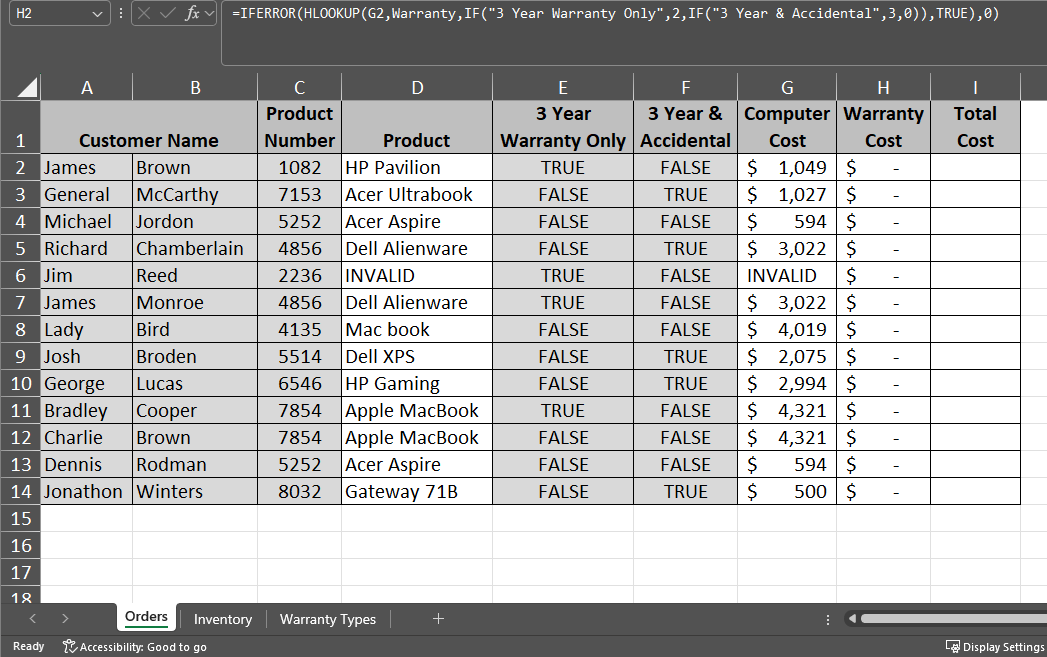
- Write a set of Excel functions in cell Orders!H2, which can be copied down the column to cell H14, to determine thewarranty cost of the computer based on the warranty type (if chosen) and the cost of the computer. If the product number does not exist in the inventory, display a 0 in the cell (this will be a '-' in accounting format). (Use the named range Warranty in your formula.) Note: If the customer chooses to purchase a warranty, they can only select one of the options. (Hint: Use the IFERROR(HLOOKUP()) functions here and an embedded IF to find which row to return (2 or 3)for the warranty type).
=IFERROR(HLOOKUP(lookup value for the computer cost in column G of the Orders worksheet, table array in Warranty Types worksheet for warranty information named Warranty, IF(is it an extended 3 year warranty only?, return row 2, IF(is if it is an extended 3 year warranty and accidental damage or theft?, return row 3, return 0)), TRUE), 0)
=IFERROR(HLOOKUP(G2,Warranty,IF(_________,2,IF(_________,3,0)),TRUE),0)
Step by Step Solution
There are 3 Steps involved in it
1 Expert Approved Answer
Step: 1 Unlock

Question Has Been Solved by an Expert!
Get step-by-step solutions from verified subject matter experts
Step: 2 Unlock
Step: 3 Unlock
 Study Help