







Question: Write a Visual Basic NET program by the user: to determine a student GPA. The following information will be entered Student ID Student Name Course
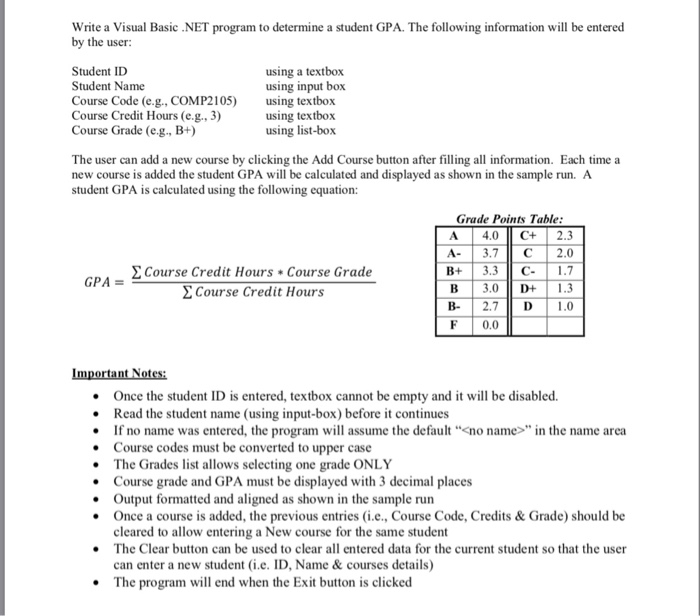
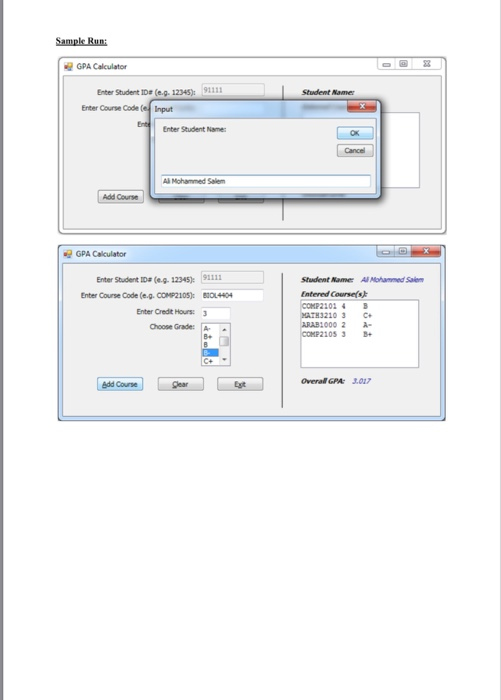
Write a Visual Basic NET program by the user: to determine a student GPA. The following information will be entered Student ID Student Name Course Code (e.g., COMP2105) using textbox Course Credit Hours (e.g., 3) Course Grade (e.g., B+) using a textbox using input box using textbox using list-box The user can add a new course by clicking the Add Course button after filling all information. Each time a new course is added the student GPA will be calculated and displayed as shown in the sample run. A student GPA is calculated using the following equation: Grade Points Table A 4.0 C+ 2.3 A- 1 3.7 C | 2.0 Course Credit Hours * Course Grade GPA B 3.0 D 1.3 B- | 2.7 D | 1.0 F 0.0 Course Credit Hours Once the student ID is entered, textbox cannot be empty and it will be disabled. Read the student name (using input-box) before it continues If no name was entered, the program will assume the default"no name"in the name area Course codes must be converted to upper case The Grades list allows selecting one grade ONLY . . Course grade and GPA must be displayed with 3 decimal places Output formatted and aligned as shown in the sample run Once a course is added, the previous entries (i.e., Course Code, Credits & Grade) should be cleared to allow entering a New course for the same student The Clear button can be used to clear all entered data for the current student so that the user can enter a new student (i.e. ID, Name& courses details) e The program will end when the Exit button is clicked Sample Run GPA Calculator Enter Student IDe (e.g. 12345): 91111 Enter Courve Code(Input Student Namer Enter Student Name ox Cancel Add Course GPA Calculator Enter Student Ds (e.g. 12345) tter Cone Code (e.g. COMP2105): Enter Credit Hours: Student Name Al Mohammed Sale Entered Courses COMP2102B MATH3210 3 C ..04 Choose Grade: A B+ 3 B+ Course Est Overall GPA 3.07
Step by Step Solution
There are 3 Steps involved in it

Get step-by-step solutions from verified subject matter experts
 Study Help