





Question: Write a WidgetView GUI that has the following widgets: a button labeled go up/down a label initialized to 0 (we'll call this the left label)
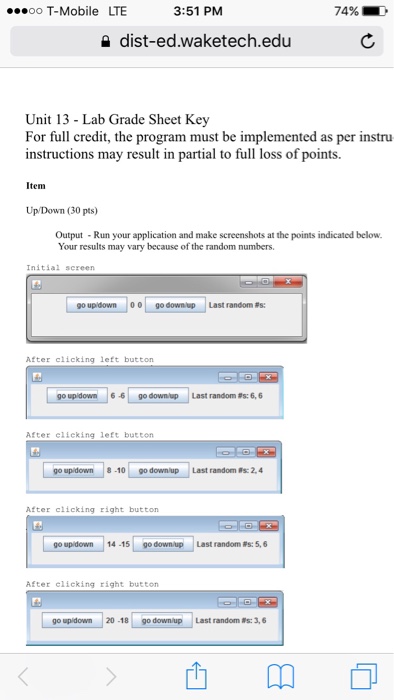
Write a WidgetView GUI that has the following widgets:
a button labeled "go up/down"
a label initialized to 0 (we'll call this the left label)
a label initialized to 0 (we'll call this the right label)
a button labeled "go down/up"
a label initialized to Last Random #s: (well call this the numbers label)
When the "go up/down" button is pushed, a random number between 1 and 10 (inclusive) is generated and added to the left label, and another random number between 1 and 10 (inclusive) is generated and subtracted from the right label. The two random numbers are displayed in the numbers label.
When the "go down/up" button is pushed, a random number between 1 and 10 (inclusive) is generated and subtracted from the left label, and another random number between 1 and 10 (inclusive) is generated and added to the right label. The two random numbers are displayed in the numbers label.
The picture below is the output.
 Write a WidgetView GUI that has the following widgets: a button

3:51 PM ooooo T-Mobile LTE 74% dist-edwaketech.edu Unit 13 Lab Grade Sheet Key For full credit, the program must be implemented as per instru instructions may result in partial to full loss of points. Item Up Down (30 pts) Output Run your application and make screenshots at the points indicated below. Your results may vary because of the random numbers. Initial s go downtup Last random Rs: After clicking left button go updown 6 go downup Last random es: 6,6 After clicking eft button go up down 8-10 go down up Last random Rs 2.4 After clicking right button go updown 14-15 go down up Last random s: 5,6 After clicking right button go up down 20-18 go down up Last random s: 3,6

Step by Step Solution

There are 3 Steps involved in it

1 Expert Approved Answer
Step: 1 Unlock blur-text-image
Question Has Been Solved by an Expert!

Get step-by-step solutions from verified subject matter experts

Step: 2 Unlock
Step: 3 Unlock

Students Have Also Explored These Related Databases Questions!