







Question: Write an R function prism(df, decisionAttributeIndex) that applies the Prism algorithm to the dataset specified by the dataframe df where decisionAttributeIndex is the (1-based) index
Write an R function prism(df, decisionAttributeIndex) that applies the Prism algorithm to the dataset specified by the dataframe df where decisionAttributeIndex is the (1-based) index that corresponds to the decision attribute in the dataframe df. The function should output the rules that are found. Show that your function works by running it on the two datasets given below:
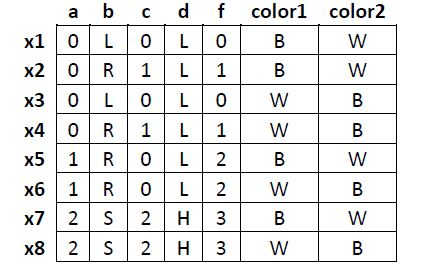
Decision attribute is f (i.e., attribute number 5) Output should be: If b = L then f = 0 If c = 1 then f = 1 (instead of c = 1, could be a = 0) If a = 1 then f = 2 (instead of a = 1, could be b = R, c = 0, or d = L) If a = 2 then f = 3 (instead of a = 2, could be b = S, c = 2, or d = H) Note: Your output doesnt have to list all the alternatives for conditions in a rule; were just showing them so you can check for alternate answers
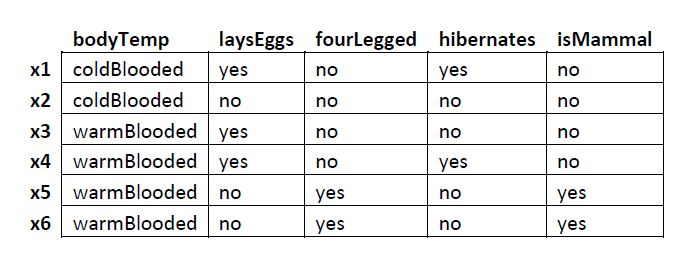
Decision attribute is isMammal (i.e., attribute number 5) Output should be: if fourLegged = no then isMammal = no if bodyTemp = warmBlooded then isMammal = yes (instead of bodyTemp = warmBlooded, could be laysEggs = no, fourLegged = yes, or hibernates = no) This dataset is available on Canvas under Files/Lecture Notes/Lecture Notes for Week 4 as dataset2.csv You should write your function using a text editor like Notepad or Wordpad, and save it as a text file. The very first line in your file should be a comment that identifies the authors (no more than 2) of the program. If your file is named prism.r, we should be able to do the following to run it from within the R interpreter: source(prism.r) df = read.csv("c:\\dataset1.csv", header = TRUE, sep=",") prism(df, 5);
a b c d f color1 color2 x72S 2H3 B
Step by Step Solution
There are 3 Steps involved in it

Get step-by-step solutions from verified subject matter experts
 Study Help