







Question: write code for it You have to make the following embedded system using PIC18 Microcontroller and do the programming in C-Language. 1 40 PIN DIP
write code for it
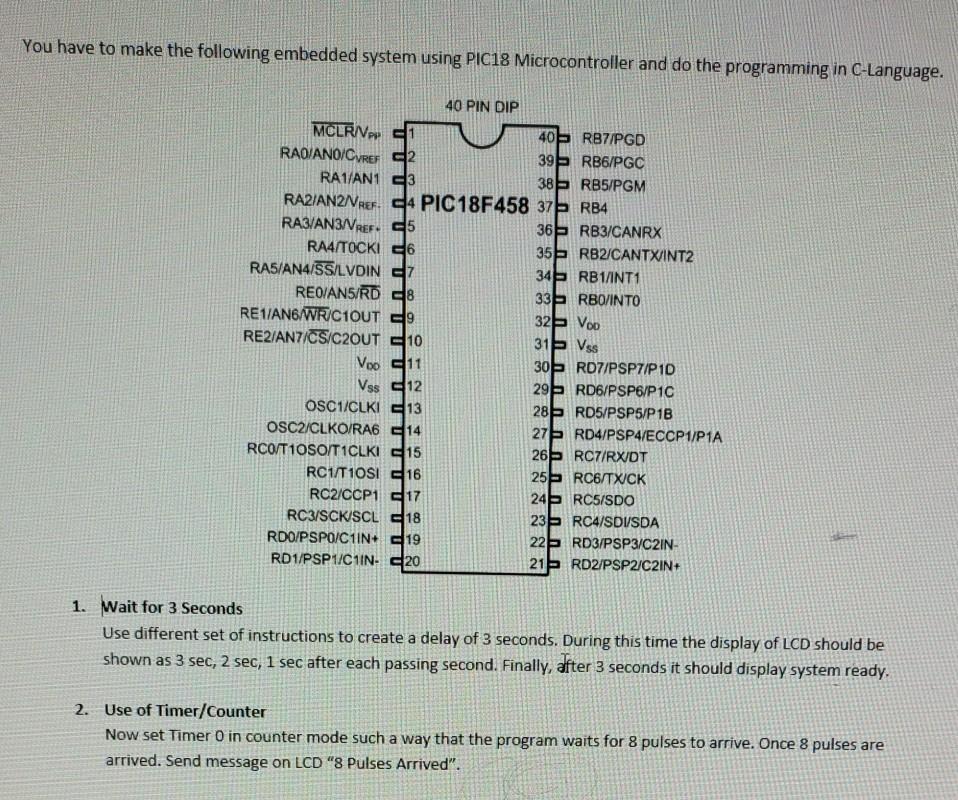
You have to make the following embedded system using PIC18 Microcontroller and do the programming in C-Language. 1 40 PIN DIP MCLRIVpp 40E RB7/PGD RA0/ANO/CyREE 39 RB6/PGC RA1/AN1 3 38 RB5/PGM RA2/AN2NREF. C4 PIC18F458 37 RB4 RA3/AN3/VREF. 25 365 RB3/CANRX RA4/TOCKI 6 355 RB2/CANTXINT2 RA5/ANAISSILVDIN 7 34RB1/INT1 REO/AN5/RD 28 33 RBO/INTO RE1AN6/WR/C1OUT 9 32 Voo RE2/AN/CS/C2OUT 10 315 Vss Voo 11 30% RD7/PSP/P1D Vss 12 29% RD6/PSP6/P10 OSC1/CLKI 13 28% RD5/PSP5/P1B OSC2/CLKO/RA6 14 27 RD4/PSP4/ECCP1/P1A RCO/T1OSO/T1CLKI 15 26 RC7/RXIDT RC1/T10SI 16 25 RC6/TWICK RO2/CCP1 17 24RC5/SDO RC3/SCK SCL 18 23 RC4/SDISDA RDO/PSPO/C11N+ 19 22 RD3/PSP3/C2IN- RD1/PSP1/C1IN- 20 21- RD2/PSP2/C2IN+ 1. Wait for 3 Seconds Use different set of instructions to create a delay of 3 seconds. During this time the display of LCD should be shown as 3 sec, 2 sec, 1 sec after each passing second. Finally, after 3 seconds it should display system ready. 2. Use of Timer/Counter Now set Timer O in counter mode such a way that the program waits for 8 pulses to arrive. Once 8 pulses are arrived. Send message on LCD "8 Pulses Arrived
Step by Step Solution
There are 3 Steps involved in it

Get step-by-step solutions from verified subject matter experts
 Study Help