







Question: write in python. it needs to be ablee to acceept user input as debugging and run using CSPLOT, howvr CSPLOT is showing errrors when trying
 write in python. it needs to be ablee to acceept user input as debugging and run using CSPLOT, howvr CSPLOT is showing errrors when trying to run..
'
heree is the currnt code:
import csplot
from time import sleep
import sys
import random
def createBoard(rows,cols):
B = [[0 for j in range(rows)] for i in range(cols)]
#arr = [[0]*cols]*rows
#print(arr)
print(B)
def life( width, height ):
#""" will become John Conway's Game of Life... """
B = createBoard( width, height )
csplot.showAndClickInIdle(B)
while True: # run forever
csplot.show(B) # show current B
time.sleep(0.25) # pause a bit
oldB = B # just a reminder for us humans
B = createBoard(width, height) # creates a new board
updateReversed( oldB, B )
def updateRandom(*B):
width = len(*B[0])
height = len(*B)
for row in range(height):
for col in range(width):
return random.choice[0,1]
def life(oldB):
newB = [[0 for x in range(len(oldB[0]))] for y in range(len(oldB))] # initialize new board
updateNextLife(oldB, newB)
return newB
def updateNextLife(oldB, newB):
for i in range(1, len(oldB) - 1):
for j in range(1, len(oldB[0]) - 1):
neighbors = countNeighbors(oldB, i, j)
if oldB[i][j] == 1:
if neighbors 3:
newB[i][j] = 0 # dies due to loneliness or over-crowding
else:
newB[i][j] = 1 # maintains state
else:
if neighbors == 3:
newB[i][j] = 1 # comes to life
else:
newB[i][j] = 0 # maintains state
def countNeighbors(board, row, col):
count = 0
for i in range(row-1, row+2):
for j in range(col-1, col+2):
if (i != row or j != col) and board[i][j] == 1:
count += 1
return count
def main():
B=createBoard(10,10)
csplot.show(*B)
csplot.sleep()
main()
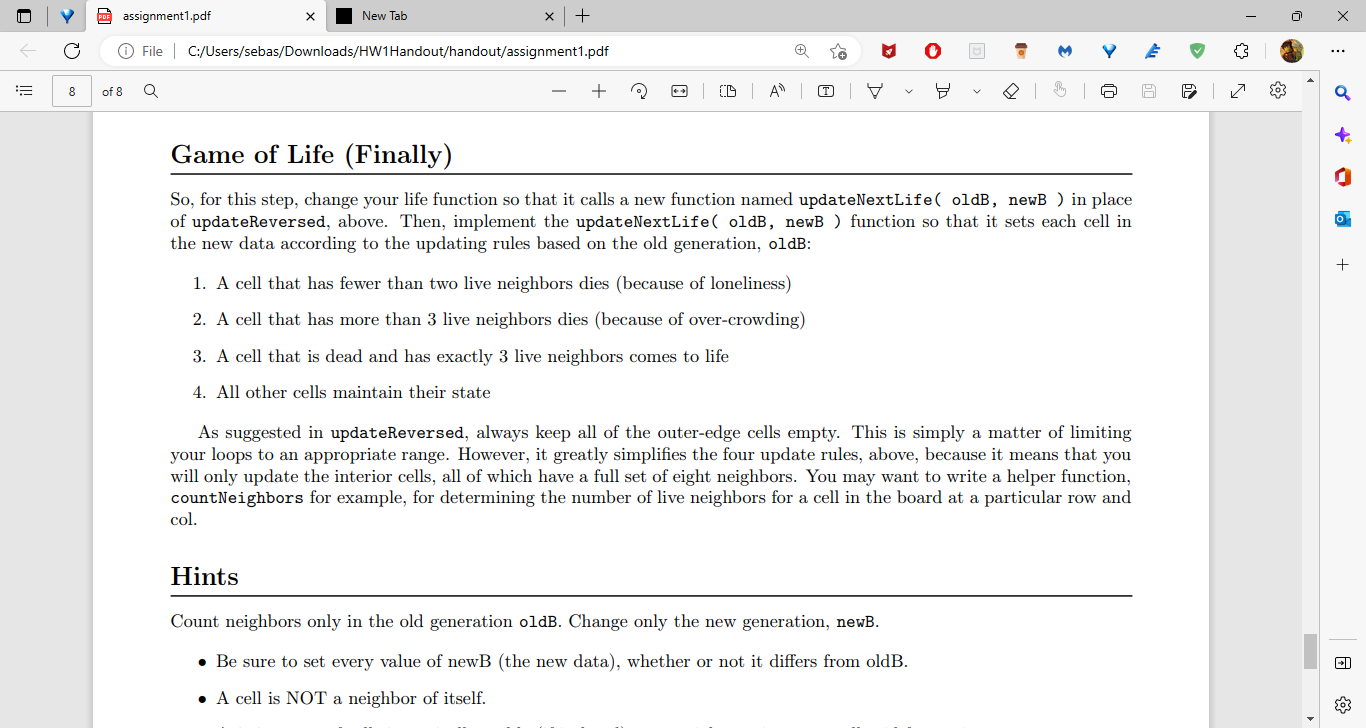
So, for this step, change your life function so that it calls a new function named updateNextLife( oldB, newB ) in place of updateReversed, above. Then, implement the updateNextLife ( oldB, newB ) function so that it sets each cell in the new data according to the updating rules based on the old generation, oldB: 1. A cell that has fewer than two live neighbors dies (because of loneliness) 2. A cell that has more than 3 live neighbors dies (because of over-crowding) 3. A cell that is dead and has exactly 3 live neighbors comes to life 4. All other cells maintain their state As suggested in updateReversed, always keep all of the outer-edge cells empty. This is simply a matter of limiting your loops to an appropriate range. However, it greatly simplifies the four update rules, above, because it means that you will only update the interior cells, all of which have a full set of eight neighbors. You may want to write a helper function, countNeighbors for example, for determining the number of live neighbors for a cell in the board at a particular row and col. Hints Count neighbors only in the old generation oldB. Change only the new generation, newB. - Be sure to set every value of newB (the new data), whether or not it differs from oldB. - A cell is NOT a neighbor of itself
Step by Step Solution
There are 3 Steps involved in it

Get step-by-step solutions from verified subject matter experts
 Study Help