







Question: Write MATLAB m-file to plot PV curve for E = 1.05, X = 0.75 and plot PV curves for following three cases: PF = 1.0,
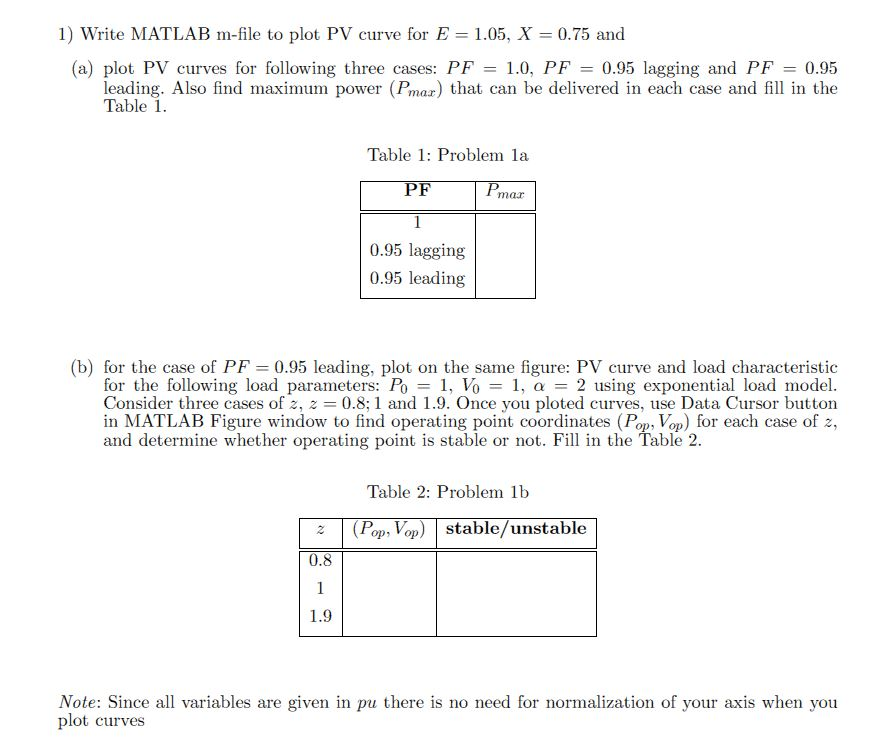
Write MATLAB m-file to plot PV curve for E = 1.05, X = 0.75 and plot PV curves for following three cases: PF = 1.0, PF = 0.95 lagging and PF = 0.95 leading. Also, find maximum power (P_max) that can be delivered in each case and fill in the Table 1. for the case of PF = 0.95 leading, plot on the same figure: PV curve and load characteristic for the following load parameters: P_0 = 1, V_0 = 1, alpha = 2 using exponential load model. Consider three cases of z, z = 0.8; 1 and 1.9. Once you plotted curves, use Data Cursor button in MATLAB Figure window to find operating point coordinates (P_op, V_op) for each case of z, and determine whether operating point is stable or not. Fill in the Table 2. Write MATLAB m-file to plot PV curve for E = 1.05, X = 0.75 and plot PV curves for following three cases: PF = 1.0, PF = 0.95 lagging and PF = 0.95 leading. Also, find maximum power (P_max) that can be delivered in each case and fill in the Table 1. for the case of PF = 0.95 leading, plot on the same figure: PV curve and load characteristic for the following load parameters: P_0 = 1, V_0 = 1, alpha = 2 using exponential load model. Consider three cases of z, z = 0.8; 1 and 1.9. Once you plotted curves, use Data Cursor button in MATLAB Figure window to find operating point coordinates (P_op, V_op) for each case of z, and determine whether operating point is stable or not. Fill in the Table 2
Step by Step Solution
There are 3 Steps involved in it

Get step-by-step solutions from verified subject matter experts
 Study Help