







Question: write on javascript using HTML Function 1: Student Information I function_one() Create a JavaScript function that meets the following requirements: Creates the following variables that
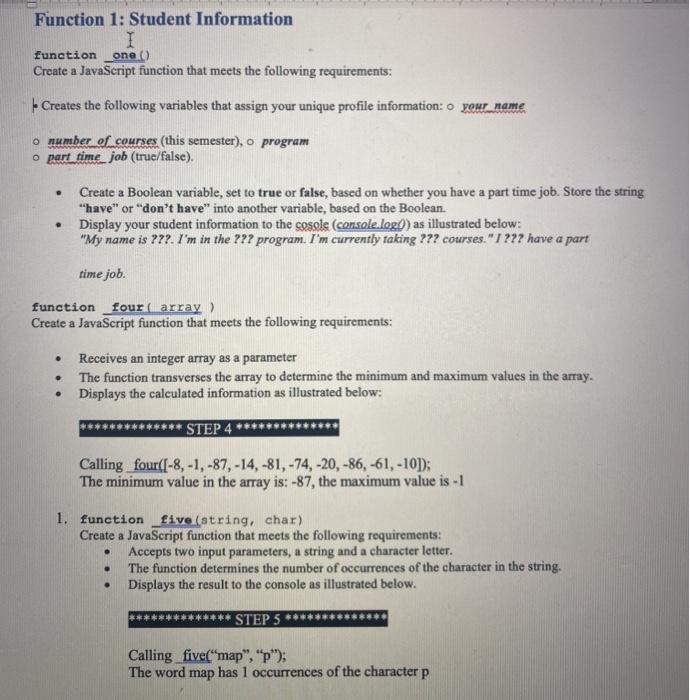
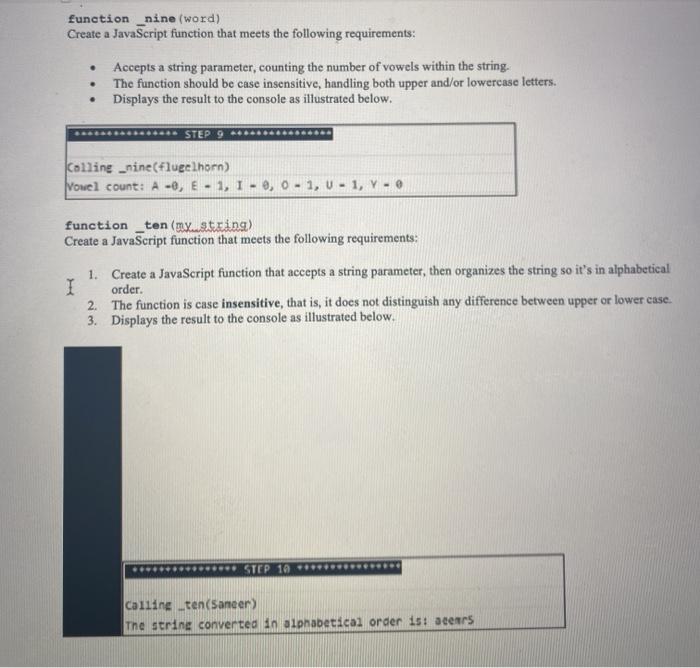
Function 1: Student Information I function_one() Create a JavaScript function that meets the following requirements: Creates the following variables that assign your unique profile information: 0 your name o number of courses (this semester), o program o part time job (true/false). . Create a Boolean variable, set to true or false, based on whether you have a part time job. Store the string "have" or "don't have" into another variable, based on the Boolean. Display your student information to the cosale (console.logd) as illustrated below: "My name is ???. I'm in the ??? program. I'm currently taking ??? courses."I ??? have a part . time job. function four array Create a JavaScript function that meets the following requirements: Receives an integer array as a parameter The function transverses the array to determine the minimum and maximum values in the array. Displays the calculated information as illustrated below: . STEP 4 Calling four((-8,-1,-87, -14, -81, -74, -20, -86, -61, -10]); The minimum value in the array is: -87, the maximum value is - 1 1. function _five (string, char) Create a JavaScript function that meets the following requirements: Accepts two input parameters, a string and a character letter. The function determines the number of occurrences of the character in the string. Displays the result to the console as illustrated below. STEP 5 Calling five("map","p); The word map has 1 occurrences of the character p function _nine (word) Create a JavaScript function that meets the following requirements: . Accepts a string parameter, counting the number of vowels within the string. The function should be case insensitive, handling both upper and/or lowercase letters. Displays the result to the console as illustrated below. . *** STEP 9 Colline _nine(flugelhorn) Vowel count: A-, E-1, 1-0, 0-1, U-1, Y- function _ten(n.string) Create a JavaScript function that meets the following requirements: 1. Create a JavaScript function that accepts a string parameter, then organizes the string so it's in alphabetical I order. 2. The function is case insensitive, that is, it does not distinguish any difference between upper or lower case. 3. Displays the result to the console as illustrated below. ..... ** STEP 10 ****** Calling _ten(Saneer) The string converted in alphabetical order is: acers
Step by Step Solution
There are 3 Steps involved in it

Get step-by-step solutions from verified subject matter experts
 Study Help