







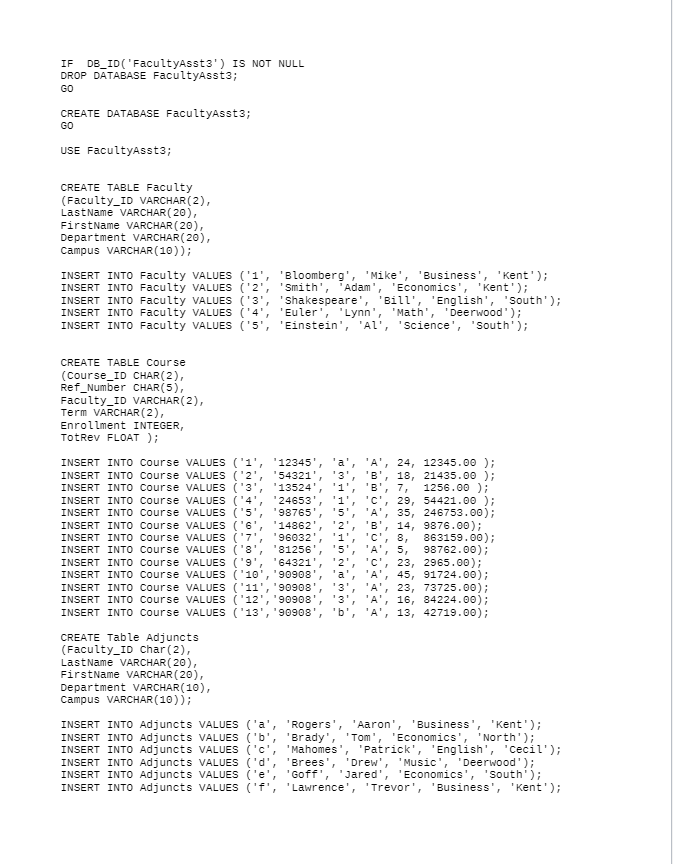
Question: Write queries to solve the following problems. You will be using the Faculty-Assignment 3 database for this assignment. The code for the database content is
 Write queries to solve the following problems. You will be using the Faculty-Assignment 3 database for this assignment.
The code for the database content is attached.
To create the database, do theEach problem should begin on a new page and include (1) the code to produce the result and (2) a screen shot of your results.
Please see the Assignment Example attached to Assignment 3.
1. Select all rows and columns from the Course table.
2. Display only the last names, departments, and campuses of full time faculty members in the Faculty table in descending order by last name.
3. Select course reference numbers and total revenues of courses only for courses for which the total revenue is more than $10,000. Column headings should be Course Reference Number and Total Revenue. Results should be in order from the course with the highest revenue to the course with the lowest revenue.
4. Display course reference numbers and enrollments of courses for which the enrollments are between 20-30 inclusive. Display enrollments from lowest to highest. Headings should be Course Reference Number and Enrollment.
5. List course reference numbers for courses with revenues greater than $10,000 and enrollments between 20-30.
6. Select from the Course table the course reference number (Ref_Number), total revenue (Tot_Rev) and the average cost per student for the course in a column called Average Cost (Hint: divide the total revenue by the enrollment for each class to obtain the average per student).
7. Select the reference numbers and total revenues for the 5 highest total revenues for all courses, ordered from highest to lowest.
8. Select the reference numbers and enrollments of all courses that have a reference number that begins with 9.
IF DB_ID('FacultyAsst3') IS NOT NULL DROP DATABASE FacultyAsst3; GO CREATE DATABASE Facultyasst3; GO USE FacultyAsst3; CREATE TABLE Faculty (Faculty_ID VARCHAR(2), Last Name VARCHAR(20), FirstName VARCHAR(20), Department VARCHAR(20), Campus VARCHAR(10)); INSERT INTO Faculty VALUES ('1', 'Bloomberg', 'Mike', 'Business', 'Kent'); INSERT INTO Faculty VALUES ('2', Smith', 'Adam' 'Economics', 'Kent'); INSERT INTO Faculty VALUES ('3', 'Shakespeare', 'Bill', 'English', 'South'); INSERT INTO Faculty VALUES ('4', 'Euler'; 'Lynn', 'Math', Deerwood'); INSERT INTO Faculty VALUES ('5', 'Einstein', 'Al', 'Science', 'South'); CREATE TABLE Course (Course_ID CHAR(2), Ref_Number CHAR(5), Faculty_ID VARCHAR(2), Term VARCHAR(2), Enrollment INTEGER, TotRev FLOAT); INSERT INTO Course VALUES ('1', '12345' 'a' 'A', 24, 12345.00 ); INSERT INTO Course VALUES ('2', 54321', '3', 'B', 18, 21435.00 ); INSERT INTO Course VALUES ('3' '13524 '1' 'B' 7 1256.00); INSERT INTO Course VALUES ('4', '24653' 'C' 29, 54421.00); INSERT INTO Course VALUES ('5', '98765' 5 'A', 35, 246753.00); INSERT INTO Course VALUES ('6', '14862 '2', 'B', 14, 9876.00); INSERT INTO Course VALUES ('7', '96032 '1', 'C', 8, 863159.00); INSERT INTO Course VALUES ('8', 81256 '5', 'A', 5, 98762.00): INSERT INTO Course VALUES ('9', '643210 '2', 'C', 23, 2965.00); INSERT INTO Course VALUES ('10 90908 'a', 'A' 45, 91724.00); INSERT INTO Course VALUES ('11', '90908', '3', 'A', 23, 73725.00); INSERT INTO Course VALUES ('12', '90908' '3', 'A', 16, 84224.00); INSERT INTO Course VALUES ('13', '90908', 'b', 'A' 13, 42719.00); CREATE Table Adjuncts (Faculty_ID Char(2), LastName VARCHAR(20), FirstName VARCHAR(20), Department VARCHAR(10), Campus VARCHAR(10)); INSERT INTO Adjuncts VALUES ('a', 'Rogers', 'Aaron', 'Business', 'Kent'); INSERT INTO Adjuncts VALUES ('b', 'Brady', Tom', 'Economics', 'North'); INSERT INTO Adjuncts VALUES ('c': 'Mahomes', 'Patrick', 'English', 'Cecil'); INSERT INTO Adjuncts VALUES ('d', 'Brees', Drew', 'Music', 'Deerwood'); INSERT INTO Adjuncts VALUES ('e', 'Goff', Jared', 'Economics', 'South'); INSERT INTO Adjuncts VALUES ('f', 'Lawrence', 'Trevor', 'Business', 'Kent')
Step by Step Solution
There are 3 Steps involved in it

Get step-by-step solutions from verified subject matter experts
 Study Help