







Question: Write the following functions enclosed in the assignment screenshot attachment below and be sure to add them to the genBST.h file supplied in the download
Write the following functions enclosed in the assignment screenshot attachment below and be sure to add them to the genBST.h file supplied in the download link below. GenBST.h file is in the link http://s000.tinyupload.com/index.php?file_id=86544375185714297666.
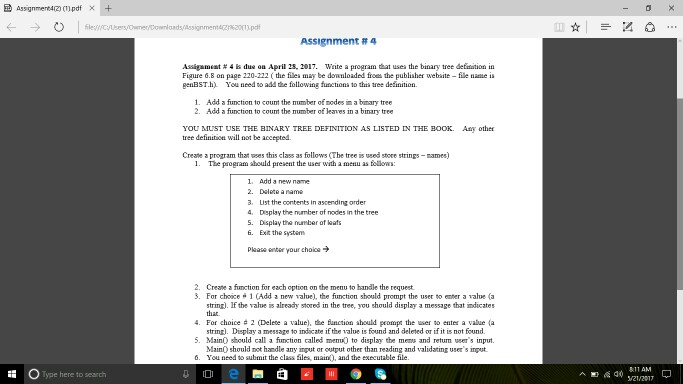
O Type here to search Assignment 4 waite a program that usea the binary tree definition in Assigamest 4 is due April 2017. Figure 6.8 on page 220-222 (the filek may be downloaded foes the publisher webaite file naame is genBST.hy You need to add the following functiona to this tree definition. 1. Add a function to count the mumber of nodes ina binary tree Add a function to count the mumber of leaves in a binary tree YOU MUST USE THE BINARY TREE DEFINITION AS LISTED IN THE Book. Any other tree definition will not be accepted. Create a program that wees this class as follows (The tree is vsed store strings mames The program should prekent the user with a menu as follown 1. Add a new name 3, LIst the contents n ascending order 4. Display the number of nodes in the tree 5. Display the number of leafs 6. Exit the system please enter your choice 2. Create a function for each option on the menu to handle the request. 3. For choice 1 (Add a new value), the function should prompt the user to enter a value Ga string). If the value is already stored in the tree, you should display a message that indicate For choice d 2 (Delete a value), the function ahould prompt the user to enter a value (a string). Display a message to indicate if the value is found and deleted or ifitisnot found. 5. Main0 should call a function called memo to display the menu and return weer s input should not handle any imput or output other than reading and validating wser's input. You need to submit the class files, and the executable file 40
Step by Step Solution
There are 3 Steps involved in it

Get step-by-step solutions from verified subject matter experts
 Study Help