







Question: Write the program in C++, VIsual Studio with QT Framework ONLY. QtHelloWorld Project Files: . qtprogramwin.h #ifndef QTPROGRAMWIN_H #define QTPROGRAMWIN_H #include namespace Ui { class
Write the program in C++, VIsual Studio with QT Framework ONLY.
QtHelloWorld Project Files:
.
qtprogramwin.h
#ifndef QTPROGRAMWIN_H
#define QTPROGRAMWIN_H
#include
namespace Ui {
class QtProgramWin;
}
class QtProgramWin : public QMainWindow
{
Q_OBJECT
public:
explicit QtProgramWin(QWidget *parent = 0);
~QtProgramWin();
private:
Ui::QtProgramWin *ui;
public slots:
void setLineEditText();
};
#endif // QTPROGRAMWIN_H
.
.
qtprogramwin.cpp
#include "qtprogramwin.h"
#include "ui_qtprogramwin.h"
QtProgramWin::QtProgramWin(QWidget *parent) :
QMainWindow(parent),
ui(new Ui::QtProgramWin)
{
ui->setupUi(this);
connect(ui->pushButton, SIGNAL(clicked()), this, SLOT(setLineEditText()));
}
QtProgramWin::~QtProgramWin()
{
delete ui;
}
void QtProgramWin::setLineEditText()
{
ui->lineEdit->setText(QString("Hello World!") );
}
.
.
Main.cpp
#include "qtprogramwin.h"
#include
int main(int argc, char *argv[])
{
QApplication a(argc, argv);
QtProgramWin w;
w.show();
return a.exec();
}
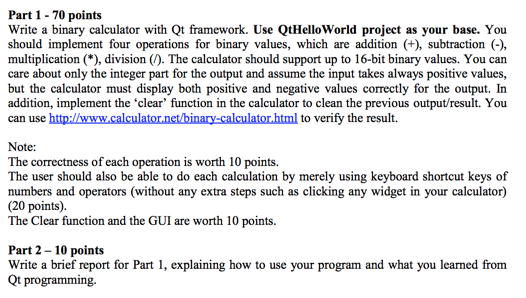
Part 1- 70 points Write a binary calculator with Qt framework. Use QtHello World project as your base. You should implement four operations for binary values, which are addition (+), subtraction () multiplication (*), division (). The calculator should support up to 16-bit binary values. You can care about only the integer part for the output and assume the input takes always positive values, but the calculator must display both positive and negative values correctly for the output. In addition, implement the clear' function in the calculator to clean the previous output/result. You can use http://www.calculator.net/binary-calculator html to verify the result. Note: The correctness of each operation is worth 10 points The user should also be able to do each calculation by merely using keyboard shortcut keys of numbers and operators (without any extra steps such as clicking any widget in your calculator) (20 points). The Clear function and the GUI are worth 10 points. Part 2- 10 points Write a brief report for Part 1, explaining how to use your program and what you learned from Qt programming Part 1- 70 points Write a binary calculator with Qt framework. Use QtHello World project as your base. You should implement four operations for binary values, which are addition (+), subtraction () multiplication (*), division (). The calculator should support up to 16-bit binary values. You can care about only the integer part for the output and assume the input takes always positive values, but the calculator must display both positive and negative values correctly for the output. In addition, implement the clear' function in the calculator to clean the previous output/result. You can use http://www.calculator.net/binary-calculator html to verify the result. Note: The correctness of each operation is worth 10 points The user should also be able to do each calculation by merely using keyboard shortcut keys of numbers and operators (without any extra steps such as clicking any widget in your calculator) (20 points). The Clear function and the GUI are worth 10 points. Part 2- 10 points Write a brief report for Part 1, explaining how to use your program and what you learned from Qt programming
Step by Step Solution
There are 3 Steps involved in it

Get step-by-step solutions from verified subject matter experts
 Study Help