







Question: Write the Python code for the following restaurant ordering system. Follow the instruction below. Task : Ordering n the ordering page, the following options should

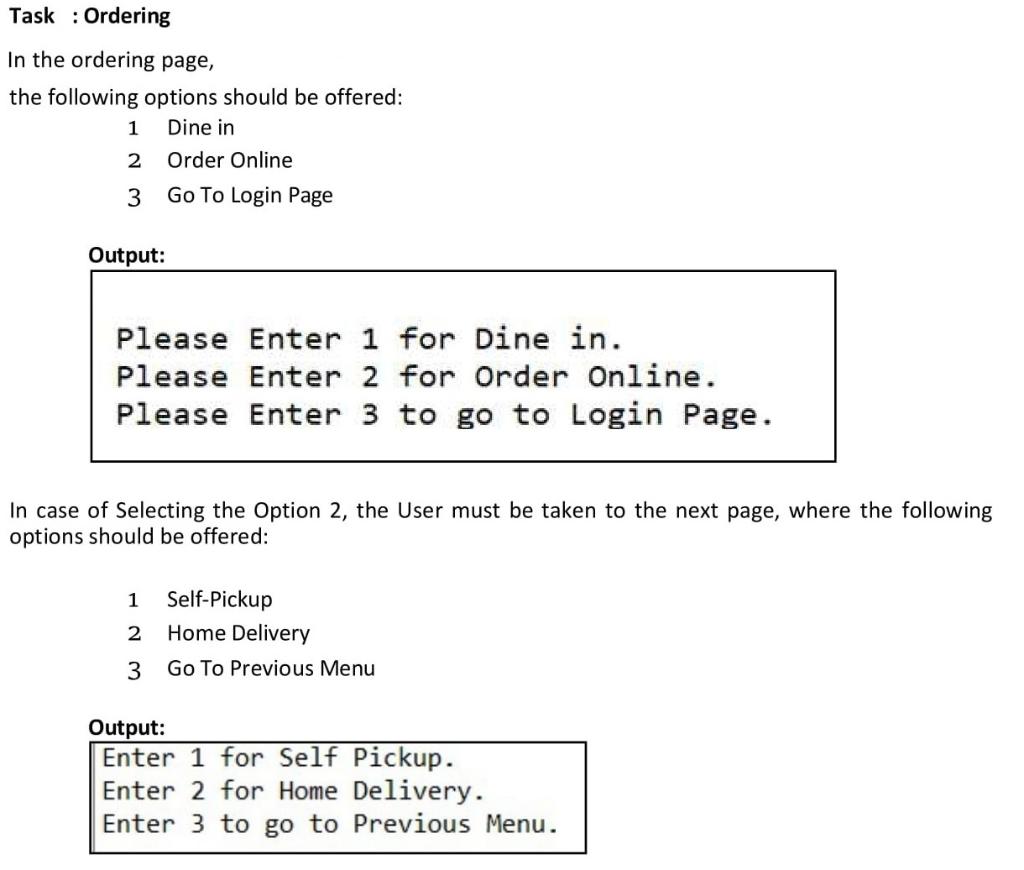
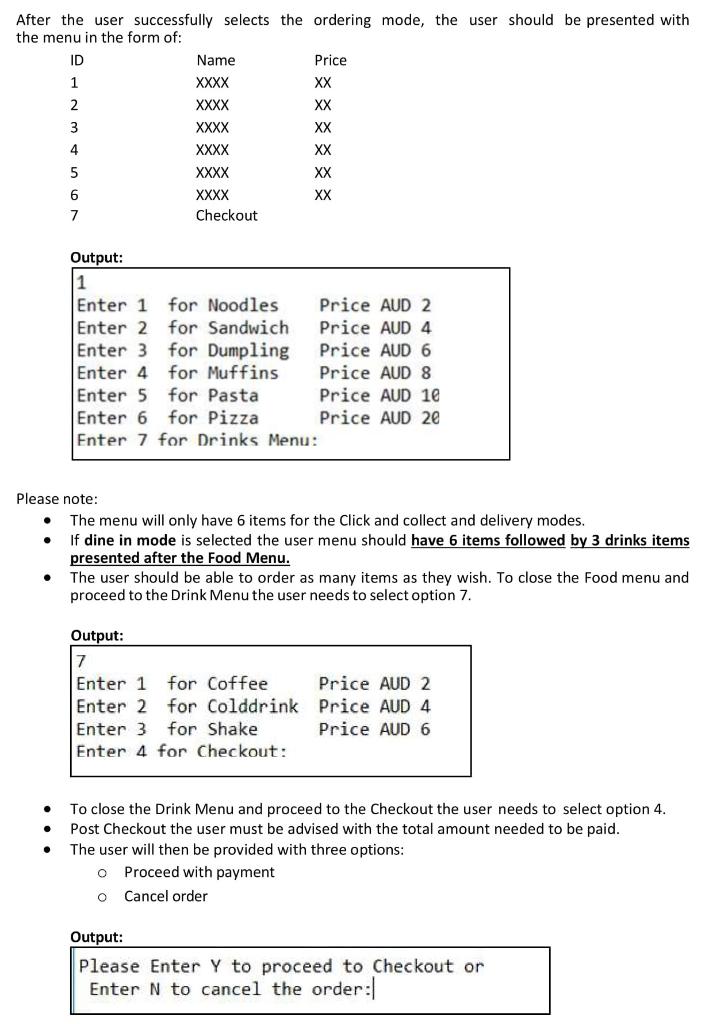
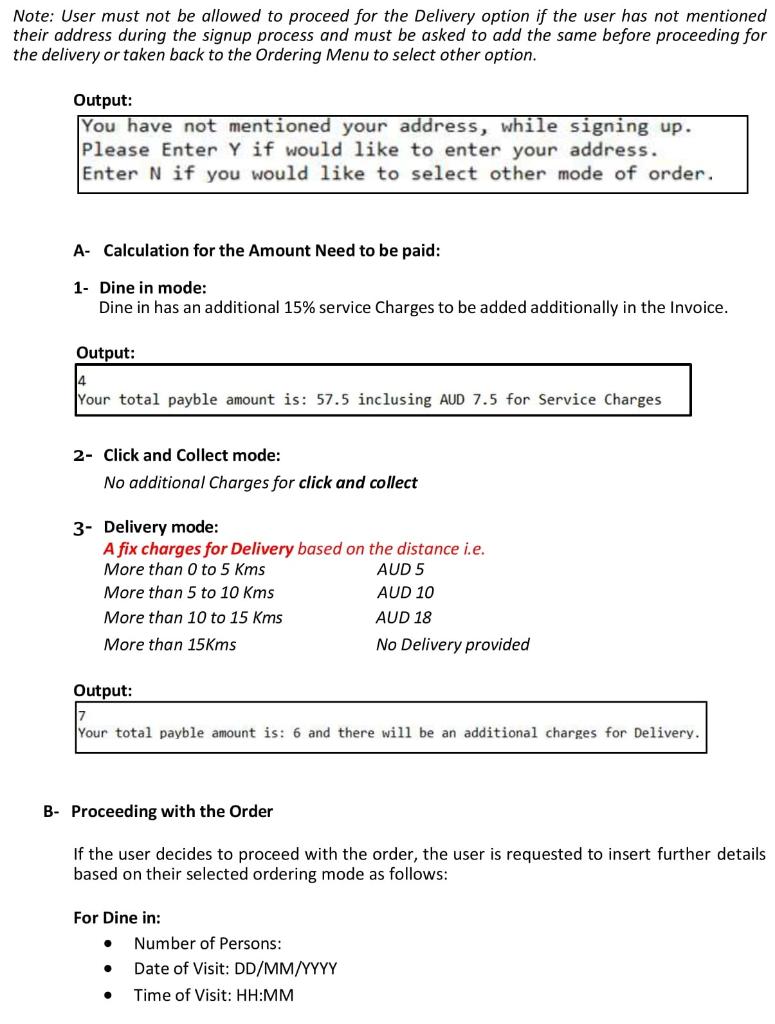
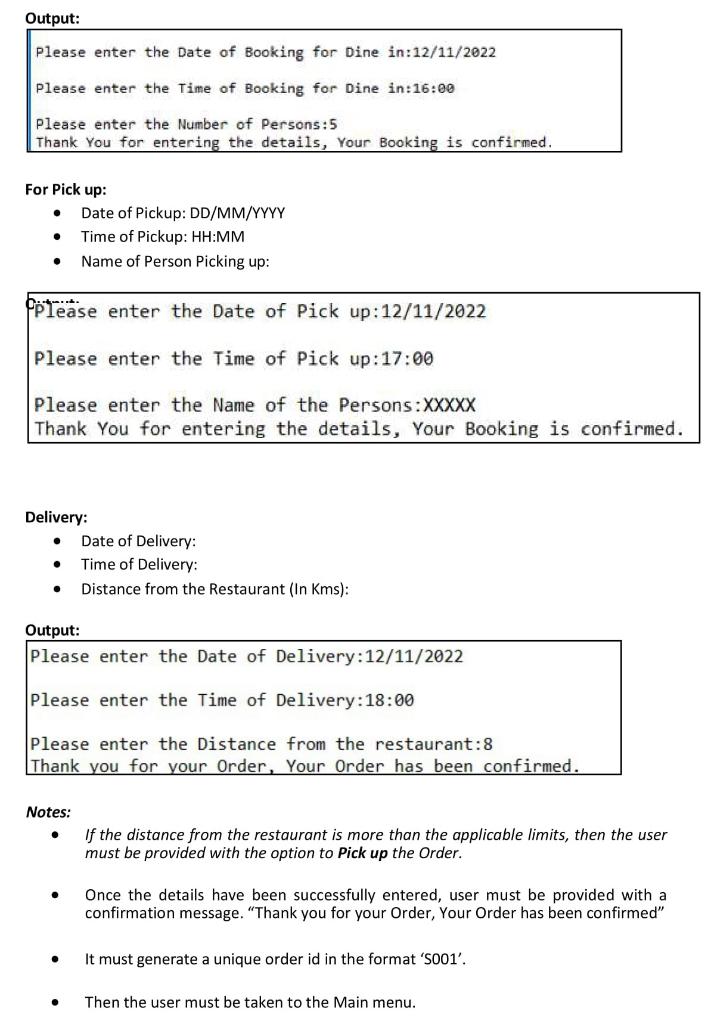
Write the Python code for the following restaurant ordering system. Follow the instruction below. Task : Ordering n the ordering page, the following options should be offered: 1 Dine in 2 Order Online 3 Go To Login Page Output: Please Enter 1 for Dine in. Please Enter 2 for Order Online. Please Enter 3 to go to Login Page. In case of Selecting the Option 2, the User must be taken to the next page, where the following options should be offered: 1 Self-Pickup 2 Home Delivery 3 Go To Previous Menu Output: Enter 1 for Self Pickup. Enter 2 for Home Delivery. Enter 3 to go to Previous Menu. After the user successfully selects the ordering mode, the user should be presented with the menu in the form of: Please note: - The menu will only have 6 items for the Click and collect and delivery modes. - If dine in mode is selected the user menu should have 6 items followed by 3 drinks items presented after the Food Menu. - The user should be able to order as many items as they wish. To close the Food menu and proceed to the Drink Menu the user needs to select option 7. - To close the Drink Menu and proceed to the Checkout the user needs to select option 4. - Post Checkout the user must be advised with the total amount needed to be paid. - The user will then be provided with three options: - Proceed with payment - Cancel order Output: Please Enter Y to proceed to Checkout or Enter N to cancel the order: Note: User must not be allowed to proceed for the Delivery option if the user has not mentioned their address during the signup process and must be asked to add the same before proceeding for the delivery or taken back to the Ordering Menu to select other option. Output: You have not mentioned your address, while signing up. Please Enter Y if would like to enter your address. Enter N if you would like to select other mode of order. A- Calculation for the Amount Need to be paid: 1- Dine in mode: Dine in has an additional 15% service Charges to be added additionally in the Invoice. 2- Click and Collect mode: No additional Charges for click and collect 3- Delivery mode: A fix charges for Delivery based on the distance i.e. Output: 7 Your total payble amount is: 6 and there will be an additional charges for Delivery. B- Proceeding with the Order If the user decides to proceed with the order, the user is requested to insert further details based on their selected ordering mode as follows: For Dine in: - Number of Persons: - Date of Visit: DD/MM/YYYY - Time of Visit: HH:MM Output: Please enter the Date of Booking for Dine in:12/11/2022 Please enter the Time of Booking for Dine in:16:00 Please enter the Number of Persons: 5 Thank You for entering the details, Your Booking is confirmed. For Pick up: - Date of Pickup: DD/MM/YYYY - Time of Pickup: HH:MM - Name of Person Picking up: please enter the Date of Pick up:12/11/2022 Please enter the Time of Pick up:17:00 Please enter the Name of the Persons: XXXXX Thank You for entering the details, Your Booking is confirmed. Delivery: - Date of Delivery: - Time of Delivery: - Distance from the Restaurant (In Kms): Output: Please enter the Date of Delivery:12/11/2022 Please enter the Time of Delivery:18:00 Please enter the Distance from the restaurant:8 Thank you for your Order, Your Order has been confirmed. Notes: - If the distance from the restaurant is more than the applicable limits, then the user must be provided with the option to Pick up the Order. - Once the details have been successfully entered, user must be provided with a confirmation message. "Thank you for your Order, Your Order has been confirmed" - It must generate a unique order id in the format ' S001. - Then the user must be taken to the Main menu. Write the Python code for the following restaurant ordering system. Follow the instruction below. Task : Ordering n the ordering page, the following options should be offered: 1 Dine in 2 Order Online 3 Go To Login Page Output: Please Enter 1 for Dine in. Please Enter 2 for Order Online. Please Enter 3 to go to Login Page. In case of Selecting the Option 2, the User must be taken to the next page, where the following options should be offered: 1 Self-Pickup 2 Home Delivery 3 Go To Previous Menu Output: Enter 1 for Self Pickup. Enter 2 for Home Delivery. Enter 3 to go to Previous Menu. After the user successfully selects the ordering mode, the user should be presented with the menu in the form of: Please note: - The menu will only have 6 items for the Click and collect and delivery modes. - If dine in mode is selected the user menu should have 6 items followed by 3 drinks items presented after the Food Menu. - The user should be able to order as many items as they wish. To close the Food menu and proceed to the Drink Menu the user needs to select option 7. - To close the Drink Menu and proceed to the Checkout the user needs to select option 4. - Post Checkout the user must be advised with the total amount needed to be paid. - The user will then be provided with three options: - Proceed with payment - Cancel order Output: Please Enter Y to proceed to Checkout or Enter N to cancel the order: Note: User must not be allowed to proceed for the Delivery option if the user has not mentioned their address during the signup process and must be asked to add the same before proceeding for the delivery or taken back to the Ordering Menu to select other option. Output: You have not mentioned your address, while signing up. Please Enter Y if would like to enter your address. Enter N if you would like to select other mode of order. A- Calculation for the Amount Need to be paid: 1- Dine in mode: Dine in has an additional 15% service Charges to be added additionally in the Invoice. 2- Click and Collect mode: No additional Charges for click and collect 3- Delivery mode: A fix charges for Delivery based on the distance i.e. Output: 7 Your total payble amount is: 6 and there will be an additional charges for Delivery. B- Proceeding with the Order If the user decides to proceed with the order, the user is requested to insert further details based on their selected ordering mode as follows: For Dine in: - Number of Persons: - Date of Visit: DD/MM/YYYY - Time of Visit: HH:MM Output: Please enter the Date of Booking for Dine in:12/11/2022 Please enter the Time of Booking for Dine in:16:00 Please enter the Number of Persons: 5 Thank You for entering the details, Your Booking is confirmed. For Pick up: - Date of Pickup: DD/MM/YYYY - Time of Pickup: HH:MM - Name of Person Picking up: please enter the Date of Pick up:12/11/2022 Please enter the Time of Pick up:17:00 Please enter the Name of the Persons: XXXXX Thank You for entering the details, Your Booking is confirmed. Delivery: - Date of Delivery: - Time of Delivery: - Distance from the Restaurant (In Kms): Output: Please enter the Date of Delivery:12/11/2022 Please enter the Time of Delivery:18:00 Please enter the Distance from the restaurant:8 Thank you for your Order, Your Order has been confirmed. Notes: - If the distance from the restaurant is more than the applicable limits, then the user must be provided with the option to Pick up the Order. - Once the details have been successfully entered, user must be provided with a confirmation message. "Thank you for your Order, Your Order has been confirmed" - It must generate a unique order id in the format ' S001. - Then the user must be taken to the Main menu
Step by Step Solution
There are 3 Steps involved in it

Get step-by-step solutions from verified subject matter experts
 Study Help