







Question: Write the Python Program for the following question. 1. (8 points) class Counter: def __init__(self, start=0): self.count = start def click(self): self.count += 1 def
Write the Python Program for the following question.
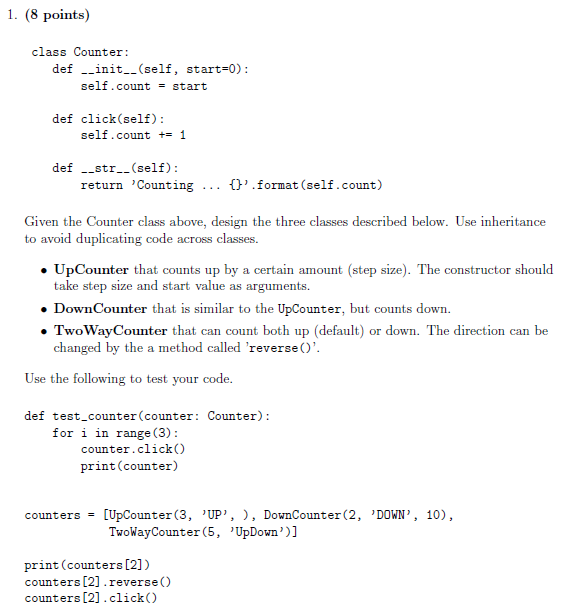
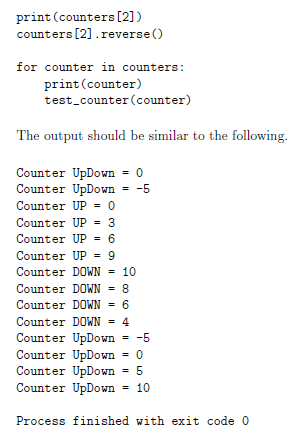
1. (8 points) class Counter: def __init__(self, start=0): self.count = start def click(self): self.count += 1 def - str._(self): return 'Counting ... {}'.format (self.count) Given the Counter class above, design the three classes described below. Use inheritance to avoid duplicating code across classes. UpCounter that counts up by a certain amount (step size). The constructor should take step size and start value as arguments. DownCounter that is similar to the UpCounter, but counts down. . TwoWay Counter that can count both up (default) or down. The direction can be changed by the a method called 'reverse(). Use the following to test your code. def test_counter(counter: Counter): for i in range (3): counter.click() print(counter) counters = [UpCounter(3, 'UP', ), DownCounter(2, 'DOWN', 10), TwoWayCounter(5, 'UpDown')] print(counters [2]) counters [2].reverse() counters [2] .click() print(counters [2]) counters[2].reverse() for counter in counters: print(counter) test_counter(counter) The output should be similar to the following. Counter UpDown = 0 Counter UpDown = -5 Counter UP = 0 Counter UP 3 Counter UP = 6 Counter UP = 9 Counter DOWN = 10 Counter DOWN = 8 Counter DOWN = 6 Counter DOWN = 4 Counter UpDown = -5 Counter UpDown = 0 Counter UpDown = 5 Counter UpDown = 10 Process finished with exit code 0
Step by Step Solution
There are 3 Steps involved in it

Get step-by-step solutions from verified subject matter experts
 Study Help