







Question: Write the Script in Python. courseCategories = [Mathematics,Computer Science,Business,Economics,Literature,Art,Music] Sample of the output. It should look same as the output. ndexcharacters long. 3. 'AS -
Write the Script in Python.
courseCategories = ["Mathematics","Computer Science","Business","Economics","Literature","Art","Music"]
![Write the Script in Python. courseCategories = ["Mathematics","Computer Science","Business","Economics","Literature","Art","Music"] Sample of the](https://dsd5zvtm8ll6.cloudfront.net/si.experts.images/questions/2024/09/66f07997d76f6_79966f079975ebdf.jpg)
Sample of the output. It should look same as the output.
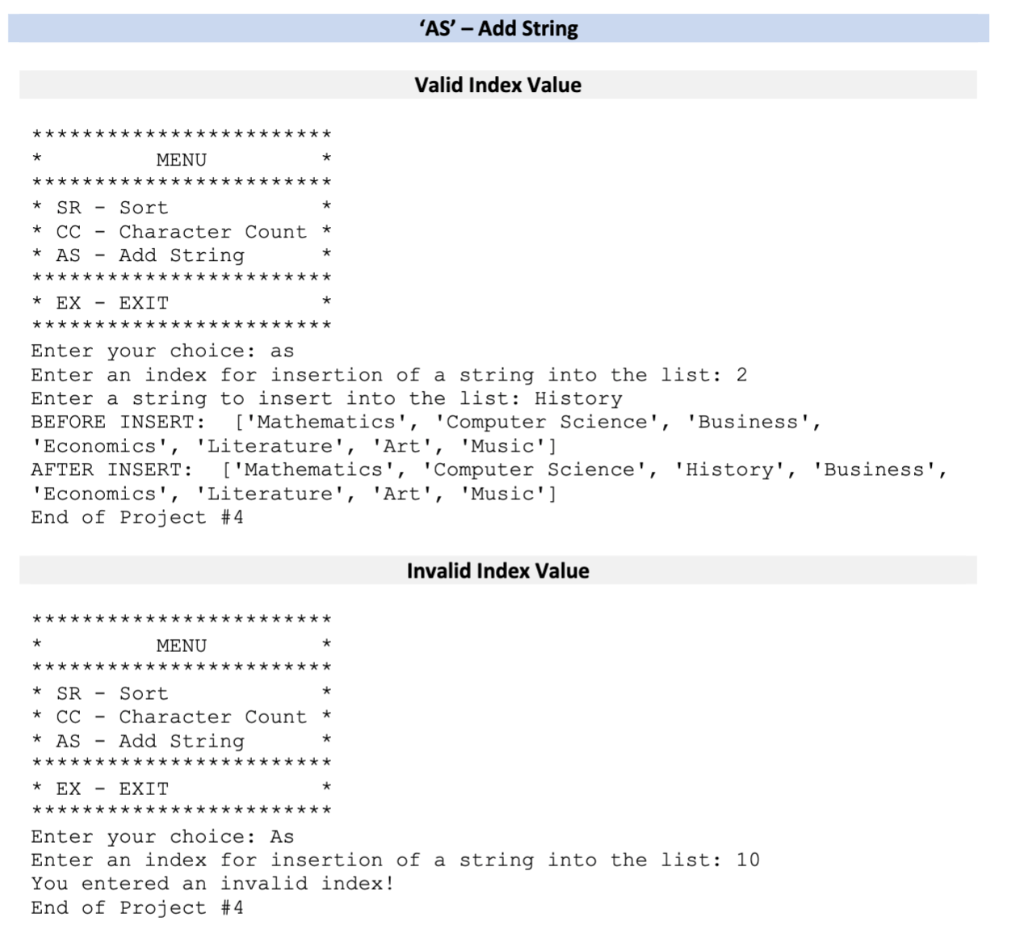
ndexcharacters long. 3. 'AS - Add String at Index This operation will prompt the user for the index as an integer that will be the location where a string will be inserted If the integer is less than 0 or greater than the last possible insertion index in the list, display the following error message: a. b. i. "You entered an invalid index!" c. If the integer is a valid index value, prompt the user to enter a string: i. ii. Display the list to the user before the string has been inserted into the list Take the string entered by the user, and insert it into the course categories list at the index specified. ii. Display the list to the user after the string has been inserted into the list AS'-Add String Valid Index Value MENU * SR - Sort * CC - Character Count* * AS - Add String *EX - EXIT Enter your choice: as Enter an index for insertion of a string into the list: 2 Enter a string to insert into the list: History BEFORE INSERT 'Mathematics', 'Computer Science','Business', Economics','Literature', 'Art', 'Music'] AFTER INSERT: Mathematics', Computer Science', 'History', 'Business', Economics','Literature',Art', 'Music' End of Project #4 Invalid Index Value MENU *SR-Sort * CC -Character Count* * AS - Add String * EX - EXIT Enter your choice: As Enter an index for insertion of a string into the list: 10 You entered an invalid index! End of Project #4
Step by Step Solution
There are 3 Steps involved in it

Get step-by-step solutions from verified subject matter experts
 Study Help