







Question: Write the SQL statement that lists the city and the employees sorted in the descending order of employees . Write the SQL statement that lists
- Write the SQL statement that lists the city and the employees sorted in the descending order of employees.
- Write the SQL statement that lists the city and the employees sorted in the ascending order of employees.
- Write the SQL statement that lists the branchNo, the street, the city, and the employees of branches with number of employees more than 20.
- Write the SQL statement that lists the branchNo, the street, and the city of branches from London or Glasgow cities.
- Write the SQL statement that lists the branchNo, the street, the city, and the employees of branches with number of employees between 18 and 30. Note: Use the keyword BETWEEN to accomplish this task.
- Similarly, using a compound comparison search condition, write the SQL statement that lists the branchNo, the street, the city, and the employees of branches with number of employees between 18 and 30. Note: Dont use the keyword BETWEEN in this task.
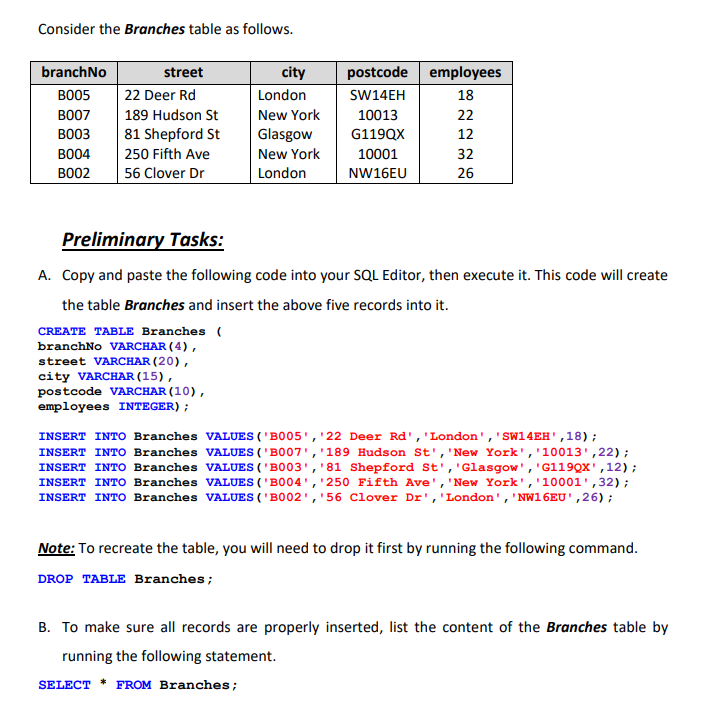
Consider the Branches table as follows. branchNo B005 B007 B003 B004 B002 street 22 Deer Rd 189 Hudson St 81 Shepford St 250 Fifth Ave 56 Clover Dr city London New York Glasgow New York London postcode employees SW14EH 18 10013 22 G1199x 12 10001 32 NW16EU 26 Preliminary Tasks: A. Copy and paste the following code into your SQL Editor, then execute it. This code will create the table Branches and insert the above five records into it. CREATE TABLE Branches branchNo VARCHAR(4), street VARCHAR (20), city VARCHAR(15), postcode VARCHAR(10), employees INTEGER); INSERT INTO Branches VALUES ('B005', '22 Deer Rd', 'London', 'SW14EH',18); INSERT INTO Branches VALUES ('B007', '189 Hudson St', 'New York', '10013',22); INSERT INTO Branches VALUES ('B003','81 Shepford St', 'Glasgow', 'G1199x', 12); INSERT INTO Branches VALUES ('B004', '250 Fifth Ave', 'New York', '10001',32); INSERT INTO Branches VALUES ('B002', '56 Clover Dr', 'London', 'NW16EU',26); Note: To recreate the table, you will need to drop it first by running the following command. DROP TABLE Branches; B. To make sure all records are properly inserted, list the content of the Branches table by running the following statement. SELECT * FROM Branches
Step by Step Solution
There are 3 Steps involved in it

Get step-by-step solutions from verified subject matter experts
 Study Help