







Question: write this in java, use for loop Complete the method blur(Picture p, int radius) that blurs an image using a box blur filter of the
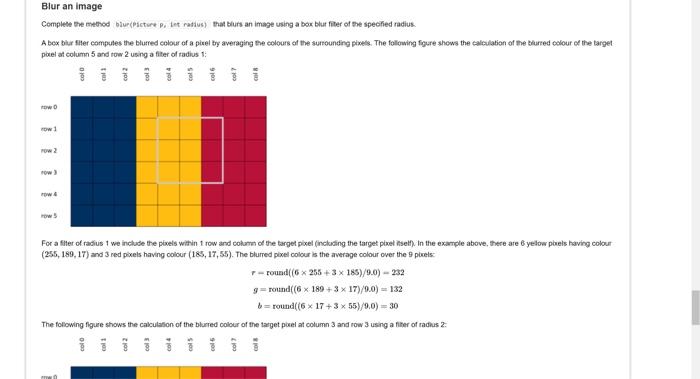
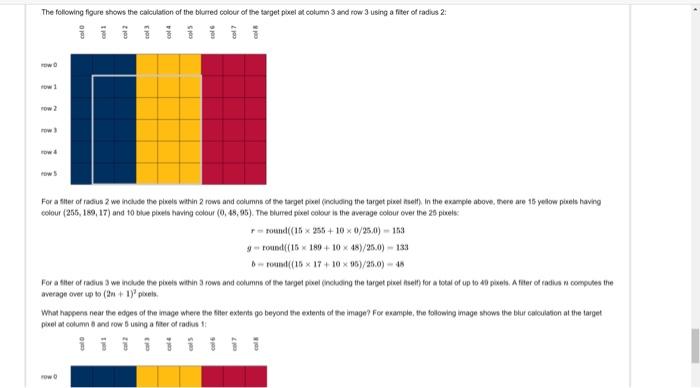
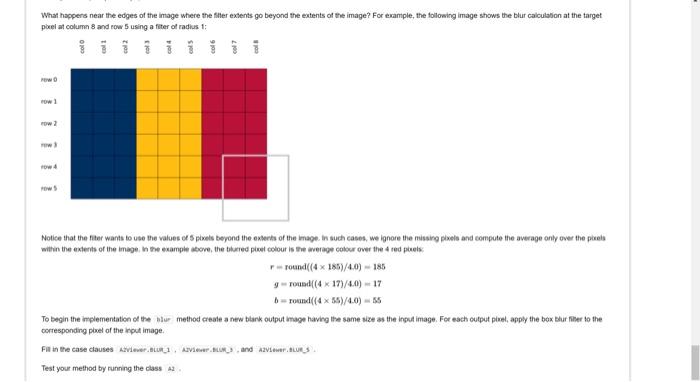
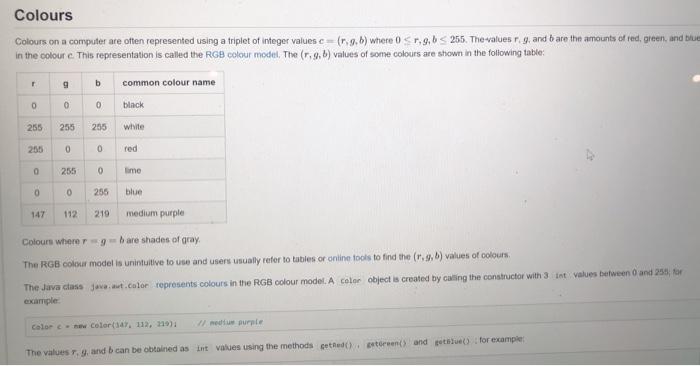
Blur an image Complete the method blur(Picture P. let radius) that blurs an image using a box blue filter of the specified radius. A box biur Site computers the blurred colour of a pixel by averaging the colours of the surrounding pixels. The following figure shows the calculation of the blurred colour of the target potel at column 5 and row 2 using a fiter of radius 1: ow For a filter of radius 1 we include the pixels within 1 row and column of the target pixel (including the target pixel itself) In the example above, there are yelow piels having colour (256, 189, 17) and 3 red pixels having colour (185, 17, 55). The blurred pixel colour is the average colour over the plels r-round((6 * 255+3 x 185)/9.0) - 232 ground(6 x 180 +3 x 17)/0,0) = 132 b = round(6 x 17+3 x 55)/0,0) = 30 The following figure shows the calculation of the blurred colour of the target pelat column 3 and row 3 using a filer of radius 2: The following figure shows the calculation of the blurred colour of the target pixel et column 3 and row 3 using a fiber of radius 2: For after of radius we include the ples within 2 rows and columne of the target porel (including the target pivet ). In the example above, there are 15 yellow piels having colour (256, 189, 17) and to blue pixels having colour (0,48,95). The blurred pixel colour is the average colour over the 25 piele round(15 x 256 + 100/250) - 158 Found(15 x 180 + 10 x 48)/25,0) - 133 round(15 X 17+ 10 x 96/25.0) - 15 For atter of radius 3 we include the preis within 3 rown and columine of the target poel (ncluding the target pie tietty for a total of up to 4 piens. After or radios comuns the average over up to (+1) What happers near the edge of the mage where the ther extenta po beyond the extents of the mape? For example, the following mage shows the bhur calculation at the target pietat column and row using a liter of radius 1: What happens near the edges of the image where the filter extents go beyond the extents of the image? For example, the following image shows the bur calculation at the target polat column 8 and row 5 using a fiter of radius 1: w 1 4 w Notice that the fiber wants to use the values of pixels beyond the extent of the image. In such cases, we ignore the missing pixels and compute the average only over the pres within the extent of the image in the example above the blurred pleel colour is the average color over the red pels r-round(4 x 186/40) - 185 y round(4 x 171/44) - 19 round((455)/4.0) - 35 To begin the implementation of the nur method create a new blank output image having the same size as the input image. For each output piret, apply the box hur her to the corresponding pixel of the put image Fill in the case causes Ave., Vierand A2V.US Test your method by running the class A Colours Colours on a computer are often represented using a triplet of integer values c -(1,96) where 0.9.6 255. The valuesr 9, and are the amounts of red, green, and blue in the coloure. This representation is called the RGB colour model, The (r,9, b) values of some colours are stown in the following table 9 b common colour name 0 0 0 black 255 255 255 white 255 0 0 red 0 255 0 ime 0 0 255 blue 147 112 219 medium purple Colours where are shades of gray The RGB colour model is unintuitive to use and users usually refer to tables or online tools to find the (r.4, b) values of colours The Java class java.awt.color represents colours in the RGB colour model. A color object is created by calling the constructor with 3 Int values between 0 and 25 for example Color - Color(147. 112. 219) med murale The values and can be obtained as int values using the methods cethed) peterent and get for example
Step by Step Solution
There are 3 Steps involved in it

Get step-by-step solutions from verified subject matter experts
 Study Help