







Question: Write this program in C++ *I recommend using visualstudio Thank you very much!. Assigno8 -Payroll CSIS 123 C++ Programming Fundamentals Payroll Calculations with Lookup File
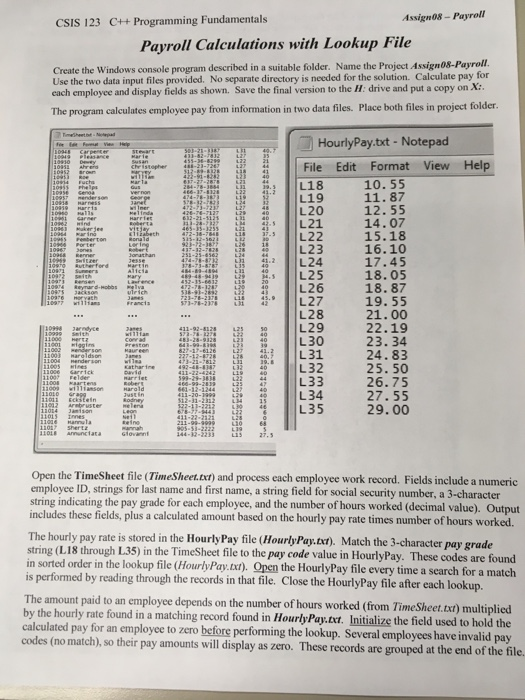
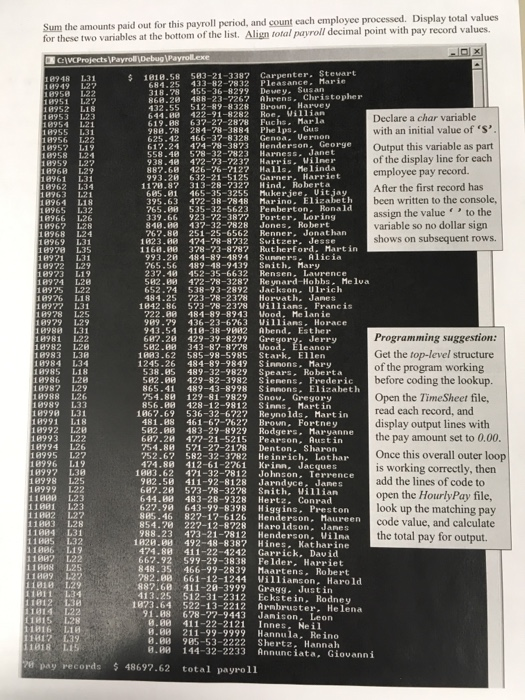
Assigno8 -Payroll CSIS 123 C++ Programming Fundamentals Payroll Calculations with Lookup File Create the Windows console program described in a suitable folder. Name the Project Assign08-Payroll. Use the two data input files provided. No separate directory is needed for the solution. Calculate pay for each employee and display fields as shown. Save the final version to the H: drive and put a copy on X: The program calculates employee pay from information in two data files. Place both files in project folder. HourlyPay.txt - Notepad File Edit Format View Help L19 18 10.55 1L20 12.55 L21 14.07 1096) Porterton Lonalbeth472-72-7621 2617.511 L22 15.18 16.10 L23 24 4 tenL25 18.05 18. 87 21.00 22.19 34 r 124L31 24.83 26 27 28 L29 L30 3225. 50 tte L33 1L34 38 L35 26.75 27. 55 29.00 Open the TimeSheet file (TimeSheet.txt) and process each employee work record. Fields include a numeric employee ID, strings for last name and first name, a string field for social security number, a 3-character string indicating the pay grade for each employee, and the number of hours worked (decimal value). Output includes these fields, plus a calculated amount based on the hourly pay rate times number of hours worked. The hourly pay rate is stored in the Hourly Pay file (HourlyPay.xt). Match the 3-character pay grade string (L18 through L35) in the TimeSheet file to the pay code value in HourlyPay. These codes are found in sorted order in the lookup file (HourlyPay.txt) Open the HourlyPay file every time a search for a match is performed by reading through the records in that file. Close the HourlyPay file after each lookup The amount paid to an employee depends on the number of hours worked (from Time Sheet.txi) multiplied by the hourly rate found in a matching record found in HourlyPay.txt. Initialize thef eld used to hold the calculated pay for an employee to zero before performing the lookup. Several employees have invalid pay codes (no match), so their pay amounts will display as zero. These records are grouped at the end of the fil
Step by Step Solution
There are 3 Steps involved in it

Get step-by-step solutions from verified subject matter experts
 Study Help