





Question: Write the following program inc C++ I recommend using visualstudio CSIS 123 C++ Programming Fundamentals Lab07-Inventory Report Inventory Report from File Records Create the Windows
Write the following program inc C++
I recommend using visualstudio
 Write the following program inc C++ I recommend using visualstudio CSIS
123 C++ Programming Fundamentals Lab07-Inventory Report Inventory Report from File Records Create

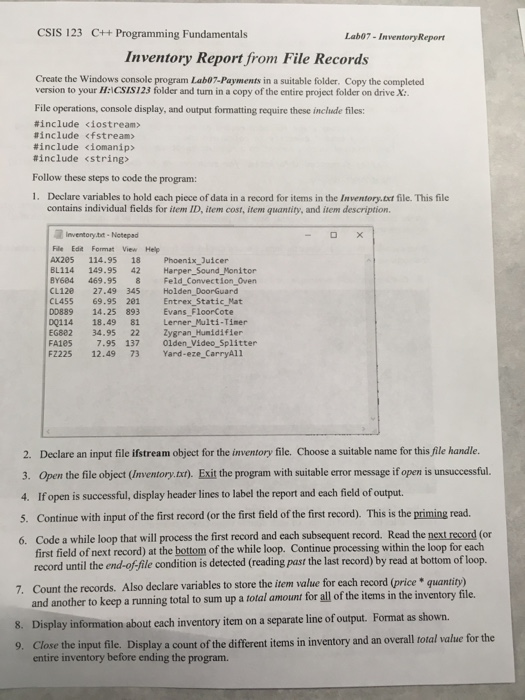
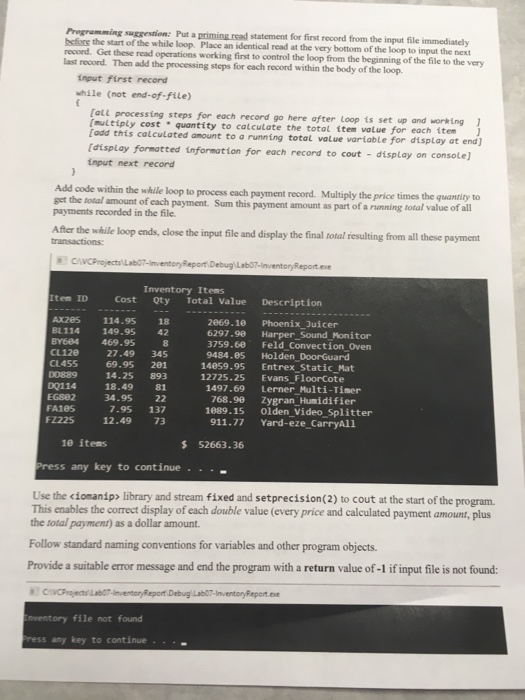
CSIS 123 C++ Programming Fundamentals Lab07-Inventory Report Inventory Report from File Records Create the Windows console program Lab07-Payments in a suitable folder. Copy the completed version to your H:ICSIS123 folder and turn in a copy of the entire project folder on drive X: File operations, console display, and output formatting require these include files: #include #include #include domanip> #include Follow these steps to code the program: 1. Declare variables to hold each piece of data in a record for items in the Inventory.ext file. This file contains individual fields for item ID, item cost, item quantity, and item description Inventory.tt- Notepad File Edit Format View Help AX205 114.95 18 Phoenix Juicer BL114 149.9542 Harper_Sound Monitor BY684 469.95 8 Feld_Convection_Oven CL120 27.49 345 Holden DoorGuard CL455 69.95 201 Entrex_Static_Mat DD889 14.25 893 Evans FloorCote DQ114 18.49 81 Lerner Multi-Timer EG882 34.95 22 Zygran Hunidifier FA105 7.95 137 0Olden_Video Splitter FZ225 12.49 73 Yard-eze CarryAll 2. Declare an input file ifstream object for the inventory file. Choose a suitable name for this file handle. 3. Open the file object (Inventory.txt). Exit the program with suitable error message if open is unsuccessful. 4. If open is successful, display header lines to label the report and each field of output. 5. Continue with input of the first record (or the first field of the first record). This is the priming read 6. Code a while loop that will process the first record and each subsequent record. Read the next record (or first field of next record) at the bottom of the while loop. Continue processing within the loop for each record until the end-of-file condition is detected (reading past the last record) by read at bottom of loop. Count the records. Also declare variables to store the item value for each record (price quantity) and another to keep a running total to sum up a total amount for all of the items in the inventory file. Display information about each inventory item on a separate line of output. Format as shown. Close the input file Display a count of the different 7. 8. 9. items in inventory and an overall total value for the entire inventory before ending the program

Step by Step Solution

There are 3 Steps involved in it

1 Expert Approved Answer
Step: 1 Unlock blur-text-image
Question Has Been Solved by an Expert!

Get step-by-step solutions from verified subject matter experts

Step: 2 Unlock
Step: 3 Unlock

Students Have Also Explored These Related Databases Questions!