







Question: Write Visual Basic Design the screenshot below and the number will be generated for New Arrivals. Write your name and surname, select Year, Faculty, Department,
Write Visual Basic Design the screenshot below and the number will be generated for New Arrivals. Write your name and surname, select Year, Faculty, Department, calculate the student number according to the following rule, Year + Faculty code + Department code and student order number, write the student number in the textbox and enter the student's name-surname and number in the listbox. Please write a program that adds as is?
Note-1: By designing the form in the figure, pasting the copy of the form to the worde, write the working code?
Note-2: Faculty and department codes Faculty Code Fan Literature Department Code Fine arts 10 Statistics 10 Science and Literature 20 Mathematics 20 Architecture 30 Literature 30 Conservatory 40 History of Art 40
Ex .: Years + Faculty C + Department C. + student sequence number
2018 + 20 + 20 + 001 1.student 20182020001 2010 + 20 + 20 + 002 2nd student 20182020002
Note: the rogram ode will be written in the add record button.
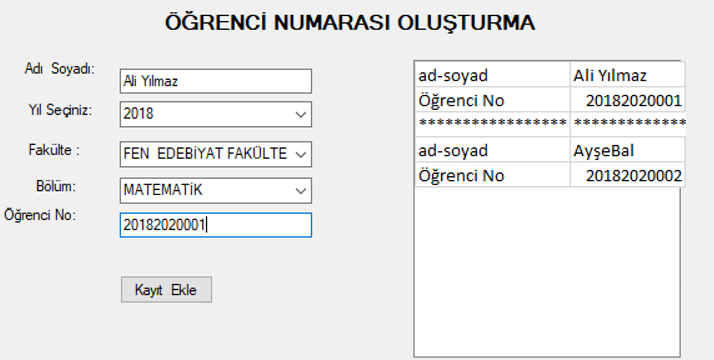
RENC NUMARASI OLUTURMA Ad Soyad: Ali Ylmaz 2018 ad-soyad renci No Ali Ylmaz 20182020001 Yl Seiniz: Faklte: FEN EDEBYAT FAKLTE ad-soyad renci No AyeBal 20182020002 MATEMATK Blm: Orenci No: 201820200011 Kayt Ekle
Step by Step Solution
There are 3 Steps involved in it

Get step-by-step solutions from verified subject matter experts
 Study Help