







Question: written SQL statment for the questions. Purpose: Write and Run SQL Statements in MS Access MySQL focusing on SELECT, FROM and WHERE clauses. If you
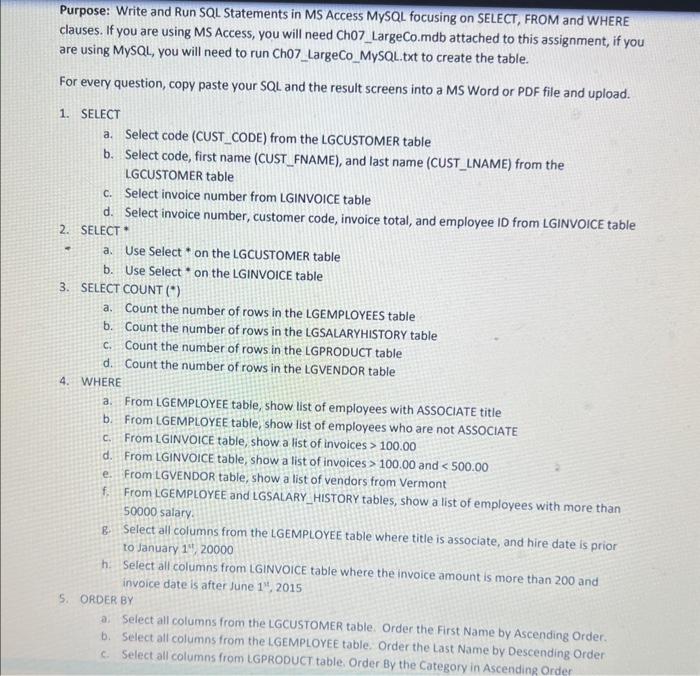
Purpose: Write and Run SQL Statements in MS Access MySQL focusing on SELECT, FROM and WHERE clauses. If you are using MS Access, you will need Ch07 LargeCo.mdb attached to this assignment, if you are using MySQL, you will need to run Ch07 LargeCo MySQL.txt to create the table. For every question, copy paste your SQL and the result screens into a MS Word or PDF file and upload. 1. SELECT a. Select code (CUST_CODE) from the LGCUSTOMER table b. Select code, first name (CUST_FNAME), and last name (CUST_LNAME) from the LGCUSTOMER table c. Select invoice number from LGINVOICE table d. Select invoice number, customer code, invoice total, and employee ID from LGINVOICE table 2. SELECT * a. Use Select * on the LGCUSTOMER table b. Use Select * on the LGINVOICE table 3. SELECT COUNT (*) a. Count the number of rows in the LGEMPLOYEES table b. Count the number of rows in the LGSALARYHISTORY table c. Count the number of rows in the LGPRODUCT table d. Count the number of rows in the LGVENDOR table 4. WHERE a. From LGEMPLOYEE table, show list of employees with ASSOCIATE title b. From LGEMPLOYEE table, show list of employees who are not ASSOCIATE c. From LGINVOICE table, show a list of invoices >100.00 d. From LGINVOICE table, show a list of invoices >100.00 and 100.00 d. From LGINVOICE table, show a list of invoices >100.00 and
Step by Step Solution
There are 3 Steps involved in it

Get step-by-step solutions from verified subject matter experts
 Study Help