







Question: You are given the first names, middle names or initials, and last names of several people below. Use Excel text functions to transform the names
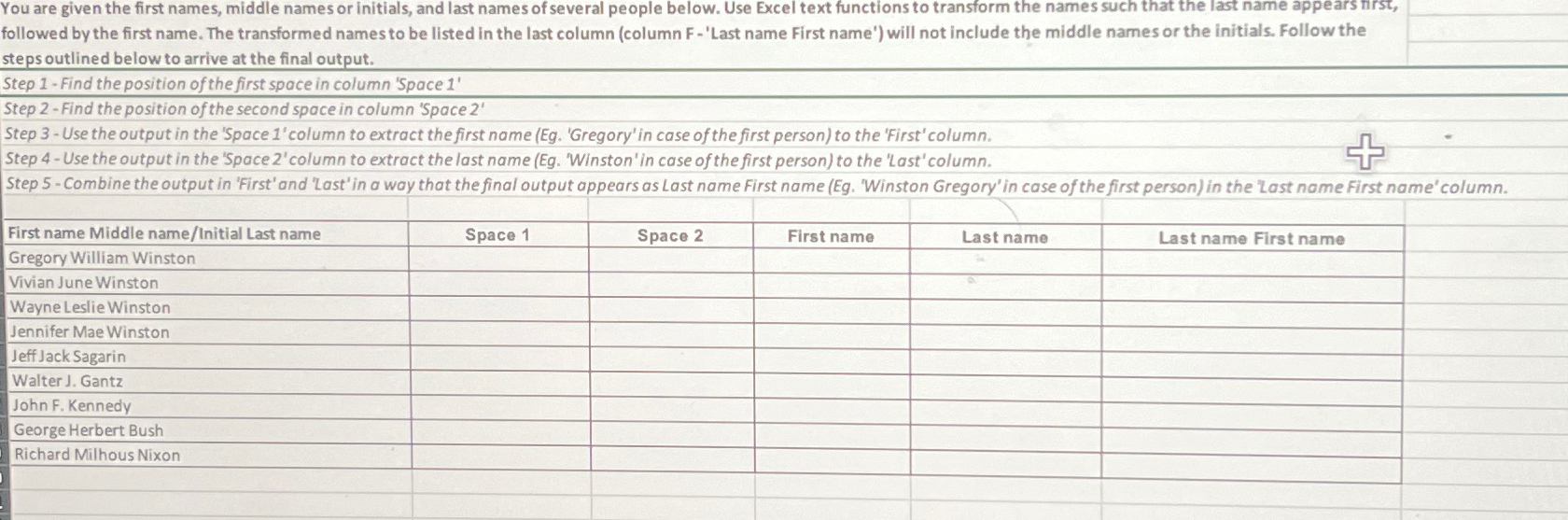
You are given the first names, middle names or initials, and last names of several people below. Use Excel text functions to transform the names such that the last name appears tirst, followed by the first name. The transformed names to be listed in the last column column F 'Last name First name' will not include the middle names or the initials. Follow the steps outlined below to arrive at the final output.
Step Find the position of the first space in column 'Space
Step Find the position of the second space in column 'Space
Step Use the output in the 'Space 'column to extract the first name Eg 'Gregory' in case of the first person to the 'First' column.
Step Use the output in the 'Space column to extract the last name Eg 'Winston' in case of the first person to the 'Last' column.
Step Combine the output in 'First' and 'Last'in a way that the final output appears as Last name First name Eg 'Winston Gregory' in case of the first person in the 'Last name First name' column.
tableFirst name Middle nameInitial Last name,Space Space First name,Last name,Last name First nameGregory William Winston,,,,isVivian June Winston,,,,Wayne Leslie WinstonJennifer Mae Winston
Step by Step Solution
There are 3 Steps involved in it
1 Expert Approved Answer
Step: 1 Unlock

Question Has Been Solved by an Expert!
Get step-by-step solutions from verified subject matter experts
Step: 2 Unlock
Step: 3 Unlock
 Study Help