







Question: You are ready to start completing the loan amortization table. Display the Loan worksheet. In cell B8, type a reference formula to cell B1. The
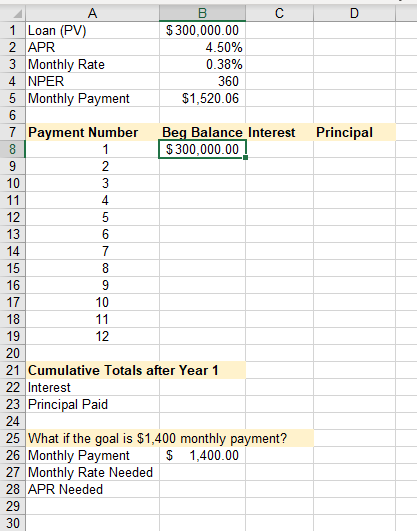
You are ready to start completing the loan amortization table.
Display the Loan worksheet. In cell B8, type a reference formula to cell B1. The balance before the first payment is identical to the loan amount. Do not type the value; use the cell reference instead. In cell B9, subtract the principal from the beginning balance on then previous row. Copy the formula to the range B10:B19
D Principal B 1 Loan (PV) $300,000.00 2 APR 4.50% 3 Monthly Rate 0.38% 4 NPER 360 5 Monthly Payment $1,520.06 6 7 Payment Number Beg Balance Interest 8 1 $300,000.00 9 2 10 3 11 4 12 5 13 6 14 7 15 8 16 9 17 10 18 11 19 12 20 21 Cumulative Totals after Year 1 22 Interest 23 Principal Paid 24 25 What if the goal is $1,400 monthly payment? 26 Monthly Payment $ 1,400.00 27 Monthly Rate Needed 28 APR Needed 29 30
Step by Step Solution
There are 3 Steps involved in it

Get step-by-step solutions from verified subject matter experts
 Study Help