







Question: You are required to create a Java Web application to manage students information using ISP, Servlets and MySQL Database. 1. Create a new MysQL database
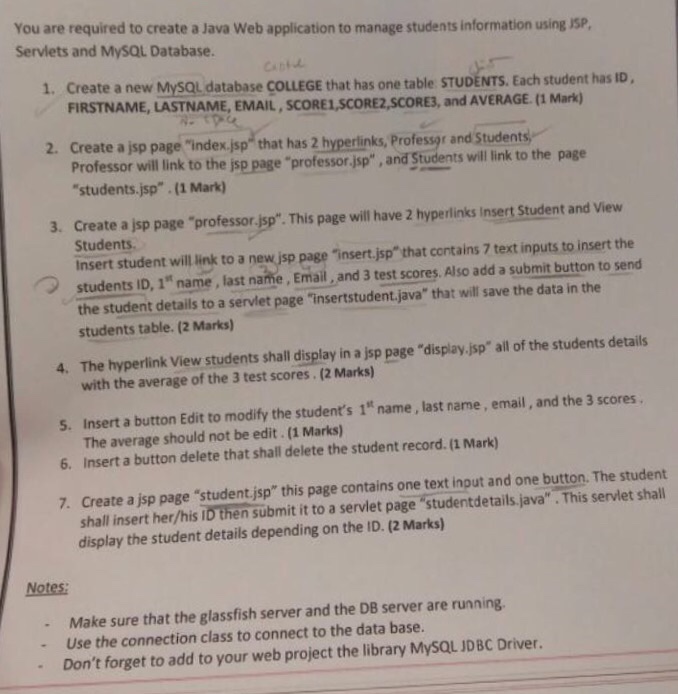
You are required to create a Java Web application to manage students information using ISP, Servlets and MySQL Database. 1. Create a new MysQL database coLLEGE that has one table STUDENTS. Each student has ID, FIRSTNAME, LASTNAME, EMAIL, SCORE1,SCORE2,SCORES, and AVERAGE.(1 Mark) Create a jsp page "index.jspehat has 2hyperlinks, Profess? r and Students Professor will link to the jsp page "professor.jsp", and Students will link to the page "students.jsp .(1 Mark) 2. 3. Create a jsp page "professor.isp". This page will have 2 hyperlinks Insert Student and View Students insert. students ID, 1" name, last name. Email, and 3 test scores, Also add a submit button to send the student details to a servlet page "insertstudent.java" that will save the data in the students table. (2 Marks) 4. The hyperlink View students shall display in a jsp page "display jsp" all of the students details 5. Insert a button Edit to modify the student's 1 name, last name, email, and the 3 scores 6. Insert a button delete that shall delete the student record. (1 Mark) 7. Create a jsp page "student.jsp" this page contains one text inout and one button. The student with the average of the 3 test scores. (2 Marks) The average should not be edit. (1 Marks) shall insert her/his ID then submit it to a servlet page "studentdetails java". This servlet shall display the student details depending on the ID. (2 Marks) Notes - Make sure that the glassfish server and the DB server are running - Use the connection class to connect to the data base. Don't forget to add to your web project the library MySQL JDBC Driver
Step by Step Solution
There are 3 Steps involved in it

Get step-by-step solutions from verified subject matter experts
 Study Help