







Question: You are working as a network administrator. You do not want that users can get access the local hard drive (C:). Even you do not
You are working as a network administrator. You do not want that users can get access the local hard drive (C:\). Even you do not want users to see the contents of local hard drive. After having the setup, capture the screen image from the client (see the image below), paste it to Word file, and upload it. When you capture the screen, you must log in to the client using one of your user accounts, not administrator account.
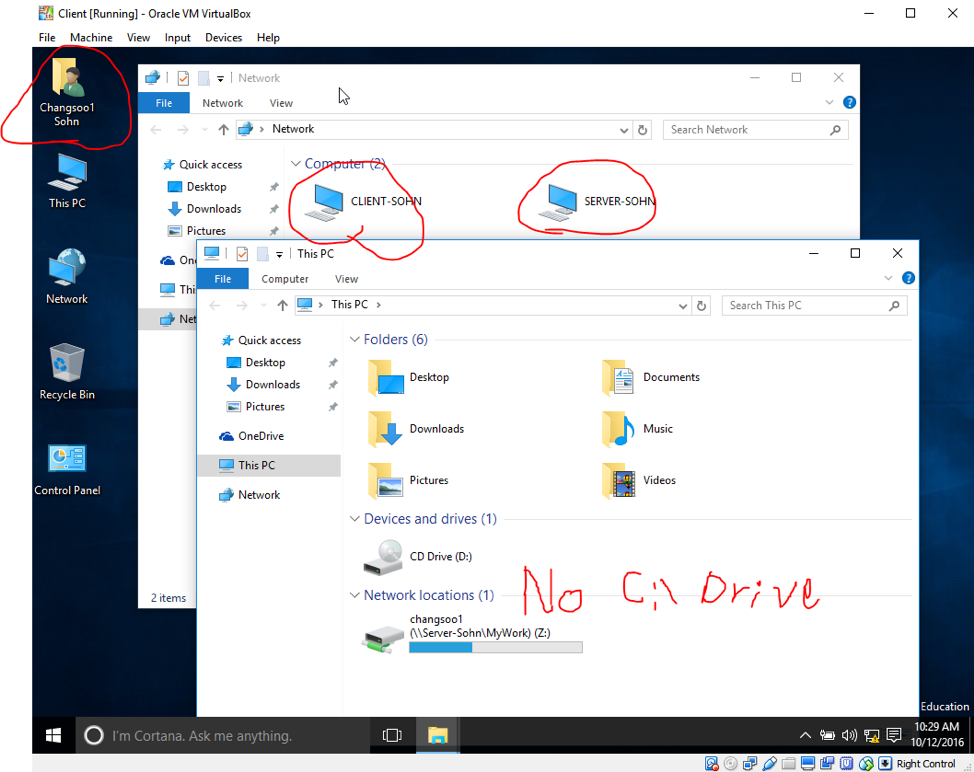
Client [Running-Oracle VM VirtualBox File Machine View Input Devices Help File Network View Changsoo Sohn Network OSearch Network Quick access Desktop Downloads Pictures This PC CLIENT-SO SERVER-SOH File Compute ew Th Network -> This PC > Search This PC Quick access Folders (6) Desktop Downloads Pictures Desktop Recycle Bin Downloads Music OneDrive This PC Network Pictures Videos Control Panel Devices and drives (1) CD Drive (D) No C Driv 2 items Network locations (1) changsoo1 Server-Sohn MyWork) (Z:) tO I'm Cortana. Ask me anything. 10:29 AM 10/12/2016 ^ " d)
Step by Step Solution
There are 3 Steps involved in it

Get step-by-step solutions from verified subject matter experts
 Study Help