







Question: You, as the network admin, console into a switch via the IP address and configure a port with a specific VLAN for a printer. You
You, as the network admin, console into a switch via the IP address and configure a port with a specific VLAN for a printer. You add the VLAN to the port as an untagged port or access port on the printer VLAN. The traffic should be routed from the edge switch that the printer will be patched into, to the core/distribution switch in the MDF. After configuring the VLAN, you plug the printer into the wall jack and see the printer NIC link lights light up. All appears to be good. However, you notice the printer shows it is offline when you try to access it through the print server. You start with the following troubleshooting steps: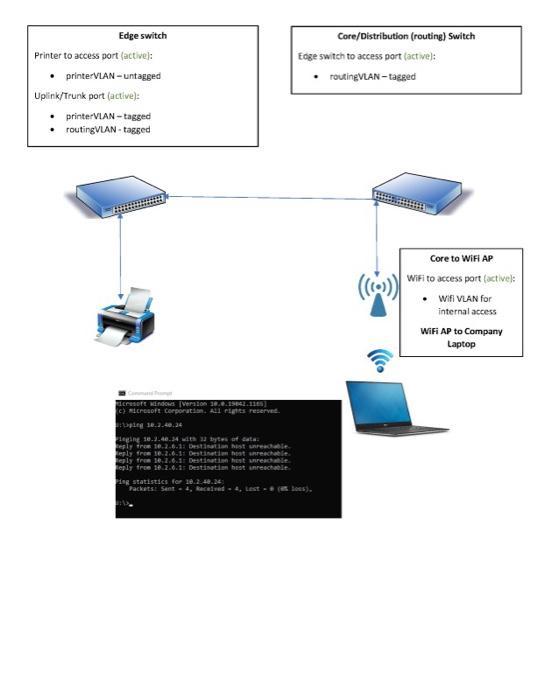
Edge switch Printer to access port (active): printer VLAN-untagged Uplink/Trunk port (active): printer VLAN-tagged routingVLAN-tagged icrosoft windows [Version 1.0.19842.1105) (c) Microsoft Corporation. All rights reserved. ping 10.3.40.24 leging 10.3.40.34 with 32 bytes of cata eply from 10.2.6.1: Destination host unrea eply from 10.2.6.1: Destination host Reply from 10.1.6.1: Destination Reply free 16.2.6.1: Destination Core/Distribution (routing) Switch Edge switch to access port (active): routingVLAN-tagged Ping statistics for 18.2.48.24 Fackets: Sent-4, Received 4, Lest-(los). Core to WiFi AP WiFi to access port (active): Wifi VLAN for internal access WiFi AP to Company Laptop
Step by Step Solution
3.42 Rating (155 Votes )
There are 3 Steps involved in it
Next troubleshooting steps Verify that the printer VLAN is allowed to communicate with other networks on the switch This can be done by checking the VLAN access list VACL or by using a tool like a pac... View full answer

Get step-by-step solutions from verified subject matter experts
 Study Help