







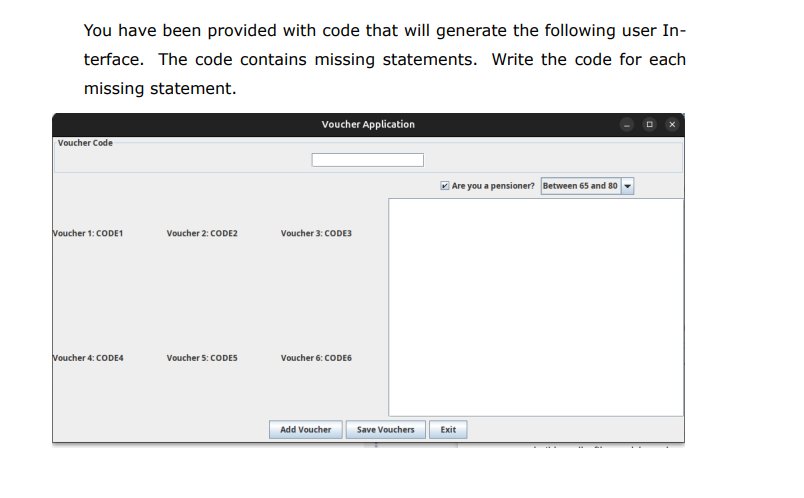
Question: You have been provided with code that will generate the following user Interface. The code contains missing statements. Write the code for each missing statement.
You have been provided with code that will generate the following user Interface. The code contains missing statements. Write the code for each missing statement. import javax.swing.;
import javax.swing.border. TitledBorder;
import java.awt.;
import java.awt. event.ActionEvent;
public class VoucherApp
public static void mainString args
SwingUtilities.invokeLater
Create the main frame
JFrame frame new JFrame
;
frame.setDefaultCloseOperationJFrameEXITONCLOSE;
frame.setLayoutnew BorderLayout;
frame.setSize;
Panel with GridLayout
JPanel gridPanel new JPanelnew GridLayout;
for int i ; i : ;; i
gridPanel.addnew JLabelVoucher i : CODE" i;
Panel with TitledBorder and TextField
JPanel voucherPanel new JPanel;
voucherPanelnew TitledBorderVoucher Code"
;
JTextField voucherField new JTextField;
voucherPanel.addvoucherField; JTextField voucherField new JTextField;
voucherPanel.addvoucherField;
Panel with JTextArea, JCheckBox, and JComboBox
JPanel historyPanel new JPanelnew BorderLayout;
JTextArea historyArea new JTextArea;
historyArea.setEditablefalse;
JScrollPane scrollPane new JScrollPanehistoryArea;
JCheckBox pensionerCheckBox
pensionerCheckBox
JComboBox
"Between and
"Between and
"Over
;
ageComboBox.setEnabledtrue;
Add components to the historyPanel
JPanel checkBoxPanel new JPanel;
checkBoxPanel.addpensionerCheckBox;
checkBoxPanel.addageComboBox;
historyPanel.addcheckBoxPanel BorderLayout.NORTH;
historyPanel.addscrollPane BorderLayout.CENTER;
Panel with buttons
JPanel buttonPanel new JPanel;
JButton addVoucherButton new JButtonAdd Voucher";
JButton saveVouchersButton new JButtonSave Vouchers";
JButton exitButton new JButtonExit;
Add action listener for exit button
exitButton
e System. exit;public void actionPerformedActionEvent e
ageComboBox.setEnabledpensionerCheckBox is Selected ;
;
Display the frame
S
;
C
B
Voucher Application
Voucher Code Voucher : CODE Are you a pensioner?
Step by Step Solution
There are 3 Steps involved in it
1 Expert Approved Answer
Step: 1 Unlock

Question Has Been Solved by an Expert!
Get step-by-step solutions from verified subject matter experts
Step: 2 Unlock
Step: 3 Unlock
 Study Help