







Question: Create a new folder for this JavaJam case study. Create an external style sheet named javajam.css that configures the color and text for the JavaJam
-
Create a new folder for this JavaJam case study.
-
Create an external style sheet named javajam.css that configures the color and text for the JavaJam website.
-
Modify the Home page to utilize an external style sheet to configure colors and fonts. The new Home page and color swatches are shown in Figure 3.29.
Figure 3.29
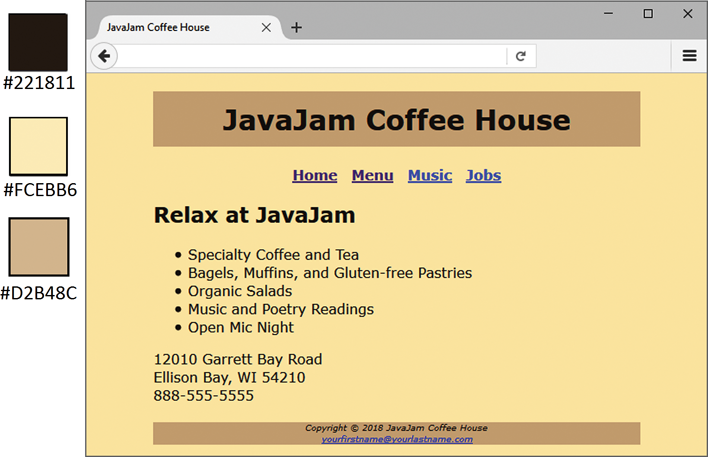
New JavaJam index.html
Figure 3.29 Full Alternative Text
-
Modify the Menu page to be consistent with the new Home page.
-
Configure centered page layout.
Hands-On Practice Case
-
TASK 1: THE WEBSITE FOLDER.Create a folder on your hard drive or portable storage device called javajamcss. Copy all the files from your Chapter 2 javajam folder into the javajamcss folder.
-
TASK 2: THE EXTERNAL STYLE SHEET.You will use a text editor to create an external style sheet named javajam.css. Code the CSS to configure the following:
-
Global styles for the document (use the body element selector) with background color #FCEBB6; text color #221811; and Verdana, Arial, or any sans-serif font.
-
Styles for the header element selector that configure background color #D2B48C centered text.
-
Styles for the h1 element selector that configure 200% line height.
-
Styles for the nav element selector that configure centered, bold text. Hint: Use the CSS text-align and font-weight properties.
-
Styles for the footer element selector that configure background color #D2B48C, small font size (.60em), italics, and centered text.
Save the file as javajam.css in the javajamcss folder. Check your syntax with the CSS validator (http://jigsaw.w3.org/css-validator). Correct and retest if necessary.
-
-
TASK 3: THE HOME PAGE.Launch a text editor, and open the index.html file. You will modify this file to apply styles from the javajam.css external style sheet as follows:
-
Add a element to associate the web page with the javajam.css external style sheet file.
-
Configure the navigation area. Remove the elements which are no longer needed because you have configured bold text with CSS.
-
Configure the page footer area. Remove the and elementsthey are no longer needed since CSS is now used to configure the text.
Save the index.html file, and test it in a browser. Your page should look similar to the one shown in Figure 3.29 except that your page content will be left-aligned instead of centered. Dont worryyoull center your page layout in Task 5 of this case study.
-
-
TASK 4: THE MENU PAGE.Launch a text editor, and open the menu.html file. You will modify this file in a similar manner as you modified the home page: Add the element and configure the navigation and page footer areas. Save and test your new menu.html page. It should look similar to the one shown in Figure 3.30, except for the alignment.
Figure 3.30
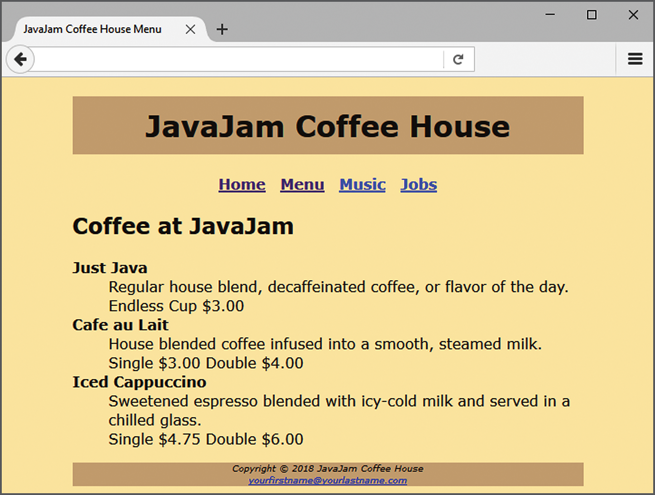
New menu.html page
Figure 3.30 Full Alternative Text
-
TASK 5: CENTER PAGE LAYOUT WITH CSS.Modify javajam.css, index.html, and menu.html to configure page content that is centered with 80% width (refer to Hands-On Practice 3.9 if necessary):
-
Launch a text editor, and open the javajam.css file. Add a style rule for an id named wrapper with width set to 80%, margin-right set to auto, and margin-left set to auto.
-
Launch a text editor, and open the index.html file. Add the HTML code to configure a div element assigned to the id wrapper that wraps, or contains, the code within the body section. Save and test your index.html page in a browser and youll notice that the page content is now centered within the browser viewport as shown in Figure 3.29.
-
Launch a text editor, and open the menu.html file. Add the HTML code to configure a div element assigned to the id wrapper that wraps, or contains, the code within the body section. Save and test your menu.html page in a browser and youll notice that the page content is now centered within the browser viewport as shown in Figure 3.30.
Experiment with modifying the javajam.css file. Change the page background color, the font family, and so on. Test your pages in a browser. Isnt it amazing how a change in a single file can affect multiple files when external style sheets are used?
-
JavaJam Coffee House X + #221811 JavaJam Coffee House #FCEBB6 Home Menu Music Jobs Relax at JavaJam #D2B48C Specialty Coffee and Tea Bagels, Muffins, and Gluten-free Pastries Organic Salads Music and Poetry Readings Open Mic Night 12010 Garrett Bay Road Ellison Bay, WI 54210 888-555-5555 Copyright 2018 JavaJam Coffee House yourfirstname@yourastrame.com - O x Javalam Coffee House Menu X + JavaJam Coffee House Home Menu Music Jobs Coffee at JavaJam Just Java Regular house blend, decaffeinated coffee, or flavor of the day. Endless Cup $3.00 Cafe au Lait House blended coffee infused into a smooth, steamed milk. Single $3.00 Double $4.00 Iced Cappuccino Sweetened espresso blended with icy-cold milk and served in a chilled glass. Single $4.75 Double $6.00 Copyright 2018 JavaJam Coffee House yourfirstname your lastname.com JavaJam Coffee House X + #221811 JavaJam Coffee House #FCEBB6 Home Menu Music Jobs Relax at JavaJam #D2B48C Specialty Coffee and Tea Bagels, Muffins, and Gluten-free Pastries Organic Salads Music and Poetry Readings Open Mic Night 12010 Garrett Bay Road Ellison Bay, WI 54210 888-555-5555 Copyright 2018 JavaJam Coffee House yourfirstname@yourastrame.com - O x Javalam Coffee House Menu X + JavaJam Coffee House Home Menu Music Jobs Coffee at JavaJam Just Java Regular house blend, decaffeinated coffee, or flavor of the day. Endless Cup $3.00 Cafe au Lait House blended coffee infused into a smooth, steamed milk. Single $3.00 Double $4.00 Iced Cappuccino Sweetened espresso blended with icy-cold milk and served in a chilled glass. Single $4.75 Double $6.00 Copyright 2018 JavaJam Coffee House yourfirstname your lastname.com
Step by Step Solution
There are 3 Steps involved in it

Get step-by-step solutions from verified subject matter experts
 Study Help