







Question: You will create a JavaScript program embedded on an HTML file - according to the requirements listed on the next page. Provide the code to
You will create a JavaScript program embedded on an HTML file - according to the requirements listed on the next page. Provide the code to create the program described below.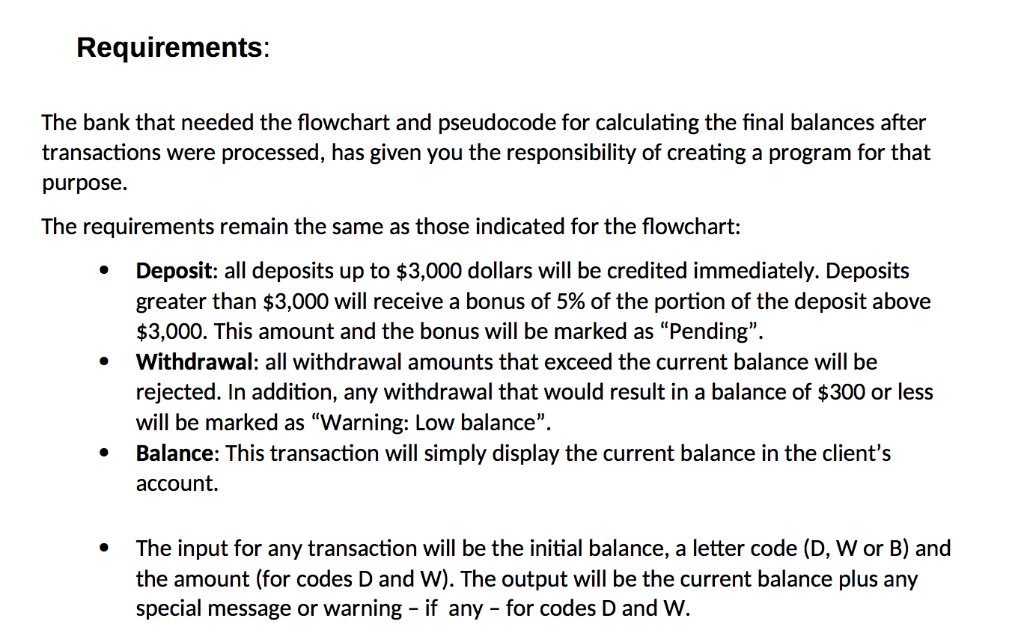
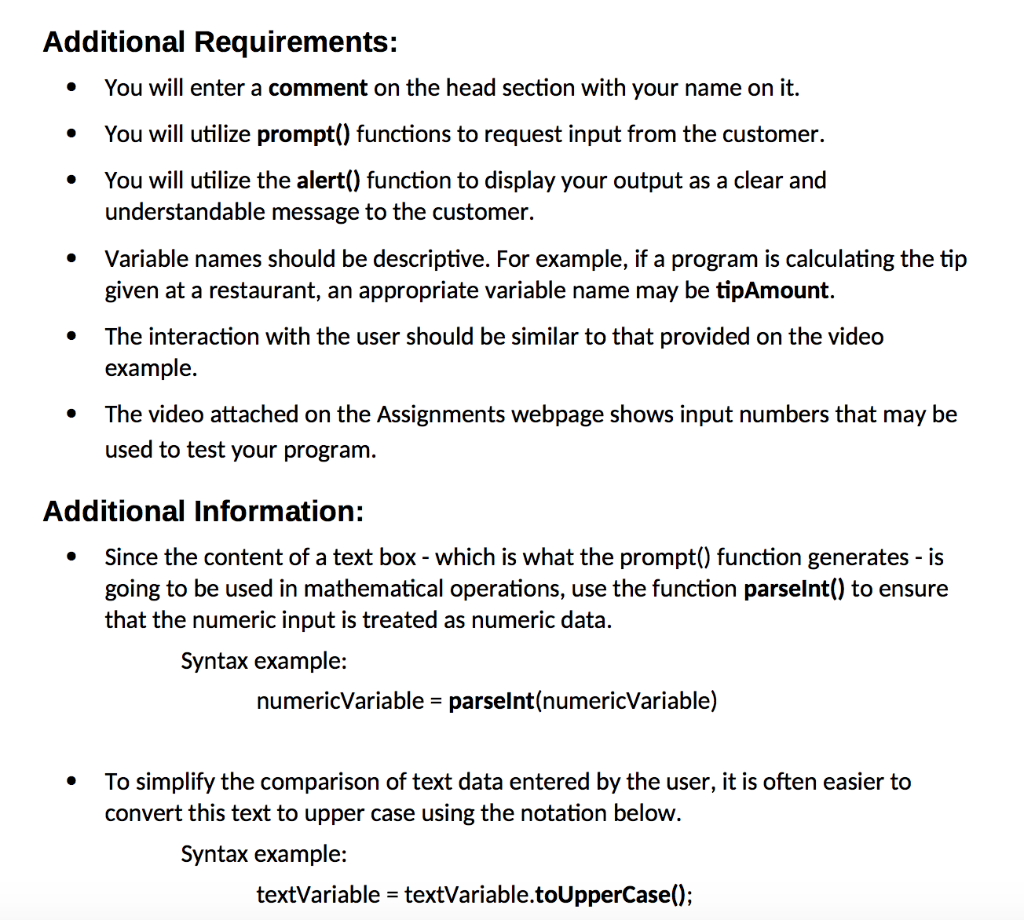
Requirements The bank that needed the flowchart and pseudocode for calculating the final balances after transactions were processed, has given you the responsibility of creating a program for that purpose. The requirements remain the same as those indicated for the flowchart: Deposit: all deposits up to $3,000 dollars will be credited immediately. Deposits greater than $3,000 will receive a bonus of 5% of the portion of the deposit above $3,000. This amount and the bonus will be marked as "Pending". Withdrawal: all withdrawal amounts that exceed the current balance will be rejected. In addition, any withdrawal that would result in a balance of $300 or less will be marked as "Warning: Low balance" Balance: This transaction will simply display the current balance in the client's account. The input for any transaction will be the initial balance, a letter code (D, W or B) and the amount (for codes D and W). The output will be the current balance plus any special message or warning if any - for codes D and W. Additional Requirements: You will enter a comment on the head section with your name on it. You will utilize prompt() functions to request input from the customer You will utilize the alert() function to display your output as a clear and understandable message to the customer. Variable names should be descriptive. For example, if a program is calculating the tip given at a restaurant, an appropriate variable name may be tipAmount. The interaction with the user should be similar to that provided on the video example The video attached on the Assignments webpage shows input numbers that may be used to test your program. * . * Additional Information: .Since the content of a text box - which is what the prompt) function generates -is going to be used in mathematical operations, use the function parselnt() to ensure that the numeric input is treated as numeric data Syntax example: numericVariable parselnt(numericVariable) To simplify the comparison of text data entered by the user, it is often easier to convert this text to upper case using the notation below. Syntax example: textVariable- textVariable.toUpperCase); Requirements The bank that needed the flowchart and pseudocode for calculating the final balances after transactions were processed, has given you the responsibility of creating a program for that purpose. The requirements remain the same as those indicated for the flowchart: Deposit: all deposits up to $3,000 dollars will be credited immediately. Deposits greater than $3,000 will receive a bonus of 5% of the portion of the deposit above $3,000. This amount and the bonus will be marked as "Pending". Withdrawal: all withdrawal amounts that exceed the current balance will be rejected. In addition, any withdrawal that would result in a balance of $300 or less will be marked as "Warning: Low balance" Balance: This transaction will simply display the current balance in the client's account. The input for any transaction will be the initial balance, a letter code (D, W or B) and the amount (for codes D and W). The output will be the current balance plus any special message or warning if any - for codes D and W. Additional Requirements: You will enter a comment on the head section with your name on it. You will utilize prompt() functions to request input from the customer You will utilize the alert() function to display your output as a clear and understandable message to the customer. Variable names should be descriptive. For example, if a program is calculating the tip given at a restaurant, an appropriate variable name may be tipAmount. The interaction with the user should be similar to that provided on the video example The video attached on the Assignments webpage shows input numbers that may be used to test your program. * . * Additional Information: .Since the content of a text box - which is what the prompt) function generates -is going to be used in mathematical operations, use the function parselnt() to ensure that the numeric input is treated as numeric data Syntax example: numericVariable parselnt(numericVariable) To simplify the comparison of text data entered by the user, it is often easier to convert this text to upper case using the notation below. Syntax example: textVariable- textVariable.toUpperCase)
Step by Step Solution
There are 3 Steps involved in it

Get step-by-step solutions from verified subject matter experts
 Study Help