







Question: You will implement a program that will read in a file of grades (>= 0) that will be analyzed: (Only have to do step 1,
You will implement a program that will read in a file of grades (>= 0) that will be analyzed:
(Only have to do step 1, 2, 4)
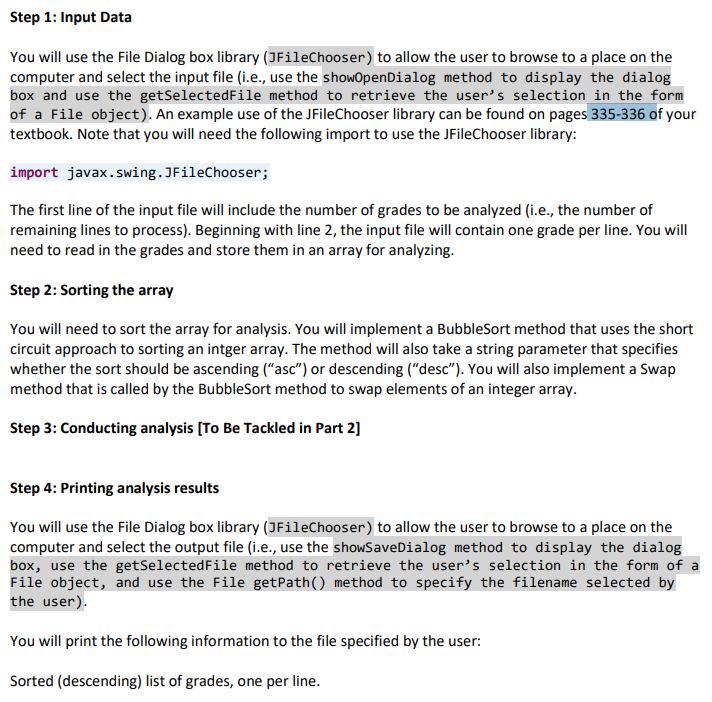
Step 1: Input Data You will use the File Dialog box library (JFileChooser) to allow the user to browse to a place on the computer and select the input file (i.e., use the shoOpenDialog method to display the dialog box and use the getSelectedFile method to retrieve the user's selection in the form of a File object). An example use of the JFileChooser library can be found on pages 335-336 of your textbook. Note that you will need the following import to use the JFileChooser library: import javax.swing.JFileChooser; The first line of the input file will include the number of grades to be analyzed (i.e., the number of remaining lines to process). Beginning with line 2, the input file will contain one grade per line. You will need to read in the grades and store them in an array for analyzing. Step 2: Sorting the array You will need to sort the array for analysis. You will implement a BubbleSort method that uses the short circuit approach to sorting an intger array. The method will also take a string parameter that specifies whether the sort should be ascending ("asc") or descending ("desc"). You will also implement a Swap method that is called by the BubbleSort method to swap elements of an integer array. Step 3: Conducting analysis [To Be Tackled in Part 2] Step 4: Printing analysis results You will use the File Dialog box library (JFileChooser) to allow the user to browse to a place on the computer and select the output file (i.e., use the showSaveDialog method to display the dialog box, use the getselectedFile method to retrieve the user's selection in the form of a File object, and use the File getPath() method to specify the filename selected by the user) You will print the following information to the file specified by the user: Sorted (descending) list of grades, one per line. Step 1: Input Data You will use the File Dialog box library (JFileChooser) to allow the user to browse to a place on the computer and select the input file (i.e., use the shoOpenDialog method to display the dialog box and use the getSelectedFile method to retrieve the user's selection in the form of a File object). An example use of the JFileChooser library can be found on pages 335-336 of your textbook. Note that you will need the following import to use the JFileChooser library: import javax.swing.JFileChooser; The first line of the input file will include the number of grades to be analyzed (i.e., the number of remaining lines to process). Beginning with line 2, the input file will contain one grade per line. You will need to read in the grades and store them in an array for analyzing. Step 2: Sorting the array You will need to sort the array for analysis. You will implement a BubbleSort method that uses the short circuit approach to sorting an intger array. The method will also take a string parameter that specifies whether the sort should be ascending ("asc") or descending ("desc"). You will also implement a Swap method that is called by the BubbleSort method to swap elements of an integer array. Step 3: Conducting analysis [To Be Tackled in Part 2] Step 4: Printing analysis results You will use the File Dialog box library (JFileChooser) to allow the user to browse to a place on the computer and select the output file (i.e., use the showSaveDialog method to display the dialog box, use the getselectedFile method to retrieve the user's selection in the form of a File object, and use the File getPath() method to specify the filename selected by the user) You will print the following information to the file specified by the user: Sorted (descending) list of grades, one per line
Step by Step Solution
There are 3 Steps involved in it

Get step-by-step solutions from verified subject matter experts
 Study Help