







Question: Your task is to implement the Name class. This class represents a person's name. It has three instance variables representing the first, last and middle
Your task is to implement the Name class. This class represents a person's name. It has three instance variables representing the first, last and middle name (all are string variables). A character instance variable representing a separator (to be used for printing purposes) is also part of the class. The only valid separators we can have are a comma (,), a dash (-), and a pound symbol (#). In addition, a nickname instance variable (string) keeps track of the person's nickname (if any).
For this class you need to define a private method called validSeparator that takes a character as a parameter. The method will return true if the character is one of the three valid separators and false otherwise. Make sure you use this method when you need to validate a separator. In addition, the class will keep track of the number of instances created by using a private static field called nameObjsCount. This field is initialized to zero when you declared it.
The methods associated with the class are provided below. All the methods are non-static unless specified otherwise. You may want to take a look at the files Driver.java, PublicTests.java and pubTest1.txt as they can help you clarify the signature associated with each method and the expected output format.
- Default Constructor - Initializes a Name object with "NOFIRSTNAME", "NOMIDDLENAME", "NOLASTNAME" as first name, middle name and last name, respectively. In addition, the separator will be the '#' character.
- Constructor with two parameters - The first parameter is the first name and the second the last name. The middle name will be the empty string and the separator will be a comma.
- Constructors with three parameters - The parameters are the first name, the middle name, and the last name. The separator will be a comma.
- Constructors with four parameters - The parameters are the first name, the middle name, the last name and the separator. If an invalid separator is provided, a comma will be used instead.
- getFirstname - Get method for first name.
- getMiddlename - Get method for middle name.
- getLastname - Get method for last name.
- setNickname - Set method for nickname.
- getNickname - Get method for the nickname. If there is no nickname, the method returns the empty string. Notice the empty string is not the same as null.
- setSeparator - Set method for the separator. If the separator parameter is invalid, the separator for the Name object will not be changed.
- getSeparator - Get method for the separator.
- equals - Two names are considered equal if they have the same first, middle and last names. The nickname is ignored.
- toString - Returns a string with the last name, the first name, the middle name (if any), and the nickname in parentheses (if any). The separator must be used to separate each value. If there is no middle name, no separator should be added after the first name. The driver output below and the public tests provide examples of the output your program must generate.
- compareTo - It will return a negative value if the current object precedes the parameter in alphabetical order, 0 if the current object is equal to the parameter, and a positive value otherwise. You must implement this method by comparing last names, then first names and middle names. You MAY NOT implement this method by converting the Name object to string (using toString()) and then using the String class compareTo method on the resulting strings.
- getNumberOfNameObjects - Static method that returns the number of objects that have been created.
- normalize - Static method that takes a Name object and a boolean as parameters. The method returns a new Name object where the first name, the last name and the middle name (if any) have been capitalized (i.e. all letters, not just the first letter) if the boolean parameter is true. If the boolean parameter is false, all the names will be in lowercase (i.e. all letters, not just the first letter). Use the string methods toUpperCase() and toLowerCase() for the normalization. Comma will be the separator for the normalized Name object.
- validSeparator - Private method that takes a character as a parameter and returns true if the parameter is a valid character.
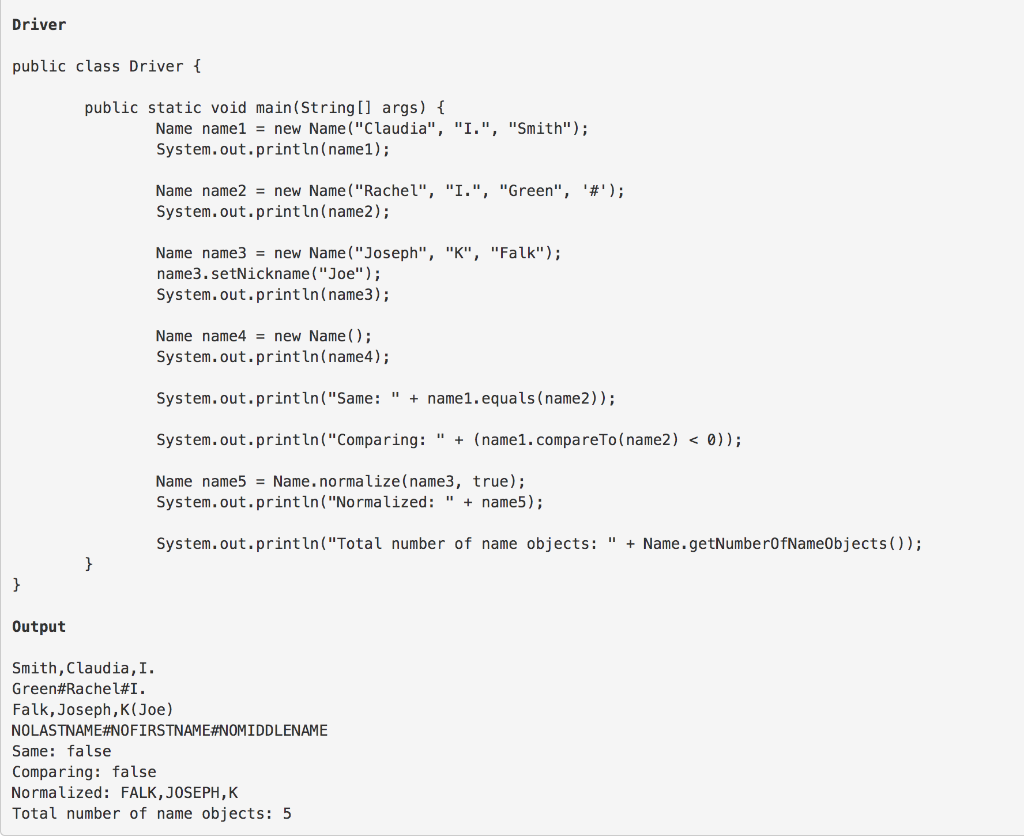
Driver public class Driver { public static void main(String[] args) { Name name1 = new Name("Claudia", "I.", "Smith"); System.out.println(namel); Name name2 = new Name ("Rachel", "I.", "Green", '#'); System.out.println(name); Name name3 = new Name("Joseph", "K", "Falk"); name3. setNickname("Joe"); System.out.println(name); Name name4 = new Name(); System.out.println(name); System.out.println("Same: " + name1.equals(name)); System.out.println("Comparing: " + (name1.compareTo(name2)
Step by Step Solution
There are 3 Steps involved in it

Get step-by-step solutions from verified subject matter experts
 Study Help