







Question: Your task is to read a data file with sound data and scale the amplitude and then create a . WAV sound filewith the slower
Your task is to read a data file with sound data and scale the amplitude and then create aWAV sound filewith the slower audio. WAV files are a Microsoft sound file that stores data samples as raw data in otherwords, there is no compression of the data. I have provided you with a test datafile that has bit samplesrecorded at samplessecond Unlike the ADC examples that were discussed in lecture, thesesamples have negative values ie they go from to instead of from to This allowsthe samples to represent negative voltages without doing any offsets I have provided you with the following skeleton main functionint mainint argc, char argvif argc printfs datafile wavfile scale
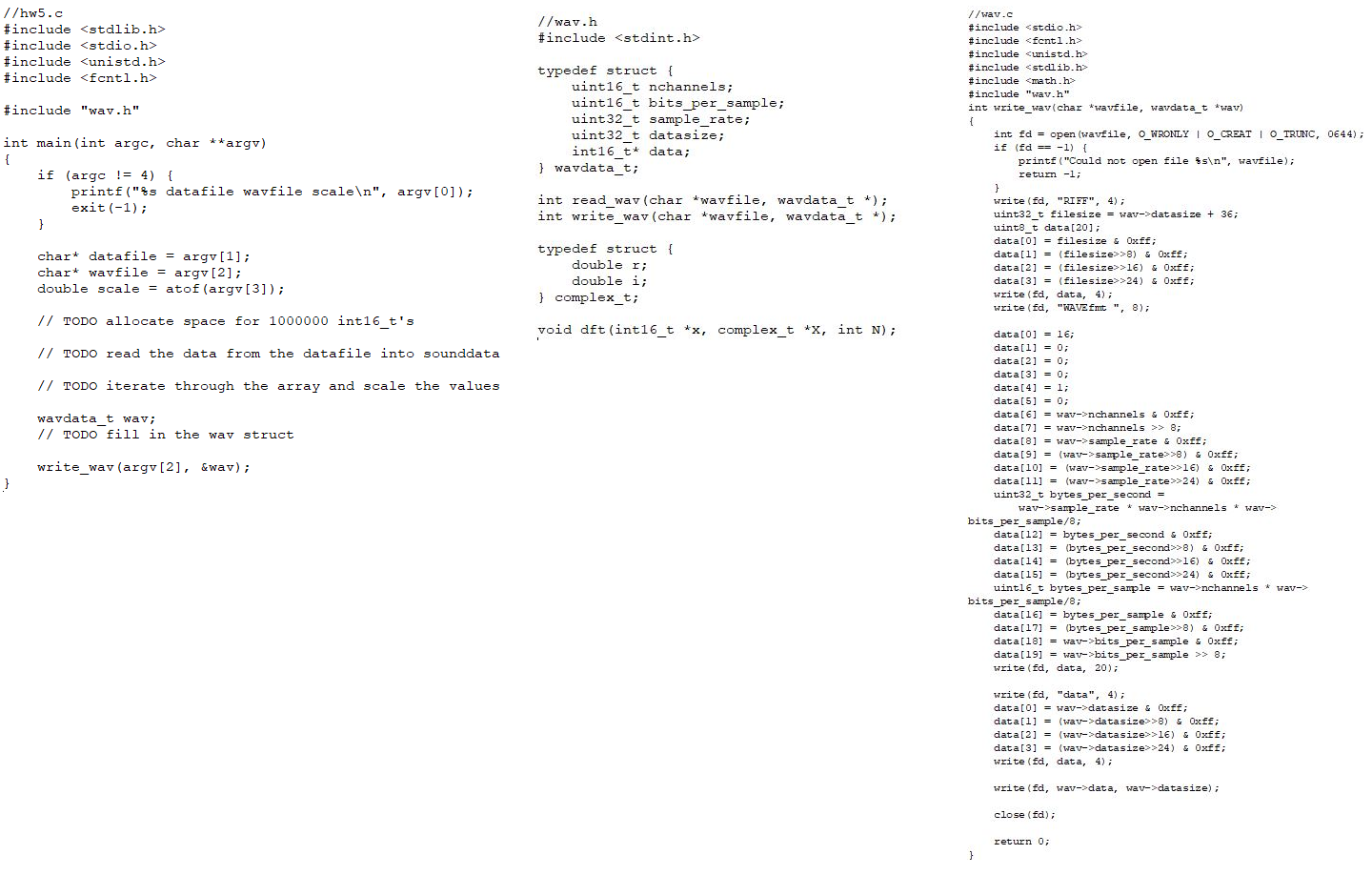
argv;exit;char datafile argv;char wavfile argv;double scale atofargv;intt sounddata; TODO allocate space for intts TODO open the datafile and read the data into sounddata TODO iterate through the array and scale the valueswavdatat wav; TODO fill in the wav structwritewavwavfile &wav; The code takes in three arguments an input datafile, the name of a WAV file to write the data with thescaled signal, and a scale value. You will need to read all the data from datafile into an array. You canassume that the file is no bigger than sound samples long that means you should allocate ansounddata array that is big enough sound samples where each sample is a intt Youshould then read the entire file into sounddata with one read of intts However, theread may return less bytes than that. Keep track of the number of bytes that the read returns, since you can use to calculate how many samples you read into the array each sample is bytes long the sizeof an intt type In this case, it will be easier to use open and read instead of fopen and fread.Once you figure out the number of samples in sounddata, you can iterate through the samples in thesounddata array and multiply the values by scale. You just have to make sure that the resultingvalues doesnt exceed or go below which are the bounds of an intt type.I have provided you with a writewav function in wav.c that helps write the data to a WAV file.However, before you call writewav, you need to fill in the wav data structure.The wavdatat struct is defined as follows:typedef struct uintt nchannels;uintt bitspersample;uintt samplerate;uintt datasize;intt data; wavdatat;For the provided testfile, nchannels bitspersample and sampleratedatasize is the number of bytes in the data set, which is equal to the number of bytes you read fromthe datafile. data is a pointer to an array that holds the data samples.Once wav data structure is filled in you can call writewav. I have included an expectedwavand an expectedwav file that contains the expected outputfor the following runs of the code. You can compare your output with the expected output using thediff command as shown below. If the files are exactly the same, then the diff command will notshow any differences.$ gcc o hw hwc wav.c$ hw datafile mywav $ diff mywav expectedwav$ hw datafile mywav $ diff mywav expectedwavYou should be able to play your output WAV file and hear the change in volume in the audio.IMPORTANT: make sure that you get no differences with your output. hwc
#include
#include
#include
#include
#include "wav.h
int mainint argc, char argv
if argc
printfs datafile wavfile scale
argv;
exit;
char datafile argv;
char wavfile argv;
double scale atofargv;
TODO allocate space for intts
TODO read the data from the datafile into sounddata
TODO iterate through the array and scale the values
wavdatat wav;
TODO fill in the wav struct
write wavargv &wav;
wavc
#include
#include
#include
#include
#include
#include "wav.h
int writewavchar wavfile wavdatat wav
int fd openwavfile OWRONLY OCREAT OTRUNC, ;
if fd
printfCould not open file s
wavfile;
return ;
writefd "RIFF", ;
uintt filesize wavdatasize ;
uintt data;
data filesize & xff;
datafilesize & xff;
datafilesize & xff;
datafilesize & xff;
writefd data, ;
writefd "WAVEfmt ;
data;
data;
data;
Step by Step Solution
There are 3 Steps involved in it
1 Expert Approved Answer
Step: 1 Unlock

Question Has Been Solved by an Expert!
Get step-by-step solutions from verified subject matter experts
Step: 2 Unlock
Step: 3 Unlock
 Study Help