







Question: The original STRIPS program was designed to control Shakey the robot Figure shows a version of Shakeys world consisting of four rooms lined up along
The original STRIPS program was designed to control Shakey the robot Figure shows a version of Shakey’s world consisting of four rooms lined up along a corridor, where each room has a door and a light switch. The actions in Shakey’s world include moving from place to place, pushing movable objects (such as boxes) climbing onto and down from rigid objects (such as boxes), and turning light switches on and off. The robot itself was never dexterous enough to climb on a box or toggle a switch, but the STRIPS planner was capable of finding and printing out plans that were beyond the robot’s abilities. Shakey’s six actions are the following:
• Go(x, y), which requires that Shakey be at x and that x and y are locations in the same room. By convention a door between two rooms is in both of them.
• Push a box b from location x to location y within the same room: Push (h, x, y). We will need the predicate Box and constants for the boxes.
• Climb onto a box: Climb Up (b): climb down from a box: Climb Down (b). We will need the predicate on and the constant Flour.
• Turn a light switch on: Turn On (s); turn it off: Turn Off (s). To turn a light on or oft Shakey must be on top of a box at the light switch’s location
Describe Shakey’s six actions and the initial state from Figure in STRIPS notation. Construct a plan for Shakey to get Box2 into Room2.
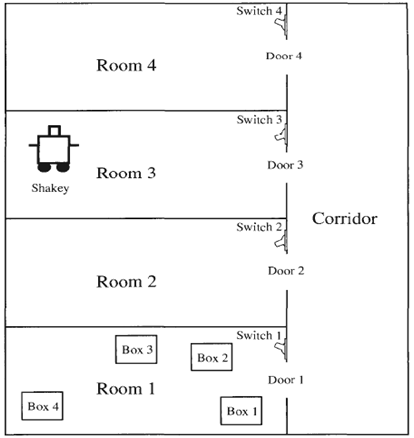
Switch 4, Door 4 Room 4 Switch 3 Door 3 Room 3 Shakey Corridor Switch 2, Door 2 Room 2 Switch 1 3 2 Door 1 Room 1 4 1
Step by Step Solution
3.44 Rating (170 Votes )
There are 3 Steps involved in it
The actions are quite similar to the monkey and banannas problemyou should prob Hat Start Left Sock ... View full answer

Get step-by-step solutions from verified subject matter experts
Document Format (1 attachment)

21-C-S-A-I (170).docx
120 KBs Word File
 Study Help